Showing posts with label Ipod Touch. Show all posts

Thursday, December 30, 2010

iPod Touch vs Archos 43 Showdown!

I've been looking for a strong alternative to the iPod Touch for a long time.  The original had several shortcomings, although there were no decent competitors to it at that time. Some challengers have shown up since.  Apple didn't rest on its laurels, and the latest Touch answers almost every complaint I had with the first one.

Archos appears to have decided to win back bragging rights for tablet media players, and the Archos 43 Internet Tablet looks like it shoots straight at the Touch. I have both, and am getting many questions about which is better. This is my showdown. I'll rank for technology, media support, ease of use, build, and a few other things. You may not agree with every conclusion, but hopefully this showdown will help you make your own decision.

I have reviewed both.  The Archos 43 has been updated since that review. Here is how they compare price-wise:

iPod Touch 8gb for $229. 32gb for $299.
Archos 43 16gb for $249. 16gb MicroSD-HC card for $36. Total for 32gb = $285.

Hardware:
- Processor: Tie
    Touch: Apple A4 1GHz processor running iOS 4
    43: ARM Cortex A8 at 1 GHz with DSP running Android 2.21 
- WiFi: Tie
    Touch: 802.11b/g/n  (802.11n 2.4GHz only). 802.11n no speed
    improvement over G.
    43: 802.11 b/g/n (including 5GHz for 802.11n) 802.11n doesn't work
    at the moment.  Archos is looking into it.
- Bluetooth devices supported: 43 wins.
    Touch: Profiles include A2DP, AVRCP, PAN, HID. Headphones, Keyboard, some accessories.
    43: Profiles include A2DP, AVRCP, HID, PAN, Headphones, Keyboard, Mouse, GPS, File Transfer,
    Phone tethering. 
- Screen size: 43 wins.
    Touch: 3.5" diagonal. 1.984375" x 2.9375", 5.83 square inches.
    43: 4.3" diagonal,  2.09375" x 3.75",  7.85 square inches.
- Screen resolution: Touch wins.
    Touch: 960 x 640
    43: 854 x 480
- External controls: Both have volume toggle power/hold button. Tie 
- Power button options43 wins.
    Touch: Simple press to turn screen off.  Long press for power OFF
    screen.
    43: Simple press to turn screen off. Long press brings up several
    device options including Airplane Mode, Buttons Mode, Power
    Off, and Silent Mode. Choosing Power OFF brings up a second
    set of choices including Deep Sleep, Reboot, and Power Off.
- Ports: Inputs, outputs, and memory expansion.  43 wins.
    Touch: Dock port, headphone jack.
    43: Micro USB sync port, HDMI output, MicroSD-HC slot, headphone jack.  USB storage drives  and devices supported with adapter cable (not included, typically under $10).
- Cameras: Touch wins with 2.  Both devices require great lighting to take good photos. The 43's camera app was updated in the latest firmware with 6 white-balance settings, resolution/quality choices, color effects, and (video) unbanding choices.  It has a Photo/Video toggle as well.   The Touch has a choice of cameras (front or back), the shutter button, and a digital zoom slider that shows up when you tap the screen.  Both have links to their photo galleries from within camera app.  
    Touch: Front facing VGA 640 x 480 resolution. Rear facing 960 x 720 for Photos, 1280 x 720 for Video.
    43: Rear facing 1280 x 720 photos and video.
- Speakers: The 43's speaker reaches to lower frequencies. The iPod's speaker is louder at the same position along the volume slider (about 50%). Both serve fine for notices, games and chat, but are not recommended for music listening. Tie.
- Microphone: Touch wins.  Its microphone is more sensitive, and the voice memo app is better integrated than the Audio Recorder app on the 43 is.

Media Support:
- Music File Types: Tie. Differences in what is supported by each, though.
    Touch: AAC, Protected AAC, HE-AAC, MP3, MP3 VBR, Audible (formats 2, 3, 4, Audible Enhanced Audio, AAX, and AAX+), Apple Lossless, AIFF, and WAV. 9
    43: Stereo MP3, MP3 VBR, WMA, WAV (PCM/ADPCM), AAC3, AAC+ stereo audio files, OGG Vorbis, FLAC, AC3, AC3 stereo audio(options plugin required). 9 or 10

- Video File Types: 43 wins. Many file types are simply containers. Still the 43 is easily most capable. It also can play videos from shared folders on your home network. Above are scenes from videos playing on both. The MULAN video on the 43 was streaming from my PC over my home WiFi network.
    Touch: M4v, MP4, MOV, AVI
    43: M4v, MP4, MOV, AVI, MKV, WMV, MPG, PS, TS, VOB, FLV, RM, RMVB, ASF, 3GP.
- Photo File Types: Tie  
    Touch: JPEG, BMP, PNG, GIF
    43: JPEG, BMP, PNG, GIF
- Photo apps: 43 wins.
    Touch: Pictures app. Sources include local, from cameras, from email, and from Web that you've downloaded.
    43: Galley and Photo Frame apps.
- Music Sort Options: Tie.  Differences. On the 43 you can find separate apps for Audiobooks and Podcasts.
    Touch: Albums, Artists, Songs, Playlists, Audiobooks, Compilations, Composers, Genres, Podcasts, iTunes U, Seach
    43: Albums, Artists, Songs, Playlists, Recently added, Recently played, Favorites, Storage, Party shuffle, Search.
- Music Now Playing: 43 wins.  Info and Features accessible directly from within the Now Playing screen.
    Touch: Artist, Album name, Song name, Position slider/info, Volume slider, Next/Previous, FF/REV, Play/Pause, Shuffle toggle, Repeat options, Album art, Shortcut to song list, Song x of Total, Back. 17. Music app changes to limited cover flow view in landscape position.
    43: Artist, Album name, Song name, Position slider/info/absolute, Volume slide/up-down/position bar,  Next/Previous, FF/REV, Play/Pause, Shuffle toggle, Repeat Options, Album Art, Shortcut to Song List, Shortcut to initial Library screen. Tap menu for Info, Party Shuffle, Add to Playlist, Add to favorites, Delete, and Audio Settings choices, Search (any text on the screen for related info using) Music/Web/Pandora/YouTube, Back.  30.  Music app presents same options in landscape and Profile views.

Experience:
- User Interface: Ease of use.  Finding what you want. Managing your files and apps. 43 wins. Neither device is intuitive, despite YouTube videos of toddlers play with an iPad. Many options are hidden in Settings, and the only way to know about them is to search through them one by one.  Android apps generally have related settings accessible within the app.  On the Touch, you have to leave the app and then open Settings to find related options.
    Touch: Folder support. Multiple (11) App pages.  System wide search. Capacitive screen +. Multitouch. Uninstall downloaded apps.  Multitasking.  Bookmarks as icons. 8
    43: Folder support.  Multiple (5) App pages.  System wide search.  Resistive screen -. Uninstall downloaded apps. Multitasking. File browser.  Delete file capability. Put icons anywhere on a screen. Widgets. App icons (shortcuts) and widgets on more than one page if you want. Shortcuts to contacts, bookmarks, direct messages, directions, an email, Gmail label, Latitude, any setting, Google Voice toggle as icons on a home page. 18

- Build: The Touch (below) is too thin.  I find myself getting hand cramps when holding it more than a few minutes.  The 43 weighs a little more, but with its larger screen the weight is expected.  Both are well built, but Apple again demonstrates that they are on top of engineering and production. The 43 is well made.  I greatly appreciate the built-in kickstand (above).  The Touch is a beautiful piece of work. Both are fingerprint magnets.  Although not the easiest to hold or use, the Touch wins build.
    Touch: 7.2 millimeters thin. Engineered glass front and stainless steel back.
    43: 9 millimeters thin. Glass front with plastic body molded over a steel frame.

- Reliability: Tie. The Touch I have now is a replacement for my original purchase.  The power button failed and Apple replaced it for me. So far my 43 doesn't work using 802.11n for WiFi connectivity as it claims to. It still connects using 802.11g. Archos is aware and hopefully will fix it in an upcoming firmware release.  Of three iPod Touches I've owned, two have gone back to Apple as defective. Of the 6 Archos product I have none has needed to be sent back as defective, yet nagging firmware glitches so far keep this 43 from being all that it can be.  Both products thus appear tied for reliability.

Summary:
43 = 16.  Touch = 12. Wins worth 1.  Ties worth 1 point to each device.  By numbers the 43 is easily the winner. Android 2.21 is a more versatile OS than iOS 4. Since my 43 arrived it has become the one device I prefer to use over everything else you can find reviewed on my blog. The larger screen of the 43 is more welcome than the higher-resolution screen of the new Touch. Applications are available for both. The range of android apps, despite fewer in number than Touch apps, covers every category well.  With no restrictions there are Android apps that do things Apple doesn't allow Touch/iPhone apps to do.   The Touch is a great piece of hardware.  Archos has a better device in its 43 though. In fact, Archos can't seem to make them fast enough to satisfy demand.

4D

If you enjoy my blog, please consider clicking on an Ad or two.  Thanks!

Thursday, September 16, 2010

iPod Touch, 4th generation. My Review

This blog started out as a quest to find a portable media player that was better than the original iPod Touch. I've still got that device. I bought Apple's second version too, but was disappointed even though they had added a few of the basic features (volume controls, Bluetooth) everyone else had except Touch #1. The 3rd generation was basically just a speed improvement over the 2nd, and so I skipped it altogether. Apple seems to have seen the light now, though. With Android based players starting to show up from the competition they appear to have pulled out all the stops with the new Touch. Almost.
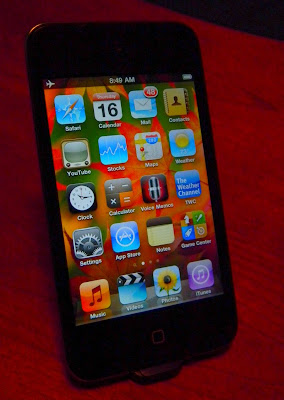
Yes, the Touch now has the cameras everyone thought would show up on #3. Multitasking (sort of), copy/paste, folders, Bluetooth keyboard support (although no mouse support), and more make the new Touch one powerful computer that fits in a pocket. Is it the best at everything though? It is certainly a jack-of-all-trades just like your desktop PC.

iPods were originally just about music. Apple still sells the Nano and Shuffle and Classic that remain music centered. The new Nano has even digressed back down to the basic music player it started as. The new Touch is a PDA, cell phone, camera, and everything else that can be enabled with software (apps). So how well does it do Music?

Music - Yes, it plays music. It even sounds pretty good if you have a good set of headphones. The included Apple earbuds should be thrown out with the packaging. There are still limits in what codecs it can play. 40 hours of music play battery life isn't as good as some competitors, but not bad. The Touch is far more than a music distraction though, and won't last anywhere near 40 hours if the screen is kept active. Audio formats supported include AAC, Protected AAC (from iTunes Store), HE-AAC, MP3, MP3 VBR, Audible (formats 2, 3, 4, Audible Enhanced Audio, AAX, and AAX+), Apple Lossless, AIFF, and WAV. No OGG, FLAC, WMA, or APE that the Cowon J3 and many other devices support.

My major complaint is that some settings can't be accessed from within the music app. You have to leave the music app then open Settings, then Music, to find options to enable Shake-to-Shuffle, Sound Check, Volume Limit, Lyrics and Podcast Info, as well as the EQ choices. The Samsung P2/P3, Cowon S9/J3 and other touchscreen players have all settings on a submenu available from within each media app.

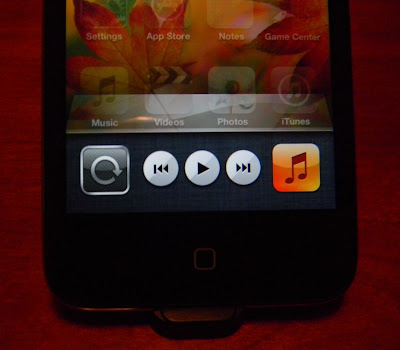
Features I like include the controls (above) that you can access from any screen in any app. To find them double click on the Home button, then slide the bar to the right. I also like full screen album art, being able to quickly flip to the song list currently playing, and genius play lists. I also appreciate the numerous ways you can sort/search your music, including with voice commands. And finally Apple seems to have made Bluetooth work right with wireless headphones. The music app is first class. Almost. It gets a B+ from me for the cheap earbuds included and settings inefficiency.

Video - With its higher resolution screen I was expecting a better video experience. Apple didn't make the screen any larger though, and video playback to my eyes is only marginally better if the content is also higher resolution than before.

Video formats include:
- H.264 video up to 720p, 30 frames per second, Main Profile level 3.1 with AAC-LC audio up to 160 Kbps, 48kHz, stereo audio in .m4v, .mp4, and .mov file formats
- MPEG-4 video, up to 2.5 Mbps, 640 by 480 pixels, 30 frames per second, Simple Profile with AAC-LC audio up to 160 Kbps per channel, 48kHz, stereo audio in .m4v, .mp4, and .mov file formats
- Motion JPEG (M-JPEG) up to 35 Mbps, 1280 by 720 pixels, 30 frames per second, audio in ulaw, PCM stereo audio in .avi file format
- Support for 1024 by 768 pixels with Dock Connector to VGA Adapter; 576p and 480p with Apple Component AV Cable; 576i and 480i with Apple Composite AV Cable.

The main problem I'm having reviewing the video app is that iTunes won't sync any 720p examples I have to my Touch, claiming they aren't compatible. I've checked the properties of each to make sure they match the above specs. So far I've found no high resolution examples to play on the higher resolution screen. Videos that played on my old Touch also play fine on this one. I'd have included a photo or two if there had been anything new to report. Until I can find a source of higher resolution videos that play I'm rating Video on the new Touch a C+.

Photos - Again, the higher resolution screen is not any larger. You can indeed put higher resolution copies of your favorite photos on the Touch. You'll succeed in consuming 4 times as much storage space and get a barely crisper image to look at for the price. The Touch has always had a decent photo app though, and multitouch proves handy for zooming in on details. Photos will rotate with the G-Sensor. You can double-tap to zoom instantly. Panning around a large photo is so smooth and natural you might think it's a printed photo you are sliding around behind the glass. Photos get an A from me. You won't find a better photo app on any device.

The Touch is easily competent at playing media files. I have devices that play a broader range of codecs. I have devices that have better media apps, primarily in making setting variables quickly accessible from within the related app. My Cowon S9 and J3 gave up mimicking Apple's cover flow in favor of their own original Album array view when tipped to landscape view. My devices using OLED screens still look better with more contrast than the new Touch's screen does. The Touch's screen isn't 16x9, and so movies have to be stretched a little to fill it. Any player with a 16x9 ratio screen plays 16x9 movies without distortion.

So if you want a killer Music/Photo/Video player, should you get the Touch? No. Get a Cowon J3 instead. Comparing 8gb models, the Touch is $229 and the J3 is $190 with a free case. You get better media apps in the J3. You get a far more customizable UI. You get a memory expansion slot. You get a beautiful OLED screen. You get video-out with a $10 cable. It does bluetooth and gapless play and full screen cover art and all those basic things the Touch also does. Add up the cable and case saving from what Apple will charge you and save $110.

If you aren't after the best media player out there, but instead want the best pocket computer, then you SHOULD get a Touch. Nothing else today does apps, the web, FaceTime, shoots Photos and Videos, does email and contacts and weather and games and so on, and is also "almost" the best media player. Yes, the upcharge to buy Apple is worth it if you need those things. I'll warn you to turn off WiFi when you don't need it though. My new Touch completely drained its battery overnight while off, yet with WiFi left on. I'll add a few screen captures once I get it charged up again.

If you've got one, then feel free to let me know what you think of it. Comments get reviewed though, so no SPAM please.

4D

Wednesday, February 24, 2010

iPad vs Archos 9? Which is the better Sofa PC?

I've studied the iPad. I've got an Archos 9 Win 7 tablet. I also have an iPod Touch and the Archos 5 Android tablet. Steve Jobs believes there is a market for something between the smart phone and the notebook PC, and that the iPad is that 'tween device. I think he missed the target.

I had my Touch first, and although I hoped it could do everything a netbook could do I found it just isn't capable of any work I need done. It's a great pocket game device though. The apps available make it far more useful than it is out-of-the-box. The limited screen and failure to multitask leave it not quite perfect for real work. Apple tries though. They added cut-and paste for a crude way to transfer data between apps. They made a 64gb version. I use my Touch every day, but it is no longer my Sofa PC.

Next came the Archos 5 with Android. The screen is bigger and reveals more detail. It is still pocketable. Browsing and email are better on the 5 than on the Touch. I can add a bluetooth mouse and keyboard if I need it. I can use it as a DVR to get video content directly onto it. I can access all the media content I have on my local network. I can access and display my MS Office files using Thinkfree Mobile. No editing though. No printing. No real work. The Android App store(s) are filling up with apps quickly, and so the Touch and iPad don't really have that edge anymore. The 5 has GPS, better bluetooth than the Touch, 802.11n Wifi, FM radio and FM broadcasting, and is almost as thin. It is still no workhorse PC and there is enough demand for work in my life that the Archos 5 with Android also fails as my ideal Sofa tablet.

My Archos 9 tablet arrived the first week of January, and I've been exploring it's potential ever since. Since it runs Windows 7 (Starter) I was able to download drivers for my printer and get that set up. I also verified that it's on board bluetooth supports bluetooth keyboards, mice, headphones, and file transfers. Starter Edition doesn't have complete Win 7 Touchscreen support in it, so I've ordered the Windows 7 Home Premium upgrade to replace it with. Although it is usable, the Touch interface of the 9 right out of the box is inefficient at best.

For comparison here are some common specs for the Archos 9 and the new iPad:
Archos 9,-------
----------------------
1.76 lbs
1.1Ghz Z510. *-
Windows 7.
8.9"
1024 x 600
resistive
LED backlight
10.08 x 5.28 x 0.67
HDD 60GB (1.8")
WiFi (802,11b/g)
Bluetooth 2.0+EDR
Microphone
Stereo Speakers. *
Headphone jack.
1.3mp Webcam, *
Optical trackpoint mouse,
L/R mouse buttons.
Built-in Stand, 2-positions.
USB port.
MicroSD slot.
Lotus Symphony included: Documents, Spreadsheets, Presentations.

Apple iPad
-----------------------------------
1.5 lbs. *
1Ghz A4.
iPad OS 3.2.
9.7". *
1024 x 768. *
capacitive.
LED backlight, IPS, Oleophobic
9.56" x 7.47" x 0.5"
16GB, 32GB, or 64GB flash memory.
WiFi (802,11a/b/g/n) *
Bluetooth 2.1+EDR
Microphone.
Speaker (Mono).
Headphone jack.
NO Webcam.
iWork Optional: $9.99 x 3.


Many years ago I won a TI-99/4A computer. Although I could write and run BASIC games on it, and play games that came on cartridges for it, it did not become truly useful until there was a printer it could print to. No content creation app was worth using until there was a way to get it out of the PC. It wasn't until PCs became fairly standardized and accessories would work on most that the PC really took off.

Knowing this, any sofa tablet that can't use the 3rd party output devices so common with macs and PCs is destined to be a content consumer only. The living room already has content though. There's a good chance you have a cable or satellite connection bringing video to a TV. If you've got an amp then you've got better speakers in there than any PC has, and something to play music though those speakers with. You certainly won't need a tablet PC to entertain you in there. Your X-Box or Wii on the big TV will be better for games. If you bought an HDTV in the last three months it may have it's own network access to Netflix and YouTube. If the TV doesn't your BlueRay player might.

The Internet brings both content and a destination for your own original content. The Internet is what suggests there is room for another device in the living room. If we assume a touch tablet is the best form factor of a device to use while on the sofa, then that tablet should minimally be an Internet content consumer and an Internet content creator. It should be able to output to your local printer. It should be able to access from and store content to DVDs, CDs and portable or networked hard drives. We buy things on the Internet. Printing that receipt is mandatory! Your boss emails you a document to print and fill out. Your Son emails you a photo of your new Grand-daughter. It looks great on the screen, and it would be wonderful to print out at 5x7 to frame for your desk.

So what will make a better in-between device? A new tablet that isn't as portable as your phone or an iPod Touch, or a tablet that is roughly the same size but will do the work you expect a PC to do? Sure there will be customers who don't need to print and will be happy with a web tablet that can't play any flash content on the web. My Archos 9 didn't come cheap. It started at $549 and rose to $800 with a software and hard drive upgrade. Upgrading it is something an iPad won't allow. Apple won't mind selling you a new model next year though.

Want a tablet? Think hard before buying that iPad. There will be more capable tablets in a variety of sizes this year. Even if you don't need to print often, a tablet that CAN print will be far less frustrating than one that can't when you wish it could. One ironic detail is that you could install iTunes on the Archos and sync the iPad with it. No need to sync the Archos to anything.

4D

Tuesday, March 17, 2009

iPhone Growing Up. iPod Touch Owners Screwed Again.

With Apple's press announcement today we discover that the iPhone and iPod Touch are getting significant new features in the upcoming 3.0 firmware update. Bluetooth stereo, although much appreciated, is just the tip of what is now possible using Bluetooth on these iDevices. The first generation won't benefit as it doesn't have a Bluetooth chip, but the 2nd gen Touch has had a Bluetooth chip in it from the start. The iPhone 3G will also get features the original iPhone won't due to hardware differences.

Looks like I'll be investing in a new Touch. Some examples of what will be possible include data updates from blood sugar meters, other health related technology, and accessories that might include keyboards (although they wouldn't say). Peer-to-Peer play is now supported. Maps within apps too. A new "Spotlight" page on the device where you can put your favorite and/or most used apps. Copy/Cut/Paste across all apps is now possible. Much more too. Subscriptions are now another way to drain your pocketbook via the app store.

I'll update this blog when I've got more to share. Looks like my search for the perfect media player may have been answered with the 3.0 update to the iPhone and iPod Touch.

Of course Apple doesn't believe in free firmware updates, despite the new firmware potentially making them more money once installed. Prepare to pay the $10 Apple Tax if you own a Touch. Pure iGreed from my point of view.

4D

Wednesday, March 4, 2009

Kindle Books on Your iPhone/Pod Touch!

As rumored, Amazon has now released a Kindle ebook application for the iPhone. It took me 30 seconds this morning to find it and install it on both my iPod Touch and my Wife's iPhone. You enter the Amazon account that is used with your Kindle and you will immediately have access to all the books you had previously purchased on your Kindle. You can sort by Title or Author. You can GO to your most recent book/page. You can add, delete, or goto bookmarks, and everything you update in the Kindle app will be updated on your Kindle via whispernet as well!

If anyone doubted how well the Kindles new and old would do, you need to step back and realize that it's not about the hardware. Amazon make it's money selling ebooks. You can now shop for and buy Kindle formatted ebooks from your iPhone, and whispernet will keep everything synced between your Kindle-capable devices.
The Kindle application is free and available from the App store right now. Be warned, as I predict several hundred thousand people will be downloading it today.

Read Well!

Tuesday, February 17, 2009

Pinnacle Video Transfer Review

The Pinnacle Video Transfer (PVT) device makes it simple to convert videos from DVD, VHS, and cable or satellite box to digital files you can play on your portable media players or PC. I bought mine from Newegg.com for around $80 after rebates. The PVT has a USB port on the bottom end which you can plug a USB thumb drive or portable hard drive into. There are red/white/yellow RCA and an Svideo jack on the top end. Plug an output cable from your player in here and you're almost set to go. Add the include AC charger cable to power up the PVT and you are treated to a nice display of red and blue LEDs while the system checks itself up. You'll get a row of blue lights when the PVT detects a video and audio source. The other end will give you one blue LED when a satisfactory USB storage device is ready for recording. The front face has a single round icon which can be pressed at the bottom to toggle through recording modes an pressed at the top to begin or stop recording.
One thing to do when first receiving the PVT is to update it's firmware. You can download new firmware HERE. Pinnaclesys.com/pvtsupport. Simply copy the downloaded file to an empty USB thumbdrive then plug it into the PVT. Full instructions can be found at the link.

The three recording modes are there so you can choose the best video format for the device you intend to put it on. There are Good, Better, and Best modes with Best being 720x480 interlaced (DVD quality), and Good and Better modes supporting devices with smaller screens.

I found the PVT easy to set up. It came with it's own A/V patch cable, but you may want to get an A/V switch box or multi-output receiver to allow monitoring the video you are recording.

Results depend on the quality of your source. VHS tapes won't have the resolution of a DVD. Cable and Satellite boxes vary in the quality of their composite or Svideo output. Garbage in, Garbage out. Work with the best source you can. Svideo should be better than that yellow RCA composite signal.

Conclusions: I used an old VHS tape of Lost In Space to test the "better" mode, and ended up with a 640 x 480 .MP4 video file. The file played fine in iTunes, although with a bit of scrabbled scan line along the bottom edge which I'm sure was due to the VHS format not actually supporting 480 lines. My VCR had shut off and ejected the tape when it was done, and the PVT stopped recording automatically when the video signal was lost.

I haven't tried the Good or Best modes yet, but will update this blog post when I have. iTunes had no trouble syncing the digital copy over to my iPod Touch. It took a few minutes, but when finished I had a MP4 version of a VHS movie playing on my iPod, and it was nearly as simple as just waiting. You'll have to wait for the source movie to play in real time, then wait a few minutes to copy that movie from the thumb drive over to your iPod on your PC. This was far less painful than the process of ripping a movie from a DVD onto the computer and converting it to play on the iPod. I highly recommend the Pinnacle Video Transfer.

A Good price HERE. Newegg.com.
Some more photos HERE. Newegg.com.

4D

Thursday, January 29, 2009

January Updates for Your Media Player!

I'm not sure what the push was, unless the manufacturers were simply trying to keep to a once-a-month update schedule, but several of the newer media players have received firmware updates this month.

The Samsung P2 is more than a year old, but today I found two new games that work on it. Thanks to theP2Zone.com you can download them yourself. They are Sudoku Champ:
and Bubble Bang:
Released for the New Samsung P3, it is wonderful that Samsung has kept gameplay the same between the new P3 and the older P2. I'm a fan of Sudoku, and this version is very well done with a good touchscreen interface. Bubble Bang will get tiring after a couple of rounds, much in the same way that popping the bubbles of bubble-wrap does.

The Cowon S9 gets new 2.08 Firmware.
This is only a minor update over the previous 2.07 version, but a step forward none-the-less. You'll get:
- Improved page-up and page-down in documents mode.
- Displayed charging status when the device is connected to PC by USB cable.
- Improved low bit rate MP3 playback.
- They fixed the error that auto pivot was irregularly not working when auto pivot is just changed to be on.
- They fixed the error that displaying files abnormally when music in music favorites is playing in shuffle mode.
- They fixed the error that Bluetooth headset was not working when you turn on Bluetooth while some particular music files are playing.
Beyond new firmware the S9 now has a multitude of user-created interface alternatives, and custom versions of most apps that eliminate most of my original complaints about the player.

Iriver goes one step further with the 2.10 firmware update for the SPINN. It adds a Memo app that lets you draw or write directly on the screen.
The photo app has been improved. I can now rotate images easily, but apparently my photos are still not supported by the Zoom function. The Korean version had the capability to scheduled recording off FM radio, but once I changed to the US version that feature disappeared.

Even the iPod Touch gets an update this month. 2.21 firmware fixes some security flaws and a few other things. Minor, but appreciated!

So if you own any of these players, go get the updates. Their ability to be updated after purchase means your investment gets better as you continue to own it.

4D

Sunday, January 25, 2009

wiREVO A100 Review. A Bluetooth Stereo Adapter for your iPod.

I'm a big fan of Bluetooth technology. When I see a good value on something I can use I find it hard to resist. There is not much to say about this little Bluetooth adapter except that it works well, is inexpensive, and will eliminate the wires from your iPod. Apple doesn't seem to know the value of Bluetooth, but fortunately a small investment will overcome that shortfall. The wiREVO A100 is small, but is a holdover from earlier iPod design trends. It works just fine with my iPod Touch and Nano, but isn't the most stylish compliment to either. At 3/8" thick by 1.o625" by 1.5625" and only 12 grams in weight, you'll notice but not feel much addition to your iPod.
The A100 has it's own lithium battery and will charge from your iPod cable. You can charge it alone or charge both the iPod and A100 at the same time. Pairing is easy. The first time it is plugged into an iPod it will go immediately into pairing mode with it's led flashing blue and red. I had a little more trouble pairing it a second time to a different device, but it just took more careful timing. Once connected your Bluetooth headset will have control over the iPod. You can toggle between Play and Pause, and also go forward or backward one track at a time. Your headset will have volume control as well. Instructions are complete and easy to understand. It was well packaged.
I found mine at Buy.com. No tax and free shipping kept the final price below $20. MSRP was originally $99. I'll just warn you that free shipping wasn't the default choice, so make sure you look for it when checking out.

Sound quality is great. I challenge anyone to tell the difference between this adapter's wireless audio and the same source through a cable to similar headphones. Signal strength is typical. I could walk about 40ft away from my iPod outdoors with no obstructions before the signal dropped out. Indoors this adapter is the same as all others I've tested. The number of walls and your orientation to the source device will affect the signal distance. When signal is lost there is a quiet break, and the audio resumes once you move back into range.

I recommend the wiREVO (wireless Revolution) A100. It's a tremendous value at $20. You won't be disappointed.

4D

Thursday, December 18, 2008

Catching Up. MP3 Players Hot on the Heels of the iPod Touch.

In August I wrote about possible new MP3 players from the major manufacturers. You can read that entry HERE. Some predictions have come true. Some have been close. Some are yet to be realized. Many companies have revealed their hands, and this post will take another look.

Apple showed us it's new iPod Touch. I guessed it would get a plastic back, and missed on that one. The iPhone, however, now has a Plastic back available in White or Black. The Touch got a lower price and a couple of hardware improvements. The new model (2nd gen) will get you a speaker, Volume controls, internal Nike Shoe support, and a new headphone jack that supports headsets with microphones. It's a better value than the first gen, with more features and that lower price. Same screen and form factor though.

Samsung has revealed the P3 it will introduce formally at CES in January 09. It has already won an award for new technology. The same size as the P2, but with a new interface, haptic screen feedback, improved audio processing (DNSE 3.0), better Bluetooth (2.1), a speaker and an aluminum body. There will also be a P4, but it is expected to be a leap ahead and available along side the P3 but with more features. The P2 and P3 are amazingly feature laden, so I strongly suspect the P4 will have WiFi. That's the only technology the P2 and P3 don't have. Samsung has shown us a folding OLED screen. The potential is great. I expected to be amazed by the P4.

Microsoft updated the Zune with new firmware and desktop software. They made the existing hardware more useful. The new Zunes are the same form factor but with a few new color options and greater capacities. Prices went down. They added the ability to buy songs from the Zune Marketplace using the Zune's WiFi. They also added a feature to let you tag a song you hear on the radio for purchase and direct download. Their desktop software is amazingly good, with quite a bit of original thinking over the competitors. Rumors include Microsoft porting the Zune UI into the Windows Mobile software. Time will tell.

Dell decided to get out of the game. Again. I'm guessing they took a hard look at the competition and realized they weren't ready. You can read a bit about it HERE.

I predicted Sony would be working hard on their own touchscreen player, but holding off on releasing it until they knew they had a great one. Latest leaks indicate their will be a touchscreen Walkman showing at CES. With Wifi and access to Amazon's Music store perhaps. A thin form factor, and original media interaction. Surely smaller and thinner than THIS player, and the best direct competitor for the iPod Touch out there. No one has seen the interface yet, and that's where many other players have failed. I'm counting on Sony to make a strong comeback though. They used to own the personal media player market. Let's just hope their new player is affordable.

There are other new players out there as well. Iriver brought out the SPINN. Cowon just released the S9 Curve. Even Coby has a 3" Touchscreen player. I've reviewed the SPINN and found it still needs work. I've got an S9 on the way. No WiFi in either, so their best competition is the Samsung P2 and P3. The Coby MP-835 is a poor attempt. The SPINN doesn't quite keep up. I'll let you know how the S9 does in a week or so. It has the most potential to unseat the Samsung players.

It's a great time for touchscreen media players. I have to give credit to Apple. They raised the bar for both cell phones and media players with the iPhone and iPod Touch. They brought all the competition up to a new level. I'm looking forward to 2009. CES 2009 is THE place to watch in the next few weeks. It's all happening there.

4D

Saturday, October 4, 2008

MP3 Player Sales Observations.

I've reviewed many players in this blog. I have my favorites. America has it's own. Curious about what people are actually buying I've stumbled across some interesting sites, and here are my observations:

CNET Shopper lists the 100 best selling players as far as it knows. It is not surprising to see the new iPod Nano appear 4 times in the top 8, with positions 1 (Silver 8gb), 5 (Silver 16gb), 6 (pink 16gb), and 8 (orange 8gb). The iPod Touch takes 2nd, 4th, and 10th with it's 8gb, 16gb, and 32gb variations.

A pleasant surprise is that the hard-drive based Zune models take 3rd (120gb), 9th (80gb), and 21st (30gb) position from the top 25 while the new ipod Classic 120gb model is 20th.

The Samsung T10 is 7th, and the top selling 4gb flash based player. The Samsung P2 8gb is 13th, and the second best touchscreen player behind the iPod Touch. It is the only other touchscreen player in the top 25.
For clip-on players, it does not surprise me to see Sansa Clips at 15th (red 2gb) and 24th (black 1gb), with no iPod Shuffle in the top 50.

Amazon.com's best seller list is nearly the same, except that it is updated hourly. In any given hour the new iPods will show up on top, with the new Zunes and Archos being in the runners up as hard drive based models, and the Samsung P2 sneaking in there in various colors and capacities as the runner-up touchscreen flash model.

Rather than compare sales, it is more interesting to compare players by ratings. In almost every case, the new iPods will not appear anywhere near the top of a "ratings" list. I'll agree that this phenomenon may be due to their popularity, with a higher number sold creating a large pool of reviews, and a greater likelihood that dissenting buyers will feel the need to review. Still, with several players getting 5-out-of-five stars, and the iPods always getting less, it points out that buyers don't buy iPods based on the reviews.

For flash memory based Touchscreens there appears to be only two major players. Amazon rates the year-old Samsung P2 second only to the new iPod Touch. Samsung's S3, a sexy little player that only has a touch sensitive control pad, ranks third among bestselling touchscreen players in the same poll.

There is no science expressed here. The lists/polls I've linked to will change over time. What sells and what is "best" are often different things. I am impressed that the rarely-advertised Samsung players appear so high so often. Owning both a P2 and a T10 I can see their value and compare them directly to my iPods and Zunes and other players. I can also understand why the Zune does well, particularly with it's latest 3.0 firmware update. The Zune software is great, and the players are more efficient to get around on than any iPod except the Touch.

What does it all mean? There are great alternatives to the Apple products. Some people get it. Fortunately for Apple most people don't.

What do YOU think? Leave me a comment.

4D

Monday, July 14, 2008

Ipod Touch. 2.0 Firmware and Apps!

Yes, the iPod Touch has now been updated with version 2.0 of Apple's firmware. Unless you can find another way, it will cost you $9.95 from Apple. This update primarily adds access to the Apps store, where so far there are more than 800 applications available for download to your Touch or iPhone. There are a few other improvements including:

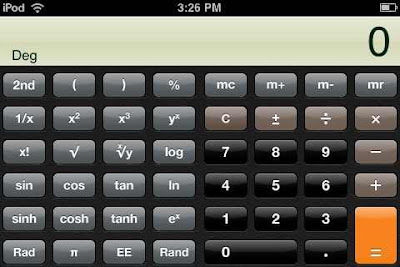
Calculator App now shows a scientific calculator in landscape mode, and the same simple calculator in portrait orientation. Much appreciated. Thank you, Apple.

Screen Shots. You can now take a snapshot of whatever is on your screen by pressing both the Home button and the Power button at the same time. the screen will white out for a second as the image is captured, and the photo will appear in your Photo App's "Saved Photos" folder. The photo of the Scientific calc above was taken that way.


I won't review the assorted Apps available. A free one I find useful is REMOTE, by Apple. It lets you take control of your iTunes applications via wifi from your Touch or iPhone. Your PC need to be on the same network, and your Touch has to be connected to that network via wifi. I've got a great sound system connecting via bluetooth to my iMac. I can sit in the sweet spot of my system, and wirelessly pick and choose songs from my iTunes library to listen to. Neat trick.

Is the 2.0 update to the iPod Touch worth it? Yes. Even if you never buy an App from the App store, the value of the free ones is easily worth $10.
4D

Thursday, March 13, 2008

New iMac for a Classic Windows User

I couldn't resist. Apple released the iPhone/iPod Touch Software Development Kit, and of course it only runs on an Intel based Mac PC. Wanting to be able to write my own custom applications for my iPod Touch it was clear I would need a Mac of some sort. Apple sells a nice variety, and every PC in their lineup is beautiful. I've written a couple of killer applications in my past, and know that writing software doesn't demand the fastest PC. It does requires one that you can sit comfortably in front of for hours on end without complaining. Poor ergonomics from the keyboard or mouse, eye strain, or even a crappy keyboard layout can take the fun out of programming in a hurry.

Macs have built-in bluetooth. Knowing this I planned to buy the least expensive Mac Mini and use the bluetooth keyboard and mouse I already own that came with a Dell PC. I've also got a spare Monitor. Perfect Economy. My local university computer store sells Apple PCs and offers a minor educational discount on them. I went in planning to buy a Mini, and came home with an iMac. There wasn't a Mini in site, and the low end iMac was my next least expensive option.

The iMac was well packaged. One simple box. I was able to carry it home on the back seat of my motorcycle. Integrating the CPU into the monitor is a wonderful idea. It is especially nice when the monitor used is a beautiful 20 inch widescreen LCD.

For some reason I was expecting my Mac experience to be delightfully simple compared to what I usually go through when I am setting up a Windows PC. Not so. The iMac wants to set up networking when first turned on, and since my router uses mac address filtering it couldn't connect. During setup there is no indication of what the iMac's mac address is. I eventually figured out that I could tell it I had no internet connection, then later add the networking. It still took several tries to get my wireless router's networking to stick. Exactly as aggravating as setting up a new windows PC in my house.

My iMac was supposed to come with wireless keyboard and mouse. When I opened up the box there was a wired keyboard and a wireless mouse. The Mac keyboard has two USB ports built into it. I found that pretty handy for plugging my camera and iPod Touch into so I decided to keep the wired keyboard. The mouse kept failing. It would drop it's connection to the iMac, freezing the cursor on the screen. On a PC the keyboard can be used to jump around to the task bar, programs, or whatever if no mouse is connected. I found I had to reboot the iMac to get the mouse working again. Bad. I complained to the store where I'd gotten the iMac. They agreed it should have had a wireless keyboard with it as well. They offered to take it back and sell me a basic iMac with wired mouse and keyboard, and a 320gb hard drive for less than I'd paid for the first iMac with a 250gb drive. I took them up on it, but of course then had to set up yet another PC on my home network. Ouch!

I'm only just beginning to get familiar with OS 10 on the Mac. I'd been a little jealous of how pretty the Mac OS was compared to Vista. Now that I can play with it, the eye candy is just that. Candy gets tiring after that first time you eat too much of it. I DON'T like program menus always being at the top of the screen. You long time mac users are laughing at me of course, but the obvious simplicity of the Mac OS turns out to be not obvious at all to a long time windows user. I'll get use to it, of course. I have already figured out how to turn it on an off. I'll take another look after I've played with it for a month or two.

Just so you'll know, my Dell bluetooth mouse works wonderfully with the iMac. The wired mighty mouse is still wrapped up in it's box.

4D

Monday, January 21, 2008

Bluetooth and the Samsung P2

That last few years I've moved all my CD music onto a hard drive, and been exploring how to have easy access to it no matter where I am. Of course that implies putting it on a portable device, so I've been looking into the options there.

I started with a nearly free little MP3 player that uses SD cards with a 2 meg limit. It's only play option was "shuffle", and with no display I found it pretty useless. Yes, it would play music. No, you couldn't choose which of the songs you put on it would play or in what order.

I went in to buy an iPod Nano but bought an iPod Touch instead. Amazing piece of technology. I don't use it much for music, though, as it's main distraction is the wifi web browser and web applications that are available. It also must be parked in a dock or have earphones plugged into it, and those are two negatives in my book. No FM radio either. 8GB capacity isn't quite large enough to hold my entire collection.

I bought one of the new Zunes with an 80GB hard drive. Like it alot. It has an FM radio which proved incredibly useful in the recent ice storm power-outage. Not an easy interface. Compared to the Touch, it takes more than twice as many clicks or strokes to get to business with. It too has to be parked in a dock or used with headphones.

Last week I added the Samsung YP-P2 8GB touchscreen mp3 player to my collection. It has built-in bluetooth and I think I'm in love. I took a trip to BestBuy yesterday and picked up bluetooth adapters for my iPod and Zune docks, a Bluetooth transmitter/receiver for my home stereo and a receiver for my car. I've had a bluetooth headphone set for awhile. The P2 easily pairs with all my docks, adapters and headphones. Instead of parking the P2 in a dock, I park it in my pocket. As I walk around my house, the bluetooth tranmission connects to whichever device is in range, and the music continues playing in the new room. I get in my car and the music starts playing on on the car speaker system. If I'm trying to be discrete, I put on the bluetooth headphones.

Now the P2 doesn't have the best interface. It is better than the Zunes, but not quite up to the simplicity of the iPod Touch screen. Still, this little player from Samsung is by far my favorite player, thanks to it's built-in bluetooth radio. I picked mine up when it was on sale through Amazon for less than $200. Samsung has promised to keep improving it with firmware upgrades. I've upgraded it once since getting it. It's got a beautiful screen, with crisp video resolution (480x272), close to the Touch (480x320). The Zune is lower resolution. The P2 is smaller and much lighter than the touch. Neither is hard to carry around, but to add a bluetooth dongle to the Touch or Zune would make them much more cumbersome. There are teasers on the internet showing a sleek add-on device for the P2 that would add wfi, FM transmission, and an SD card slot to expand memory. If they add wifi and a web browser to this little player, I'll sell my Touch. You can use the stereo bluetooth to transfer files, transmit audio, and potentially allow a bluetooth keyboard/mouse for input and bluetooth printing. I've seen bluetooth used to share internet access too, and wouldn't be surprised if they enable that feature eventually.
4D

Thursday, January 17, 2008

Apple's $40 iPod Touch Penalty

Apple demands $20 from iPod Touch owners for an upgrade.
Many retailers are now selling iPod Touches for $20 less than MSRP, recognizing that if they don't, and a new shipment of Touches comes in wth the software already upgraded for MSRP, they'll have to refund $20 to those buyers anyway.

So, if new Touches are $20 less than MSRP, every early adopter is getting laughed at right now. Apple doing half the laughing, and anyone who buys a new one for $20 less (because retailers think they'll have to pay another $20 to get them upgraded) getting the second laugh.

I could sure use that $40 difference, which the new apps are very much NOT worth. Gee thanks, Apple. I know. I bought the apps.

Just to compare, anyone who was an early adopter of the original Zune got a FREE firmware upgrade which included new functionality when the new Zunes came out. Anyone who has already bought an early Samsung YP-P2 can now update their P2 for free, adding new features and usefullness. Anyone who bought an iPhone can expect free firmware upgrades which will include more functionality. Anyone who bought an early Apple TV will get for FREE the new firmware and considerably better functionality that the new releases will have. Sony Playstation 2 and 3 owners have not had to pay for firmware upgrades that made those machines into what they should have been in the first place, far closer to being worth what they cost. I paid $299 for my Touch, not because it was worth that much at that time, but because of the obvious potential it had to be better. I invested in it's potential. The new apps make it better. By putting those apps on new touches for FREE and NOT raising the price, even Apple admits that the original Touch was overpriced without those apps. They will make their profit by selling Touches with the new apps to a much larger group of people who didn't already buy one and wouldn't have with the lack of those apps.

What should Steve have done? Perhaps he realized that Touch owners don't spend as much money at iTunes store as other iPod owners do. I find the browser far more interesting, and can listen to almost any song I want using it and seeqpod.com. Maybe he's right. IMO he should have offered previous Touch owners a special $20 gift card. Buy the card for $20 and you can also download the new apps for free. Why is this good? The card can still be used as a $20 credit at iTunes, but many people won't use it. Apple makes another $20 either way, and Touch owners aren't paying for what should have been free as they can get new songs (or movies) with that gift card. It is very clear what is fair. It is very clear what is common practice in related electronics industries. What Apple did is neither fair or common. Dangerous is the best word I can think of.

4D

Monday, December 31, 2007

iHome 2Go Review

My wife got an 8 gigabyte iPod Nano for Christmas. Of course I added a $50 iTunes gift card, a belt-clip case, and an alarm clock/dock for it. She seems to enjoy waking up to music. I was so enamored of the dock/clock that I picked up an iHome 2Go for myself and my iPod Touch.

iHome 2Go
$79.99 at Target and comes with a nice padded vinyl case, an AC power adapter, an 1/8" stereo patch cord, and a few dock adapters for various ipod models. There was no adapter for my Touch, but the adapter that came with my Touch does work. Other adapters are available through an 800 number included in the literature. I am extremely dissappointed that the 2Go didn't come with a remote control. The box contained a "special" offer for the optional remote for "only" $19.99. I can get a great universal remote with learning ability for less. The markup on the remote for the 2Go is extortion. The 2Go itself only has simple controls for the ipod on it. You can play or pause and control the volume up or down. The remote would add mute, next and previous song, scan forward and back, and control over the snooze function and alarm reset of the 2Go itself. Speakers fold up to face forward and fold down flat to let the 2Go fit in it's portable case. The 2Go will run on 4 AA batteries, with an additional small watch cell to maintain the clock setting. Sound is pretty good, although the small speakers don't do bass frequencies at all. Packaging advertises an SRS sound feature. It can be activated with the remote control or by pressing a button on the right side of the unit. SRS adds a little depth to the sound, but the effect is more a gimic than a useful feature. Small speakers are small speakers. You get only what they are capable of. There is an audio/video output and an auxiliary audio input jack on the back. The A/V jack can be used for just audio output using the included patch cable, but a special cable will be required for outputting a Video iPod's video and audio to a TV. It also appears this iHome 2Go doesn't support my Touch's video output.

As an alarm clock the 2G0 has a seperate play/wake-up volume setting. You can have the music at a louder or softer level when waking up than you do when the 2Go is in sleep mode. It's not hard to set, although the buttons have more functions than they are labelled for. The user manual does provide fairly clear instructions. There is no radio or other option. If no iPod is attached the iHome 2Go will buzz like any ordinary alarm clock. Other media sources can be played through the auxiliary input, but not if an ipod is attached as the ipod uses the same amplifier channel.

I'll give the iHome 2Go a 7 out of 10 points. It loses 2 points for not including a remote control, and another point for not having onboard buttons for the functions available on the remote. The 2Go appears to come with the remote if you buy it from iHomeAudio.com. Of course it will be $20 more expensive. I suspect Target negotiated for a lower price and iHome responded by removing the remote control from the boxes Target sells.

Friday, December 14, 2007

Technology in an Ice Storm

Kansas got hit with an Ice Storm on Monday night December 10th 2007. It took out the electricity from more than 80,000 homes, and by the date of this entry this author did not have electricity in his home. This was written at his place of employment where power was restored within 24 hours of the storm.

The obvious dilemma when power is out is that almost all the technology we come to depend on doesn't work. I woke up on the morning after the storm to no lights, no PC, no Satellite TV, and no heat. Fortunately of the gadgets I own one was a Zune. With it's FM radio I could listen to local stations for closings and weather reports. I suppose I've got a radio somewhere in the house, but none have kept me distracted enough with simple radio to have me keep them running with fresh batteries. The Zune entertains me with music and videos and as such gets charged every night. The radio feature is a bonus that proves invaluable during power outages.

The second gadget I've come to rely on is an ancient Casio Pocket TV. I bought the Casio several years ago to use as a monitor for a video camera. I was still using it as a monitor for the DVD player I use to play music on my deck. It had fresh batteries in it since it had been running off it's power adapter. Built in UHF/VHF tuners and telecoping antenna allow it to receive local analog TV broadcasts. Fortunately my local stations are still broadcasting in analog. On a normal day the little Casio doesn't get very good reception from the main TV towers 40 miles away or so. With the ice storm shutting down all electric devices, the lack of interference made for surprisingly good reception. The screen is tiny, but I've been able to keep up with my local TV programming with it. It uses three AA batteries, and fortunately in this crisis AAs are still easy to find. My D cell flashlights are worthless as D cell batteries are sold out everywhere.

My Ipod Touch didn't prove as worthwhile. With my wireless router not working, it's just another media player. I've got more music and videos stored on the Zune's 80 gig hard drive than I do on the iPod's 8 gigs. The Zune wins when power is out. Both media players have to be recharged from either a wall adapter or a PC's USB port. I could fortunately take both to work and charge them from my work PC, but the inability to use standard batteries makes both less useful when resources are limited. As such I'm looking for a media player with FM radio that can run on AA batteries.

The gadget I realize I'll need to find now is a portable TV with a digital TV (ATSC) tuner. Within a year or two those analog broadcasts will be turned off. When that happens my little Casio TV will be demoted to monitor again.

Sunday, December 9, 2007

ZUNE 80 Versus iPod Touch

Is a Zune better than an iPod Touch?
I've now owned both media players for more than a week. I started with the Touch and added the Zune 80 as soon as I could find one locally. My Touch is an 8 gig version. Obviously the Zune has more media capacity. Ten times more to be precise. So are the added capacity and unique features enough to make the Zune a better device? I'll answer that question eventually. For now I want to concentrate on how easy and how well each device plays media.

Music:
The Touch with it's touch screen has direct access to each function. The Zune may require scrolling up as many as 6 items before you can click on MUSIC. The touch pad on the second generation Zune allows an upward swipe to move the selection all the way to the top, so two actions at most are all that are required to open the music application. The iPod Touch wins but only by a hair with it's one-tap access.

Each player has sorting categories within the MUSIC application. On the Touch you can one-tap select from Playlists, Artists, Songs, Albums, and More. Selecting More brings up Audiobooks, Compilations, Composers, Genres, and Podcasts to choose from. Seven Explicit Music categories.

The Zune has Playlists, Songs, Genres, Albums, and Artists you can select from by clicking right or left within music app. There is a seperate application on the main menu for Podcasts. The Zune also has an FM Radio option that the Touch doesn't have. Five Explicit Music catagories.

Considering just the songs you have on either device, the Touch with it's Composer and Compilation sort option has the edge on finding your song by category. I've got three Christmas albums on both devices. Using Genres to find them, the Touch took 5 taps to display just Christmas albums from the Home screen. The Zune took as few as 3 clicks from the main menu, but took up to 7 clicks if the Zune was not already on the Music/Genres options when starting the search. To play a specific song from a specific Christmas album took two taps on the Touch. On the Zune it took four clicks at minimum assuming your were polished at scrolling with the Zune's touch pad. The Touch wins again as a quicker way to get a song to play.

Finding a song from the alphabetical song list is much easier on the Touch. Only 8 songs are visible on the Touch at one time. The Zune shows 12. The Touch has the complete alphabet along the right side of the screen. Tap on any letter and you are instantly moved to the songs beginning with that letter. One more tap is all it takes to begin playing any song listed on the screen. The Zune has no direct way to jump to a beginning letter group, and as such may take several swipes of the touch pad to just get close to the song you want. The Touch wins here again, thanks to the touch interface.

Once a song has been selected to play on either device, the large screens both show the cover art. The Touch has a Volume slider on the screen that you can slide with a finger. The Zune lets you control volume with upward or downward swipes across it's touch pad. The Touch has a software PLAY arrow on the screen you touch to pause and again to play. The Zune has a dedicated hard Play/Pause button. Both players will shut off their screens to save energy while still playing a song. You have to wake the Touch up with a button press and unlock it with a slide to get to the controls. The Zune wins this comparison with it's hard button controls that don't need the screen on for access.

Videos:
The Zune seperates video into Music Videos and All Videos categories. The Touch seperates Video Podcasts from Movies. Within iTunes you can add cover art to DVD movies you've converted to sync to the Touch. The Zune software found and synced the same movies to my Zune, but there was no option I could find to add cover art. As such, movies are easier to spot on the Touch. The Zune grabs a video frame to use as art, and depending on the frame chosen does not always make it easy to spot the movie you want to select from it's artwork. Both players play videos horizontally. The Zune screen is a 4:3 ratio and the Touch screen is a 16:9 ratio. Playing the full screen movie Borat, the Touch appears to stretch the image a bit to fill the screen. The Movie looks great on both devices, though. The Zune screen is brighter, with what appears to be a higher contrast ratio than the Touch. The Touch screen has a higher native resolution, and is easier to see fine movie detail on. The wide screen movies Duets appears full screen on the Touch but with bars top on bottom on the Zune. Wide screen movies are 20-25% smaller on the Zune screen than they are on the Touch. Ouch! Titles/credits on the Zune screen are too small to resolve. The same can be easily read on the Touch. I'll call the Touch the winner for resolution and detail, but the Zune wins, especially with 4:3 movies, on contrast, brightness, and black blacks. Black colors on the Touch appear a little brown/gray, but it will play both 4:3 movies and 16:9 movies full screen.

Pictures:
The Zune has the brighter display. The Zune software also puts demo pictures on the Zune by default, and as they are the only photos I've got on the Zune I added them to my PC's collection using the Zune software, then copied them onto my Touch using the iTunes application. Both devices let you select individual photos to display and also let you play a slideshow of all the photos in a group. The default time between photos seems to be about 4 seconds on both devices. The Touch and it's multitouch screen moves ahead at this point. Any photo on it's screen can be zoomed in on and panned around on to bring small detail up close and centered on the screen. An icon tap on the photo screen brings up an option to select "Use As Wallpaper" and "Assign To Contact". Photos on the Touch also rotate as you rotate the Touch itself. Photos that don't fit the screen ratio in one orientation will rotate and enlarge to fill the screen in another. The Touch makes a more versatile little photo viewer than any Photo picture frame I've yet seen. Photos on the Zune have a limited zoom and pan with a click on the touchpad. A picture can also be selected to be the background image, but a portion of a picture cannot. The Touch wins this category thanks to it's more versatile ability to manipulate the photos. When full screen on either machine the photos appear more vivid on the Zune. So I'll give the Zune a 1/2 win here.

The iPod Touch steps away from the Music player pack now, mainly thanks to it's wireless internet access. It also has some PDA functionality with Calendar, Clock, Contacts, and Calculator. Apple will soon release the software development kit for the iPhone and iPod Touch, and once that happens there will arrive all sorts of 3rd party applications that can be added to either device. Given theses added features, the Touch wins this overall comparison easily. When you ignore them and consider only the common media playing features, the Touch still wins 6 to 2.5.

Both devices have wireless capabilities. The Zune's wireless is limited to syncing and limited sharing of songs to nearby Zunes. The Touch's wireless with network and internet access opens up far more potential. Internet applicatons like Seeqpod.com and Tversity on your PC mean you don't have to put every song you own on your Touch, yet you can stream nearly any song out there including your own songs that are shared on your home server. You can play any MP3 or quicktime file you can find on the internet without needing it physically installed on your device. The 80 Gigabyte advantage of the Zune melts away when a Touch is within range of a wireless internet access point.

So is a Zune 80 a better media player than an 8 Gig iPod Touch? Perhaps it's a little better at video. The bright and high contrast screen of the Zune looks better and the hard drive space will store considerably more videos. But for music, even with it's limited storage space, the Touch wins hands down.

Friday, November 23, 2007

Belkin Case for iPod Touch

I just picked up this brown leather slip case for my Touch. I've been using an Incase beltclip/armband/wristband case and find it great for carrying but not great for holding and using. This Belkin is a simple cover. Leather, nice stitching, access for power, cables, etc., and it comes with a screen protector you stick on your touch's glass to protect it.

Belkin-iPod-Touch-Leather-Sleeve

I like it very much. Well made. Good fit. Velcro closure. Reasonable price. Allows me to hold onto the Touch without slipping or putting fingerprints all over it. The clear screen protector also doesn't show fingerprints as bad as the glass screen itself does. My single complaint is the tag they have sewn onto the side wth "belkin" on it. I'll be snipping it off once I'm confident I won't ruin the case.

4D

Monday, November 19, 2007

Amazon Kindle and iPod Touch DVDs

http://www.amazon.com/gp/mpd/permalink/m2S5YCKCJJ64W8:m1KUZNR4TVZSMM

Today it is out, and I've ordered one for my wife. I read everything posted online about it, including what Amazon itself has to say, and I like what I see, mostly. I'll post a thorough review once I've got one in my hands. Still more ugly than cute. I'll have a better perspective once I can hold one.

It is not yet clear how much web connectivity it will have. I know it will take you to Wikipedia and Amazon itself. I don't know, for example, if I'll be able to read this blog from it though. If it is a generic web browser that can access any web page then it'll be a hit. I suspect they have fixed links and don't let you browse the internet mainly because it is using a cell phone data service that is paid for in part by the cost of the e-books you buy. Spend time browsing the web and not buying anything and the data access bill will climb past the subscription Amazon pays.

I found some cheap software at my local Staples store to allow copying DVDs to my iPod Touch. Not quite ready to recommend it, as it took more than 5 hours to transcode one 2-hour DVD movie. I can't help but think this software is poorly coded if it takes longer to transcode than it actually takes to watch a movie. I'll try it on a faster PC tonight, and if I can get better performance from it I'll review it here. It DID succeed in converting a DVD to a video file I could sync to my iPod Touch. Slowly.

4D