Showing posts with label Samsung P2. Show all posts

Thursday, January 29, 2009

January Updates for Your Media Player!

I'm not sure what the push was, unless the manufacturers were simply trying to keep to a once-a-month update schedule, but several of the newer media players have received firmware updates this month.

The Samsung P2 is more than a year old, but today I found two new games that work on it. Thanks to theP2Zone.com you can download them yourself. They are Sudoku Champ:
and Bubble Bang:
Released for the New Samsung P3, it is wonderful that Samsung has kept gameplay the same between the new P3 and the older P2. I'm a fan of Sudoku, and this version is very well done with a good touchscreen interface. Bubble Bang will get tiring after a couple of rounds, much in the same way that popping the bubbles of bubble-wrap does.

The Cowon S9 gets new 2.08 Firmware.
This is only a minor update over the previous 2.07 version, but a step forward none-the-less. You'll get:
- Improved page-up and page-down in documents mode.
- Displayed charging status when the device is connected to PC by USB cable.
- Improved low bit rate MP3 playback.
- They fixed the error that auto pivot was irregularly not working when auto pivot is just changed to be on.
- They fixed the error that displaying files abnormally when music in music favorites is playing in shuffle mode.
- They fixed the error that Bluetooth headset was not working when you turn on Bluetooth while some particular music files are playing.
Beyond new firmware the S9 now has a multitude of user-created interface alternatives, and custom versions of most apps that eliminate most of my original complaints about the player.

Iriver goes one step further with the 2.10 firmware update for the SPINN. It adds a Memo app that lets you draw or write directly on the screen.
The photo app has been improved. I can now rotate images easily, but apparently my photos are still not supported by the Zoom function. The Korean version had the capability to scheduled recording off FM radio, but once I changed to the US version that feature disappeared.

Even the iPod Touch gets an update this month. 2.21 firmware fixes some security flaws and a few other things. Minor, but appreciated!

So if you own any of these players, go get the updates. Their ability to be updated after purchase means your investment gets better as you continue to own it.

4D

Sunday, January 4, 2009

Bluetooth-Capable MP3 Player Comparison

If you're not a fan of wires or the small ear bud headphones that come with 99% of the MP3 players out there, the best option available right now is Bluetooth. Not every player comes with it, and the ones that do vary in how well it is implemented. Bluetooth support is actually pretty rare among the wide array of players available. Yet if you've got a player that does include it, your music experience can spread beyond your ears. With some players you'll also get the ability to transmit files back and forth to other MP3 players or your PC if it has Bluetooth capability.

Definitions: Bluetooth is an industry specification that describes how Bluetooth-compliant stereo headsets, mobile phones, and external devices can easily interconnect with each other using a short (10 meter) wireless connection. There are several different uses for Bluetooth. Your PC may support Bluetooth keyboards, mouses, speakers, network sharing, headsets, headphones, and file transfer. The best of the pocket media players supports Bluetooth headsets, speakers, file transfer, cell phone pairing, and even game play over Bluetooth. Some acronyms we've been talking about include: (EDR)Enhanced Data Rate, (OPP) Object Push Profile, (A2DP) Advanced Audio Distribution Profile, (AVRCP) Audio Video Remote Control Profile, and (HFP) Hands Free Profile.


Players and the profiles they support:
- Samsung YP-P2: Bluetooth 2.0+EDR. A2DP, AVRCP, OPP, HFP
- Samsung YP-T10: Bluetooth 2.0+EDR. A2DP, AVRCP, OPP, HFP
- Cowon S9: Bluetooth 2.0 + EDR. A2DP, AVRCP Profiles
- Iriver SPINN: Bluetooth 2.0 + EDR. A2DP, AVRCP Profiles
- Insignia Pilot: Bluetooth 2.0 + EDR. A2DP, AVRCP Profiles
- Philips SA5245BT: Bluetooth 2.0+EDR. A2DP, AVRCP, OPP Profiles
- Sony NWZ-A828KBLK : Bluetooth 2.0+EDR. A2DP, AVRCP Profiles
- Haier Ibiza H1A030BK: Bluetooth 2.0+EDR. A2DP, AVRCP Profiles

I've had a chance to try out the bluetooth on both Samsungs, the Philips, Insignia, Cowon, and Iriver. The Iriver SPINN and Cowon S9 are both relatively new, and when using bluetooth on both I've run into a few problems with the devices running slow or choppy, or causing the music to skip or breakup. They also have difficulty seeing standalone bluetooth speakers. Each has gotten better with recent firmware updates, and I have faith they'll both get the bugs worked out eventually. The Philips is reliable, and even sends FM radio over bluetooth which is something no other player seems capable of handling. The Philips also adds the ability to send files to other devices once connected. I've tested this with the Samsung P2, and was able to send a music file from the Philips to it, as well as send a file back to the Philips from the Samsung. Bluetooth file transfer is not terribly fast, but will get the job done. The Philips also worked with the Samsung T10 and my Samsung Instinct phone.

All of the players I've tried sound great when their audio is sent over bluetooth to a decent receiver. There are several over-ear headsets out there in the $50 to $100 range. With relatively small driver, you'll miss the lower frequencies and this may contribute to Bluetooth's poor reputation for stereo audio transmission. With better quality bluetooth headphones my experience matches that of wired connections to good headphones.

Some headsets to consider are: The Sony DR-BT50, The JBL Reference Series 610, and Motorola S805. With most Bluetooth headphones/headsets you can also pair with with a cell phone and use hands-free for sending and receiving calls. The Samsung P2 and T10 can also be paired with bluetooth cell phones and be used to send and receive calls, pausing their music automatically when a call come in.

The Insignia Pilot appears to be out of production, but it represents a great value if you can find one. Bluetooth works great on it, and it pairs easily with all compatible products I've tested.

Summary: If you're tired of the wires, Bluetooth has matured into a great way to get rid of them. The Samsung Players lead the pack, with Cell phone pairing, file transfer, and even device-to-device game play over bluetooth. Philips comes in second. Philips also makes several other great Bluetooth accessories, and appear to be aggressively working to put bluetooth in even more. The Insignia does a great job, but limits it to stereo audio. The same is true of the Cowon and Iriver players, but I'll reserve final judgement on them until their firmwares evolve some more.

I've mentioned Bluetooth in several posts. For me it's a killer application, making portable media players with bluetooth profoundly more user friendly, versatile, and enjoyable than what came before.

Some previous posts relating to Bluetooth. Enjoy!

4D

Saturday, October 25, 2008

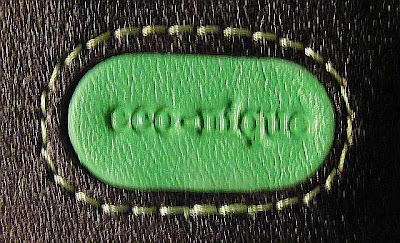
Eco-nique Case for the Samsung P2. My Review

I just received my Eco-nique case from I-nique.com via Amazon.com. It arrived via Royal Mail (Air Mail) all the way from HERE. It was ordered October 19, 2008 and arrived 6 days later on October 25, 2008. Decent service.

This case for the Samsung P2 weighs 2.0 ounces (57 grams) with belt clip and 1.3 ounces (36 grams) without it. It's the heaviest case I've evaluated so far, but not by much. For comparison the Noreve case weighs 1.7 ounces (47 grams) with belt clip and 1.3 ounces (38 grams) without. The Kroo case weighs 1.4 ounces (40 grams) with it's non-removable belt clip.

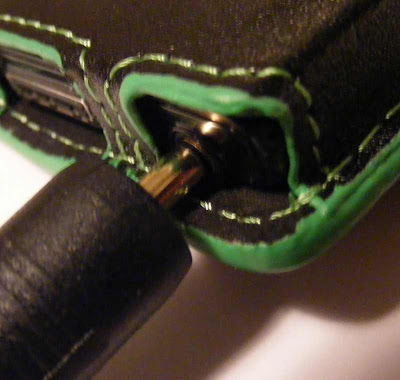
The eco-nique case has a green stripe around all the exposed edges of the leather. It appears to be painted on, and on my case rather poorly. It does serve a purpose though. Being something other than typical black it draws attention to itself, and possesses the ability to spark a conversation or discussion of it's "green" pedigree: My P2 fits snugly in the eco-nique case. My inexpensive Kroo case allows the P2 to slide up when you try to insert headphone or data cables. The eco-nique's grip is much appreciated. There are cutouts for buttons on both sides, and the headphone and data ports are exposed on the bottom. I had no trouble getting the data cable to engage, but the leather protrudes beyond the bottom edge of the P2 making it impossible to insert any headphone cable that isn't very small. My Samsung ear buds would fit (barely), but any of the larger cable ends of my higher end earphones would not insert all the way.
The lid stays closed with four magnets. I have a griffin case for my iPod Touch that also uses magnets for closure, and it tends to pop open. The smaller eco-nique case for the Samsung P2 hopefully will stay closed more reliably. I like the simplicity, but have not learned to trust magnet closures yet. With it's rear snap closure, the Noreve case has to be taken off my belt to unsnap and reveal the touchscreen. The Kroo case unsnaps from the front, and is only a little more cumbersome than the eco-nique case to use while still on my belt.
The belt clip that came with this eco-nique case is a huge lump of plastic. At 13/16" thick it also stands my P2 a full 7/8" out from my belt. On one hand it is easy to access and doesn't get covered by shirt or jacket. On the other hand it's out there more exposed than makes me comfortable. It seems likely to snag on something I'll pass in tight spaces. This aspect of the eco-nique case could use some re-engineering and refinement.

One nice aspect of this case is that the flexibility of the closure flap allows it to serve as a useful stand prop in both horizontal and vertical positions.

Conclusion? I'm not sure this case is worth the roughly $40 I paid for it unless you consider that part of that cost is going toward eco-friendly causes. The huge belt clip, roughly painted green edging, and tight headphone jack tolerance are three negative issues. On the positive side, this eco-nique case is a good fit, with good seams and appears to be made with high quality leather. I'll give it a "B" grade, but mainly because my wife is a fan of the green color and eco-pedigree.

4D

Friday, October 10, 2008

5 Great Reasons to Pass on the New Nano.

The Apple iPod Nano 4th generation may have your attention. Let it go!

1. It is not the best value for the money.
2. iTunes.
3. No Radio.
4. Not available in White or Black.
5. Non expandable Memory

Value. Simple math. What features do you get for your money? What is each feature worth? One place to compare is between the new Nano and the Zune. Each sells for $149.99 in an 8gb version. The players are nearly the same size. For that money the Zune includes wifi and an FM radio with RDS. The Nano's only unique function is the accelerometer, which has some owners wishing it could be disabled. The Samsung T10 also has a Radio, and adds Bluetooth wireless headphone(s), Phone pairing, File sharing, and gameplay between players.

iTunes. Ok, iTunes itself isn't that bad. I have it. I like some of the features. What is bad is that it is my only choice with the Nano. My Samsung P2 or T10 can use their equivalent Emodio software, or Windows Media Player, or Media Monkey, etc. I can simply drag and drop media onto either within Windows Explorer. iTunes needs to pay attention to the competition. Have you seen the new ZUNE software? It is quickly becoming my favorite with MixView and the optional music subscription plan.

Radio. Apple seems to be afraid of putting a radio receiver in their iPods. Yet EVERY OTHER player I own has one built-in. With the Zune you can "Buy from FM". With my Samsung players I can record songs from the radio. A Radio in your pocket media player will keep you connected to the outside world. Those white ipod earbuds lock you in, shut you out.

Colors. This year's Nano comes in 9 colors. No white. No true black. Not a bad choice, but there's the trouble. Those nine colors are so great looking it becomes hard to pick just one. That is Apple's evil plan. You're SUPPOSED to want more than one, turning them into fashion accessories. Buy one to match each outfit or mood. Coordinate with your shoes. Buy MORE. The Zune comes in a few colors, but they are such that you're lucky if you like one of them. There is always the safe black though, except in a Nano. "Wait!", You proclaim. "The Nano comes in Black!" I thought so too until I bought one. The Nano's black is a pretender, easily spotted in lighter contrast to the truly black click-wheel.

Memory expansion. This is only a minor infraction given the new lower price of the 8gb and 16gb Nanos. Yet with an SDHC slot my 8gb Insignia Pilot has been expanded to 24gb. That 16gb SDHC card cost me $40.99, and with the $99 price of the Pilot leaves me with an amazing 24gb player for less than $150. The Pilot also has FM radio with recording, a microphone with voice recording, Bluetooth for wireless headphones, and more.

Sure, all your friends will have an iPod. What is also true is that they spent more money than they needed to for the few features they got.


Style, you say? Yes. Apple goes out of the way to make their players sexy and desirable. The new candy colors even appeal to your taste buds. They have to, since on a feature-by-feature comparison they don't compete well. The Samsung T10 oozes with style, and you can customize the interface to be unique to you.
You get the same size screen as the Nano, with an optional and entertaining animated interface. The controls are touch sensitive and disappear into the sleek smooth face of the T10. Even the 8gb Zune has some sex appeal. The touchpad is more efficient than the Nano's click wheel. The brushed aluminum back is a nice contrast to the conservative front. The Zune's 1.8" screen is a little smaller than the Nano's, but the Zune interface is easier to read (IMO).


My Point? More than eighty percent of the people who buy MP3 players buy an Apple product. I'm sure most never considered an alternative. We can't all be swayed by style over substance. Be a smarter shopper. Get your money's worth. Do NOT buy an iPod Nano.


4D

Saturday, October 4, 2008

MP3 Player Sales Observations.

I've reviewed many players in this blog. I have my favorites. America has it's own. Curious about what people are actually buying I've stumbled across some interesting sites, and here are my observations:

CNET Shopper lists the 100 best selling players as far as it knows. It is not surprising to see the new iPod Nano appear 4 times in the top 8, with positions 1 (Silver 8gb), 5 (Silver 16gb), 6 (pink 16gb), and 8 (orange 8gb). The iPod Touch takes 2nd, 4th, and 10th with it's 8gb, 16gb, and 32gb variations.

A pleasant surprise is that the hard-drive based Zune models take 3rd (120gb), 9th (80gb), and 21st (30gb) position from the top 25 while the new ipod Classic 120gb model is 20th.

The Samsung T10 is 7th, and the top selling 4gb flash based player. The Samsung P2 8gb is 13th, and the second best touchscreen player behind the iPod Touch. It is the only other touchscreen player in the top 25.
For clip-on players, it does not surprise me to see Sansa Clips at 15th (red 2gb) and 24th (black 1gb), with no iPod Shuffle in the top 50.

Amazon.com's best seller list is nearly the same, except that it is updated hourly. In any given hour the new iPods will show up on top, with the new Zunes and Archos being in the runners up as hard drive based models, and the Samsung P2 sneaking in there in various colors and capacities as the runner-up touchscreen flash model.

Rather than compare sales, it is more interesting to compare players by ratings. In almost every case, the new iPods will not appear anywhere near the top of a "ratings" list. I'll agree that this phenomenon may be due to their popularity, with a higher number sold creating a large pool of reviews, and a greater likelihood that dissenting buyers will feel the need to review. Still, with several players getting 5-out-of-five stars, and the iPods always getting less, it points out that buyers don't buy iPods based on the reviews.

For flash memory based Touchscreens there appears to be only two major players. Amazon rates the year-old Samsung P2 second only to the new iPod Touch. Samsung's S3, a sexy little player that only has a touch sensitive control pad, ranks third among bestselling touchscreen players in the same poll.

There is no science expressed here. The lists/polls I've linked to will change over time. What sells and what is "best" are often different things. I am impressed that the rarely-advertised Samsung players appear so high so often. Owning both a P2 and a T10 I can see their value and compare them directly to my iPods and Zunes and other players. I can also understand why the Zune does well, particularly with it's latest 3.0 firmware update. The Zune software is great, and the players are more efficient to get around on than any iPod except the Touch.

What does it all mean? There are great alternatives to the Apple products. Some people get it. Fortunately for Apple most people don't.

What do YOU think? Leave me a comment.

4D

Sunday, September 28, 2008

The Best MP3 Players To Buy Your Kids This Christmas!

Kids. Plural. More than one. Twins maybe? Parents with more than one child who are looking for "equal" gifts to get each of your children are the target of this post. There are a few hundred MP3 players to choose from out there. These are the ones you should consider for siblings. Why? Each of the players mentioned in this post have a sharing feature. When these players are in close proximity they can share files including music and photos, and the Samsung P2 or T10 can play games one-to-one wirelessly between devices! All these players do a fine job of playing music, podcasts, FM radio and videos, and displaying photos. The two Samsung models can even display text files including ebooks in the .TXT format. The players I recommend are:


The Samsung YP-T10 is the only one of the bunch that I haven't personally played with. It's the little brother of the Samsung P2, yet has most of it's features and a few tricks of its own. Generally available for around $100, this 4gb player features Bluetooth 2.0 for use with wireless headphones, file transfer, and potential* pairing with your Bluetooth enabled cell phone. The built-in microphone allows voice recording, and for two friendly siblings this means easy sending of recorded messages to each other via Bluetooth. The kids can even be in separate rooms, so long as they are within about 30ft of each other. The FM radio included allows recording of songs heard playing on your favorite local channels. Should one child capture a great song he/she thinks the other should know about, it can be sent wirelessly to the other T10 using Bluetooth again. The T10 comes in at least three colors.


The Samsung P2 is my personal favorite. It's a touchscreen player with a 3" 480 x 272 pixel widescreen. Available now at BestBuy for $179.99, it is exceptional for video playback. Large enough to make reading text files easy. Both the P2 and the T10 feature Samsung's DNSe 2.0 audio enhancement feature for optimizing the sound of music you're listening to through headphones. The P2 has a touchscreen interface which is user customizable. Clever use of touch, tap, double taps, arcs, and swipes on the screen allow very efficient access to all your media. It's Bluetooth allows simultaneous listening with two bluetooth headsets at once. You can pair the P2 with your bluetooth capable cell phone and use the P2 to receive or initiate phone calls. Transfer your cell phone's contact list to the P2 using bluetooth. Transfer any file on the P2 between it and your computer (assuming it has bluetooth), any other P2 or a T10. I use my P2 as a wireless headset for Skype phone calls on my iMac. The P2 includes 5 games, and two of them can be played one-to-one with another P2 or eventually* the T10 using bluetooth! Your children can be in separate rooms, or front and back seats of your crossover, so long as they are within 30 feet playing games against each other on their P2s. The P2 comes in Black, White, and a Burgundy Red.
Last there is Microsoft's Zune. You can get an 8gb model for $149.99, a 16gb model for $199.99, and a 120gb (larger) model for $249.99. All feature WiFi wireless networking. What I love about the Zune is the ability to "squirt" files wirelessly using wifi to other Zunes. Kids can send photos or music files to each other. The music files can be played on the other Zune for three days before they will self-delete. The Zune's wifi can also be used to synchronise media files on your PC with itself. You can access the online Zune marketplace for music purchase from the Zune, and download songs you purchase directly to the Zune. If the built-in FM radio plays a song you would like to own, you can mark it for subsequent purchase using info (RDS) the radio station has broadcast along with the song.
·
All three players can play MP3 music files purchased or made from your own CDs. For kids just starting a music collection, all players work with subscription music services so an unlimited number of songs can be downloaded for a flat fee per month. The Samsungs work with Rhapsody, and Zunes work directly with the Zune Marketplace. It is not required to subscribe to these services, but they are a great legal way for kids to grow their personal music collections. Both brands have great PC-Based software to organize your media collection. You can download and try them out for free at:
·
Yes, your kids may have asked for iPods. While the iPods come in a rainbow of colors, and are seen being worn by 70%+ of the U.S. population, they are NOT the best sounding or most feature packed players out there. iTunes does not offer a subscription model for buying music. No iPod has an FM radio, which in addition to music would give your kids access to local news, weather, and event reports. No kid can follow the local radio broadcast of the high school football game on their iPod.
·
IF you've got more than one child, and you treat them equally at Christmas and other gift-giving times, then you owe them the smartest MP3 players out there. With a Samsung T10 or P2, or the Microsoft Zune, they will be unique among their friends and the envy of all of them.
·
4D
* The Samsung T10 is expecting a firmware update to enable gameplay between devices as well as "maybe" cell phone pairing with it's Bluetooth feature.

Saturday, September 20, 2008

Samsung P2+ 8gb Touchscreen Now at BestBuy!

Samsung seems to be a little stingy with it's top-of-the-line media player in the USA. You used to be only able to find this great touchscreen player in a 4gb version at Best Buy stores, and to get your money's worth out of it had to update the firmware. Now you can buy the 8gb P2+ at Best Buy stores, although you may have to have a clerk look in a locked cabinet below the display to find one. Don't be fooled by that immature 4gb model they have on display. The 8gb P2+ has version 5.09 (BestBuy) firmware on it, and is ready to take on the world. At $179, the 8gb model is a little more expensive than the 8gb iPod Nano and Zune, but it's touchscreen and bluetooth capabilities make it easily worth the difference. The P2+ throws FM radio with recording, voice recording, cell phone syncing, and much more into the mix. Included in the box you'll find earbud style headphones, a charging/sync cable, a small stand, the P2, an installation CD, a screen protector, earbud covers, and an array of paperwork that includes a quick start guide.

The P2's main menu includes icons for Videos, Music, Pictures, FM Radio, Datacasts (Podcasts), Prime Pack (extras), Rhapsody Channels, Bluetooth, and Settings. Within Settings there is a Menu Style option that lets you
change the system Font, reset your skin (background photo), and delve further into menu design. Selecting Menu Design lets you choose from 13 different menus in 3 different styles. The styles include:


a Matrix array of icons, a Cosmos 3D spinning menu style, and a My Skin option with icons in a sliding row at the bottom so you can show off your background image (skin). There are hundreds of other very creative Matrix style menus (UCIs) you can download for free from emodio.com once you've installed the included software.

- Video can be WMV or Mpeg4.
- Music can be MP3, WMA, OGG, or AAC.
- Photos must be JPGs.
- FM radio includes 30 presets or manual tuning, recording radio into MP3 files, reception sensitivity changing, and region setting (Korea/US, Japan, Other).
- Within the Prime Pack there is an excellent Text reader that supports TXT files. The included software can also turn text files into audible MP3 files you can then put onto the P2 so you can "listen" to text when you're too distracted (driving, maybe?) to read it. Prime Pack also includes a file browser, 5 games, an alarm, calendar, address book, world clock, calculator, Voice Recorder, and subway route maps.

Bluetooth is what sets the P2 apart and above every other pocket media player out there. The P2's Bluetooth options include:
- Pairing with up to two bluetooth headsets.
- Pairing with a mobile (cell) phone.
- File transfer between other bluetooth enabled devices.
- You can also rename your device's P2's bluetooth identification.
- One to one wireless gameplay between P2s.

I'll stress the value of these features. By pairing with two headsets or bluetooth receivers of any type, TWO people can share the music wirelessly off the P2 at the same time. A third can listen with wired headphones. Own a cell phone? Once you've paired it with the P2 you can leave it in a purse or backpack while listening to your P2. When your phone receives a call the P2's music will pause and then allow you to answer the call FROM THE P2. You can also initiate calls from the P2 via your bluetooth cell phone, without touching that cell phone. I've also been able to use the mobile phone mode to pair with my PC and iMac and use the P2 as a wireless headset for Skype (Voice Over IP).

The P2 is slightly larger than the Zune or iPod Nano, yet still easily pocketable. Full specifications are HERE. You can see the cable connection and headphone jack on the bottom edge. The left edge has a Hold slider and a Power/Play/Pause button. The right edge has volume + and - buttons. The top edge has a slot through which a lanyard or wrist strap (not included) can be connected.

The P2 and P2+ win points with how well thought out the User Interface (UI) is. A simple tap on any icon will select it. A second tap will move you one step down into the menu structure. Yet a slightly longer touch will move you straight to the last played media for that icon. There is a back button at the bottom left. One tap moves you one step back in the menu structure. A touch will take you all the way back to the Home screen. I've got an iPod Touch, and find the P2's UI more efficient. Settings for each player are available within each player. Each player (music/video/photo/text) has far more settings you can adjust than any iPod player app does. Additionally, the external buttons mean you can control play and volume without looking at or touching the screen.

I can (and have) gone on and on about how great the Samsung P2 is. It is now $50 less expensive than when it first came out, and with the latest firmware has three times the features. There are plenty of accessories available for it. A few accessory sites of interest are:

eforcity.com, Noreveusa.com, Amazon.com

In addition the bluetooth in the P2 means all bluetooth headphone/headsets will work. You can buy bluetooth receivers for ipod docks to make any iPod dock work wirelessly with your P2. You can also find bluetooth transceivers to make your home stereo play the music off your P2 wirelessly.

Audio quality is superb. Of course you don't want to trust the included headphones for accurate music reproduction. With a good set of over-ear headphones or through your stereo your music will sound full and rich with no static or noise.

The 3" screen makes watching videos a joy. A great way to pass the time waiting for a plane or ON the plane. The P2 comes with three sample videos so you won't have to wait to appreciate how much better the P2 is at playing videos than any smaller screen device is. You've got direct control of screen brightness and video playback speed. You can bookmark locations in a video to return to. Lastly videos can be expanded, stretched or cropped to fill the screen.

Should you buy a Samsung P2 or P2 Plus? Absolutely! Get one for each family member since using bluetooth a few of the games can be played wirelessly against other P2s. You can also transfer files from one to the other.

4D

Saturday, September 6, 2008

Sumac Leatherette Case for the Samsung P2

This Chinese made Sumac Brand case for the Samsung P2 caught my eye. AT $13 it looked like a reasonable investment, and when it finally arrived at my house I was happy I'd ordered it. It features a snap closure, rotating belt clip, openings for all the P2's controls, and generally excellent construction.On first open of the package the smell of black die/solvent was obvious. I've noticed no wearing of the color or rubbing off though. The smell disappeared quickly. This case is NOT leather, however it fools most people that see it.

The belt clip has the name KroO stamped into it, which I presume is the actual name of the Chinese company that made the case. The clip rotates 360 degrees, clicking solidly into position every 45 degrees. This clip does not detach from the case, and does slip over and stay on my belts reliably. With the snap on the front the case opens easily while on your belt. Even closed it gives you access to the P2's external controls and headphone jack.
While this case is not as nice or functional as my Noreve leather case, at 1/3 the price I'd have to rate it an excellent value. I'd love to find a case this well made and low in price for my Samsung Instinct.

Buy one!
4D

Sunday, August 10, 2008

Upgrade/Update Ponderings.

It's the time of year when old products get updated, and new products start appearing just in time for the Christmas buying season. I'm particularly interested in what new media players may appear from Apple in September and from Samsung this month. I'd also love to see some major manufacturer come out with a touchscreen challenger. Microsoft? Dell? Sony? Sandisk? Anyone?

There are strong indications the iPod Touch may get re-engineered. More memory perhaps. Perhaps changing to a plastic back that would come in more than one color. I'd love to see Apple add stereo bluetooth to it, despite many Apple fanboy protestations. There are lossless bluetooth compression protocals available now, leaving no reason to believe that listening to your iPod's music via bluetooth would diminish it's quality.
The Samsung YP-P2 will be redesigned, and at minimum be getting haptic touch response. The P2 could stand utilization of the multitouch potential of it's screen, more memory, and maybe even wifi/web access. Samsung has expressed a desire to double it's U.S. sales this year, and although pocket MP3 players aren't their prime money maker, a better P2 would help a little. There are downloadable games for the P2 in Korea. Samsung should bring the 16gb model (or even a 32gb model) to the U.S., and let us also have access to more games and other apps. If you haven't been following the P2's Bluewave Upgrade saga, you need to check THIS SITE out. The latest update allows P2 owners to create their own home page graphics and share them with others.

Microsoft is rumored to be considering a Phone with the Zune interface. Most popular phones these days are touchscreens, so imagine a new Zune player with a full touchscreen UI. Keep the 80gb model as-is, but add 8gb and 16gb flash models with wifi web access, 480x272 touchscreens, and direct access to the Zune store. Less likely than a new Touch or P2, but wouldn't it be sweet?Then there is Dell. They've announced they'll be re-entering the portable player market. No one has seen any prototypes. If they only produce one model and it's not a touchscreen, they haven't got a chance.
I suspect Sony has a Touchscreen player waiting in the wings. I believe they've been patiently checking out the competition, and won't release a new player with touchscreen until they are sure it will be amazing. Sony used to own the portable media player market, and I believe they want to own it again. It will take an amazing touchscreen player to get the world's attention away from Apple.
So bring on the Updates/Upgrades! I'm on the search for the best pocket media player out there, and I haven't found it yet.

4D