 Samsung's YP-P2 was my favorite player for the last year or so. The Cowon S9 with it's AMOLED screen has leapfrogged it though. Now Samsung's P3 has arrived at my door, so it's time to see if the new kid on the block has what it takes to earn the title back.

Hardware features include Bluetooth, Haptic, an on-board Speaker, microphone, and FM radio. The P3 unfortunately is short on hard controls. You get volume +/- and a Power/Hold button. That's it. The P2 at least had Play/Pause in addition to what the P3 has. Compare this to the Cowon S9 with Play/Pause, Volume +/-, and Track FWD/BACK along it's top edge. The little grill you see above is the P3's speaker.
  On the bottom edge you see the data and headphone jacks. There is a tiny reset/mic hole as well. There is also a mini-touch area below the screen that when swiped provides quick access to music play control when not in the music app.
The touchscreen is more sensitive than that of the P2. It takes only one tap to pick and play a song from a list, whereas the P2 required a tap to select it and another one to play it. Samsung has clearly been working to make the interface smoother, although when scrolling through a song list I often end up picking a song I didn't mean to. Their algorithm still needs a little tuning. Still, the P3 is very responsive and graphics move about much more fluidly than they did on the P2.
The P3 uses many little interface tricks. You can touch, long touch, double-tap, swipe, drag, and draw circles on some screens to great effect. Read all about it beginning on page 20 in the USER MANUAL (4.68mb download). You'll want to know these tricks as they make getting around on the P3 very efficient.
These players are all about media playback, and the P3 is very polished at it. Music formats supported include:
MP3 (8kbps ~ 320kbps, 22kHz ~48kHz),
WMA(8kbps ~ 320kbps, 8kHz ~ 48kHz),
AAC-LC (16kbps ~ 256kbps, 8kHz ~ 48kHz),
AAC-Plus (16kbps ~ 256kbps, 16kHz ~ 44.1kHz),
Enhanced-AAC-Plus (16kbps ~ 256kbps, 32kHz ~
44.1kHz)
The P3 will play your DRM-free iTunes AAC files! The Signal to Noise Ratio is 89 dB. A higher number is better here. For comparison the Samsung Q2's S/N Ratio is 90 dB. For what it's worth the Q2 also supports the lossless OGG format. Although not mentioned, the P3 also plays WMA lossless files at 1152kbps. It won't play them over Bluetooth, and they require the P3's full attention. I've been listening to the P3 while writing this post and am having a hard time hearing any faults with it. Audio is crisp and detailed. Individual instruments are easy to distinguish. You'll hear the singer's breath and fingers slide across guitar strings. This all assumes you've got high bitrate samples and are using something better than the included earbuds. The Music Play screen (above) is clean with album art, album title, song, and artist all displayed. You have several ways to sort your music, and the album sort option gives your three clever ways to graphically see your album covers as you flick through them. It requires an annoying extra tap to call up the play controls. You have access to all music settings from a submenu here. I'm giving the P3's Music app an A-. More format support and fewer taps to make it work is what it still needs.
Video playback is exceptional. The P3 plays AVI/SVI, MP4, and WMV formats at 30fps. You can play files larger than the P3's 480 x 272 screen resolution. The screen is beautiful. I'll have to do a side-by-side comparison with the same movie file on each device to decide if it's any better or worse than the AMOLED screen of my Cowon S9 or the LCD screen on the Samsung P2. A quick glance tells me the colors are truer, more saturated on the 3.3" AMOLED screen of the S9. You won't be disappointed in any case. The P3 also shares a trick with the Cowon S9 in that it can take an array of snapshots of videos scenes so you can more readily jump to a give point in the video. A larger screen is always nicer, but the P3 will be a better fit in your hand and pocket. I'm giving the P3 an A for video play.


Picture display is improved from the P2. You get a slideshow option with three speeds and some nice transitions between images. A double tap on an image will zoom it in to 2x, 3x, and 4x it's original size on the screen. Once zoomed in you can pan around on the image. You can also set any image as the booting image. The P3 simply has better graphics processing power than the P2, which makes pans and transitions much more fluid and impressive. You can put huge photos on the P3 and it will still display them, but don't expect to zoom in progressively to see tiny details in those large pictures. 4x is all you get, and it's limited to how big the image appears at 1x on the P3's 480x272 screen. The Picture app is a couple of steps up from the P2's version. I'll give it an A-. There is still room for improvement.


FM radio is relatively unchanged from the P2. You'll need to switch to the EU version of the firmware to enable RDS support for FM stations that broadcast it. To switch to EU, copy and save the following text into a CONFIG.DAT file (use NotePad on your PC) , then copy that file into the root directory of the P3:
 You can switch between preset and manual tuning. You can set the FM region and sensitivity. There is a small speaker/mute icon to tap near the frequency number, and you can RECORD anything you hear on the radio. I'm giving the FM Radio app an A. It could be a little better, but not by much.


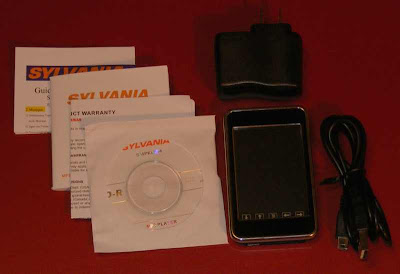
 Included in the box is a Quick Guide, Software CD, Warranty booklet, Headphones with pads, Data Cable, and a stylus.
 The Data Cable is proprietary. Plugged into your PC you are presented with three options: Power and Data, Power and Music, or only Power.
 One nice thing about the touchscreen is that you can touch it with your finger or a stylus. A simple aluminum (I think) stylus is included.
  Dimensions are 0.53" thick by 4.44" wide by 2.9" tall. It weighs 174 grams or 6.1 ounces. For comparison my

 UI. Turned on you are presented with "designed by iriver" as the Operating System loads up. No icons on this touchscreen. The home page is like a contemporary magazine contents page. Each application has it's own section of the screen. Music displays the album art of the last or current song playing. Photo is the last one you viewed. If there was art with the movie you last watched it'll display in the video section. You'll see the last radio channel listened to, and in the document section you get a snippet of the last text you viewed.
  I have to admit that I was not overly impressed the first time I turned on the P7. It's not obvious what to do, but touching any area on the screen invariably opens an application. Touch the album cover art and you'll find yourself in the music application. The upper most level gives you the choice of Now Playing, Quick List, All Music, Artists, Genres, "My Playlist", and "My Rating" to sort your music by. Quick list is basically a playlist you can create as you browse through your songs.
 Video playback is also right to the point and excellent. Formats include AVI, WMV, MP4, RM.RV, DAT/MPG, 3GP/K3G, and FLV. The video app remembers where you are within any video previously played. You can stretch video to fill the whole screen. The expected skip back/forward and play/pause are there. You also get the same bookmarking options the music app had. The submenu has Ratio, Video Option, and Subtitles, with Scan Speed and Play mode under Video Option. I've tested MP4, AVI, and WMV files on my P7. All played fine. The only negative thing I can find about video play on the P7 is related to the screen technology used. The AMOLED screen of the
  Recording is straight forward and versatile. Tap the red circle on the home screen and you're in the recording app. The submenu lets you pick from 3 quality settings including 64, 96, and 128Kbps WMA. The mic is on the right end of the P7, and I got the best recording if I talked directly into it or at least tilted the P7 so the right end was toward me. Once you have a recording or two you can play them directly from the recording app. Your list of recordings is revealed if you slide the screen from right to left.
  Radio. Nothing special here. The P7 FM Radio app won't bother doing anything until you plug in some headphones (antenna), and actually reminds you to. Once plugged in, you can manually tune or have the P7 automatically scan for and create a preset list of available channels. No RDS. You can record from FM, and choose from three different quality settings. There is no scheduled record. Competent, but not extraordinary.


 Also included was a charging cable, earbuds, earbud covers, and three pieces of paper. There was a Quick Start Guide, a Registration notice, and a warning about actual memory space on the T10.
 The front face is split with a 320 x 240 pixel 2" LCD on the top half, and the lower half occupied by a touch sensitive control area. There are dedicated spots for Menu, Back, up/down volume, left/right file browsing, and a center Play/Pause/Select button. All are backlit.
  The YP-T10 is 3.78" long by 1.63" wide and only .31" thick. It's about the same length and width as the iPod Nano and small Zune. It's smaller and thinner than the Samsung P2.


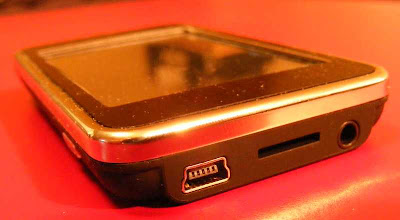
 There are minimal controls on the shell. The bottom end has the headphone jack, USB jack, and a microSD card slot.
  The left side show the Lock switch, and the right side has a Play (power) and Res (reset) button. The top edge houses a small telescoping stylus.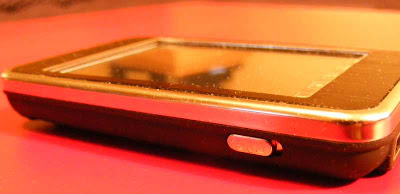
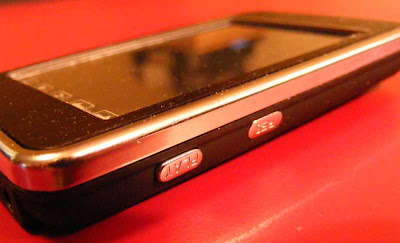 The body is a flat black which seems pretty good at not showing fingerprints. The face is also black with a chrome frame. It makes a nice setting for the screen.
 As you can see, what it promises to do is pretty amazing for such an inexpensive player. You may notice the 960 x 240 screen specification. Turns out that's a little creative marketing by the Chinese manufacturer. The 4:3 ratio screen is indeed 240 pixels high, but they counted each red, green, and blue pixel component horizontally to come up with 960. The net effect is a 320 (960/3) x 240 screen. It IS a very sharp and detailed image produced though, easily sharp enough for reading ebooks. The other high points include the microphone, camera, built-in speaker, and microSD slot.
 The player is suprisingly small. At 3.2" x 2" and .5" thick, the StyleX fits easily in a shirt pocket. The case seems to be chrome plated plastic, and the whole thing is very lightweight. Less than the weight of a deck of cards. There is a generally cheap feel to it, consistant with it's price.
 The bottom edge reveals the microSD slot, a Volume button, and the microphone hole.

 Audio output is strong, no doubt to compensate for the cheap earbuds it comes with. I have to keep it on the lowest possible setting or it overwhelms my good headphones. Audio quality is very good, with strong bass, and fairly even levels across the audible frequency range.
  The camera has a pinhole lens, and doesn't let in much light. 1.3 megapixels (up to 1600x1200), with 4x digital zoom capability. No flash, so to take a good photo you'll need a bright setting, preferably out in the sunlight. The camera can take photos or video. There is also a multi-shot photo mode. The camera can also serve as a USB PC camera. This is a shot taken from the camera:


 Posts
Posts


