Showing posts with label MP3. Show all posts

Tuesday, October 18, 2011

Samsung Galaxy Player 4.0 Review.

Samsung 4.0 WiFi Player
I have to admit that this media player has me conflicted.  It may be a great device, but it should have been in my hands 4 months ago. I found one at my local BestBuy, and I've been running it through its paces to see what shakes loose.
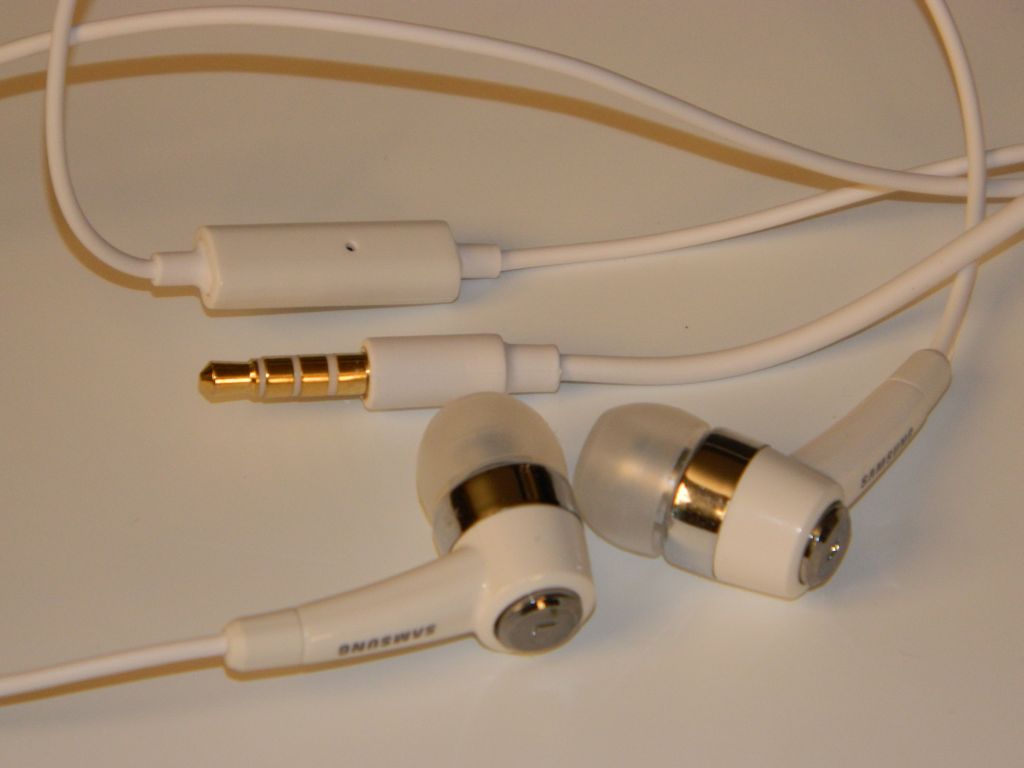
Included Headphones with Mic
In the box:
  • Nice set of in-ear-monitors (IEMs) that include a microphone on the cord.
  • Micro USB cable.
  • AC power adapter.
  • User Guide.
  • Health & Safety and Warranty Guides.
  • 1200mAh Battery: 36hrs Music play with WiFi and screen off.  5hrs video.  Replacement batteries with greater capacity are supposedly available.
AC to USB Adapter
Hardware:
  • 4.0" 800x480 Super Clear LCD
  • Front Camera: VGA 640 x 480
  • Rear Camera: 3.2 Megapixel
  • FM Radio
  • GPS
  • Haptic (vibration) feedback
  • Bluetooth® 3.0 (added speed and power savings)
  • Wi-Fi (802.11 b/g/n/a)
  • Stereo Speakers
  • MicroSD card slot (under back cover)
  • Volume Rocker
  • Power/Lock button
  • Microphone
  • USB port (under sliding cover)
  • Headphone Jack
Back Off.  Removable battery and MicroSD Slot
Media capability:
  • Music:  The Music app is excellent with easy access to volume control, shuttle controls, shuffle/repeat, lyrics (if available), EQ settings (presets and 2 user settings), full-screen album art (when available), song info including artist, album, song name and track number, song position and length, etc.. There is also a LIST icon to tap to go back to the songs list.  The menu icon will bring up several more options including Add to Quick List, Share Music Via, Add to Playlist, Via Bluetooth/Speakers, Set as Alarm Tone, and More.  Tap "More" and you'll get a Settings and Details option. Settings include Samsung's SoundAlive,  Choices for how the music is sorted, and the option for choosing a graphic to show when no Album Art is available. The Music app claims WAV, MP3, AAC, AAC+, eAAC+, WMA (v9), WMA Lossless, and Ogg formats will play. The player also played M4A and FLAC files with no trouble.  The was no left/right balance setting.  The largest negative I can find is that there is no gapless playback. I'm giving music playback an A though.   Just not an A+.
Music: Now Playing
  • FM Radio: The radio app is also well done.  The first time I opened it the app started searching for stations.  When done there were no active frequencies in range of me that were left out, and no frequencies logged that were nothing but static or noise. You can have it output through the headphone (required for antenna) or the onboard speakers.  You can turn it OFF within the app or leave it playing in the background after leaving the app. Volume levels are separate for speakers and headphones. No RDS that I noticed. No FM output via Bluetooth. No Radio recording. That leaves Radio with a B+.
  • Video: Video support is great, supporting any WMV, AVI or MP4 up to 720p that I've tried. The specs claim H.263, H.264, MPEG4, 3GP, WMV (v9), Xvid, and DivX ® formats. The Video app remembers your position in the file when you return to it. Besides the normal shuttle controls, the Menu button brings up Share Video, Details, Via Bluetooth/Speakers, Play Speed, Subtitles, and Settings options. The Settings option includes Repeat, Brightness, Colour tone, and Outdoor visibility. You can resize/stretch video to fill the screen. There is also a toggle for 5.1ch audio although I'm not sure why given the player only has stereo out. Video deserves an A+. 
Video Player
  • Photos: The larger screens get, the better they are for photo display.  This is true for the 4.0" Samsung compared to my previous 3" P2, P3, and M1 players from Samsung. The Gallery app supports JPG, PNG, GIF, and BMP files. Photos are vivid.  Sliding between them is fluid. The included samples look great.  You have Slideshow options, Share options, and Editing options including Crop and Rotate left or right.  You can also delete photos from within the Gallery app. Photos get an A thanks to the great screen. 
  • Cameras: The front facing camera is worthless for anything other than video chat.  Photos taken with it are low resolution (640 x 480) and grainy. The rear camera does a little better, but at 3.2mp isn't up to the images you'll get from most 5mp or 8mp phones these days. The lens is much better than that on the front, so with good light you can take some decent images. There are several settings and options in the Camera app. You have Shooting Mode choices of Single Shot, Smile Shot, Continuous, Panorama, Add me, and Action Shot.  You have Scene choices of Landscape, Portrait, Sports, Night, Party/Indoor, Beach/Snow, Sunset, Dawn, Fall Colour, Firework, Text, Candlelight, and Backlight. You can adjust Exposure Value from -2 to +2 in .5 steps. There is also a long list of Camera settings you might find on Samsung's best consumer cameras. Finally you have tools, which include Guidlines, Review, GPS, Shutter Sound, Storage, and Reset.  You may want to check out a few photography books for information on how to use all these features.  The Rear camera's highest resolution is 2048 x 1536.  There is no flash.  I'm giving the Camera app an A though.  They don't usually come as full-featured as this one.
UI: The user interface is Typical Android Phone.  I'm guessing that if you own a Samsung android phone you'll be right at home. Samsung's TouchWiz additions are nothing more than useful. They include a dock bar that hold 4 apps and is always there no matter which home page you are on. Power shortcuts (Wi-Fi, Bluetooth, GPS, Sound, and Auto Rotation) also were added to the dropdown notifications list. A long press on the menu icon brings up Search, and a long press on the Home icon brings up a window showing recently used apps and a shortcut to the Task Manager. There are 7 home screens, but Edit in the home screen menu options will let you delete ones you don't use. You can add them back using the same Edit option.  The UI doesn't rotate as the device rotates. For few improvements over their phone UIs, I'll give the UI an Android average C+.  Yes there are widgets and animations and such.  Nothing surprising though.

Apps:  In addition to the Google Android Market, this player also comes with the Samsung Apps application. You can also add the Amazon App Store with relative ease. No need to root or hack this player to gain access to all of Google's apps.  Some unique apps added by Samsung include AllShare, Samsung App(store), and Thinkfree Office.  Several typical android apps (usually social or media related) also appear to have been altered (improved) by Samsung.
Android Market
Impressions:  Light weight. Well built.  Beautiful screen. Great media support.  Good headphones included. The removable battery implies this player could be the last player you'll ever need. Batteries have a limited number of charge cycles, and as such will wear out eventually.  Any player without a removable battery will only last as long as that battery. This player is comfortable to hold although a little slippery. This is an "everything device" you can carry in your pocket. Cameras, Radio, GPS, Skype and Google Talk phone services, in addition to the great media capabilities make this a wonderful alternative to a phone if you don't want to pay that monthly phone service fee.

Conclusions:  Samsung has built a great player here. At $229 for 8gb it is higher but more capable than the $199 8gb iPod Touch.  GPS, FM radio, and a larger screen may be worth the $30 difference. There are other more subtle differences that should help justify that cost. I'm rating the Samsung Galaxy 4.0 a Great Buy. Consider that 9.5 out of 10, with .5 for hoping the price drops to $199.

4D


P.S.:  If you enjoy my blog, please consider clicking on an Ad or two.  Thanks!

Thursday, June 23, 2011

Google Music vs Apple's iCloud. Showdown!

I'm fortunate to have been invited to join Google's Music Beta program, and at the same time have several iOS devices from Apple that will soon be updated to iOS 5 and have access to Apple's iCloud for access to my music anytime those devices have a web connection.
Both services are free (to start). 

Google: Required uploading all my music to its servers. Free.  In my case the upload of 2000ish songs took three days of background uploading.  I could still use my PC with no apparent slowdown of web access during that time. Google has a limit of 20,000 songs for each user.

Apple:  Past and new music purchases from iTunes will be available on all your iOS devices from the iCloud.  Free.   Other music of yours (not originally from iTunes) will only require the uploading of songs Apple doesn't have a match for in the vast iTunes database. Songs in your collection it knows about will be available from that collection without any physical upload from you.  For just $24.99 a year.  Apple calls this iTunes Match.  Limit of 25,000 songs.  Your songs will be available in (your) iTunes on your PC or Mac, and on any iPad1 or iPad2 or iPhone (3GS, 4), or iPod touch (3rd and 4th generation) registered to the same iTunes account.

Basically, both services are offering to make your music available to you no matter where you are or what device you are using. 

Apple puts a few restrictions on that though:
  • You have to be using (your) iTunes (so much for the Post-PC era) if you are at a PC,
  • Older iPhone and iPod Touches won't have access. 
  • No accessing your music on a friend's computer,
  • No using any work computer you aren't allowed to install iTunes on.
  • No Linux PCs either.
  • Songs Apple provides will all be limited to 256kb
This is where Google Music gets the win: 
  • I can access my music on ANY WEB BROWSER, simply by going to Google.Music.Beta and logging into my account.
  • There is also the Google Music app for Android devices which runs on anything running Android 2.1 or higher.
  • Android devices running anything lower can still access the music via their web browsers.
  • It works via Safari on both iPads, all iPhones, and every generation of iPod Touch.
  • It even works using the web browser on my Zune HD.
Conclusion?  It should be obvious by now.  Google Music Beta is by far the best way to enjoy your music wherever you have a data connection.

4D

PS: If you enjoy my blog, please consider clicking on an Ad or two.  Thanks!

Thursday, February 26, 2009

Kindle 2.0 Unboxing

My Kindle 2.0 shipped on the 23rd of february via US Postal Service. It arrived well packaged and in great shape on the 26th of February. Thin is in! At just 1/3" thick, Kindle 2 is uniformly thin and much more portable than Kindle 1. It slips easily into a briefcase and won't wedge your stack. Is your brief case full of documents, weighing enough to strain your arm when carrying? Imagine every single page now living in your Kindle, and only needing the Kindle with you on a business trip. Sixteen is four times better than four. While the 4 gray shades of the 1st Kindle could show you crude photos and passable artwork if it was limited to linework, the 16 shades of gray supported on the Kindle 2 make photos reasonable, and permit artwork at least some range.
Details: The Kindle comes with a USB cable and an AC USB charger. A very nice touch as it allows charging from a wall socket or via USB from your PC.
New to Kindle 2 is a 5-way toggle. It simplifies getting around in menus and on the screen. Push it up or down or left or right, then push down to select whatever the cursor is on. Page buttons have been simplified and re-engineered to eliminate accidental page turns when picking up or holding the Kindle. The Volume control will be used more on this Kindle as it can now read your book to you via built in text-to-speech. You get a male or female voice to choose from. Along the top edge you'll find a headphone jack and the power slider. The bottom edge houses the proprietary USB jack. The Kindle is not as big as it appears in most online photos. I can slip this one in the chest pocket of my coat. It is 5.25" x 8", and only a hair over 1/3" thick. It weighs 10.2 ounces or 289 grams. For comparison my iPod Touch weighs 4.2 ounces or 120 grams. With the $30 Amazon Kindle leather case it is 9/10th of an ounce heavier than Kindle 1.0 is with the case it came with. Not a tremendous amount, but noticable. I'm guessing there is a larger battery inside. What, me read? I'm not an avid book reader, but do read several blogs, news articles, and magazines. I'm hoping the ones I prefer are available for automatic delivery to my Kindle. I also write some, and may see how well I do at self publishing to the Kindle store.

Where thou goest memory slot? Kindle 1.0 has an SD card slot (limited to 2gb) which although hidden beneath the removeable battery cover gave you the option of changing out the content you kept on your Kindle. Kindle 2.0 has more internal memory (2gb), and as such can natively hold more books, but now there is no potential for increased or variable content without re-syncing Kindle with your PC.

Instant books! Whispernet is the name Amazon has given to the Kindle's ability to download content directly without needing to be hooked up to a PC.

Experimental? The Kindle has more potential than obvious from a first look. With ubiquitous internet connectivity it is natural to think it should come with a web browser. Amazon was gracious to put one there, although since the screen only supports 16 shades of grey at 800x600 pixels your web experience can at best be called "experimental". Only a fraction of the web will render perfectly on the Kindle, but it's there to use when nothing else is available. Audio playback capability is also included, and so MP3 playing is supported. The text-to-speech feature is also considered experimental. I'll chock it up to mean Amazon is still working on these features and we can expect them to improve over time. If I remember right, there should be a game and possible calculator hidden in the software. Hopefully there will be a few more suprises as well.

Should you get a Kindle? $359 and shipping is expensive. I noticed Amazon has some 1st generation Kindles for sale at a much lower price ($220) now. Kindle 2 is a significant improvement over Kindle 1. If you're an avid reader or technology addict (like me) then getting a Kindle 2 is a no-brainer.

I had to buy one. Be careful, or you'll have to buy one too.

4D

Saturday, September 20, 2008

Samsung P2+ 8gb Touchscreen Now at BestBuy!

Samsung seems to be a little stingy with it's top-of-the-line media player in the USA. You used to be only able to find this great touchscreen player in a 4gb version at Best Buy stores, and to get your money's worth out of it had to update the firmware. Now you can buy the 8gb P2+ at Best Buy stores, although you may have to have a clerk look in a locked cabinet below the display to find one. Don't be fooled by that immature 4gb model they have on display. The 8gb P2+ has version 5.09 (BestBuy) firmware on it, and is ready to take on the world. At $179, the 8gb model is a little more expensive than the 8gb iPod Nano and Zune, but it's touchscreen and bluetooth capabilities make it easily worth the difference. The P2+ throws FM radio with recording, voice recording, cell phone syncing, and much more into the mix. Included in the box you'll find earbud style headphones, a charging/sync cable, a small stand, the P2, an installation CD, a screen protector, earbud covers, and an array of paperwork that includes a quick start guide.

The P2's main menu includes icons for Videos, Music, Pictures, FM Radio, Datacasts (Podcasts), Prime Pack (extras), Rhapsody Channels, Bluetooth, and Settings. Within Settings there is a Menu Style option that lets you
change the system Font, reset your skin (background photo), and delve further into menu design. Selecting Menu Design lets you choose from 13 different menus in 3 different styles. The styles include:


a Matrix array of icons, a Cosmos 3D spinning menu style, and a My Skin option with icons in a sliding row at the bottom so you can show off your background image (skin). There are hundreds of other very creative Matrix style menus (UCIs) you can download for free from emodio.com once you've installed the included software.

- Video can be WMV or Mpeg4.
- Music can be MP3, WMA, OGG, or AAC.
- Photos must be JPGs.
- FM radio includes 30 presets or manual tuning, recording radio into MP3 files, reception sensitivity changing, and region setting (Korea/US, Japan, Other).
- Within the Prime Pack there is an excellent Text reader that supports TXT files. The included software can also turn text files into audible MP3 files you can then put onto the P2 so you can "listen" to text when you're too distracted (driving, maybe?) to read it. Prime Pack also includes a file browser, 5 games, an alarm, calendar, address book, world clock, calculator, Voice Recorder, and subway route maps.

Bluetooth is what sets the P2 apart and above every other pocket media player out there. The P2's Bluetooth options include:
- Pairing with up to two bluetooth headsets.
- Pairing with a mobile (cell) phone.
- File transfer between other bluetooth enabled devices.
- You can also rename your device's P2's bluetooth identification.
- One to one wireless gameplay between P2s.

I'll stress the value of these features. By pairing with two headsets or bluetooth receivers of any type, TWO people can share the music wirelessly off the P2 at the same time. A third can listen with wired headphones. Own a cell phone? Once you've paired it with the P2 you can leave it in a purse or backpack while listening to your P2. When your phone receives a call the P2's music will pause and then allow you to answer the call FROM THE P2. You can also initiate calls from the P2 via your bluetooth cell phone, without touching that cell phone. I've also been able to use the mobile phone mode to pair with my PC and iMac and use the P2 as a wireless headset for Skype (Voice Over IP).

The P2 is slightly larger than the Zune or iPod Nano, yet still easily pocketable. Full specifications are HERE. You can see the cable connection and headphone jack on the bottom edge. The left edge has a Hold slider and a Power/Play/Pause button. The right edge has volume + and - buttons. The top edge has a slot through which a lanyard or wrist strap (not included) can be connected.

The P2 and P2+ win points with how well thought out the User Interface (UI) is. A simple tap on any icon will select it. A second tap will move you one step down into the menu structure. Yet a slightly longer touch will move you straight to the last played media for that icon. There is a back button at the bottom left. One tap moves you one step back in the menu structure. A touch will take you all the way back to the Home screen. I've got an iPod Touch, and find the P2's UI more efficient. Settings for each player are available within each player. Each player (music/video/photo/text) has far more settings you can adjust than any iPod player app does. Additionally, the external buttons mean you can control play and volume without looking at or touching the screen.

I can (and have) gone on and on about how great the Samsung P2 is. It is now $50 less expensive than when it first came out, and with the latest firmware has three times the features. There are plenty of accessories available for it. A few accessory sites of interest are:

eforcity.com, Noreveusa.com, Amazon.com

In addition the bluetooth in the P2 means all bluetooth headphone/headsets will work. You can buy bluetooth receivers for ipod docks to make any iPod dock work wirelessly with your P2. You can also find bluetooth transceivers to make your home stereo play the music off your P2 wirelessly.

Audio quality is superb. Of course you don't want to trust the included headphones for accurate music reproduction. With a good set of over-ear headphones or through your stereo your music will sound full and rich with no static or noise.

The 3" screen makes watching videos a joy. A great way to pass the time waiting for a plane or ON the plane. The P2 comes with three sample videos so you won't have to wait to appreciate how much better the P2 is at playing videos than any smaller screen device is. You've got direct control of screen brightness and video playback speed. You can bookmark locations in a video to return to. Lastly videos can be expanded, stretched or cropped to fill the screen.

Should you buy a Samsung P2 or P2 Plus? Absolutely! Get one for each family member since using bluetooth a few of the games can be played wirelessly against other P2s. You can also transfer files from one to the other.

4D

Saturday, September 6, 2008

Sumac Leatherette Case for the Samsung P2

This Chinese made Sumac Brand case for the Samsung P2 caught my eye. AT $13 it looked like a reasonable investment, and when it finally arrived at my house I was happy I'd ordered it. It features a snap closure, rotating belt clip, openings for all the P2's controls, and generally excellent construction.On first open of the package the smell of black die/solvent was obvious. I've noticed no wearing of the color or rubbing off though. The smell disappeared quickly. This case is NOT leather, however it fools most people that see it.

The belt clip has the name KroO stamped into it, which I presume is the actual name of the Chinese company that made the case. The clip rotates 360 degrees, clicking solidly into position every 45 degrees. This clip does not detach from the case, and does slip over and stay on my belts reliably. With the snap on the front the case opens easily while on your belt. Even closed it gives you access to the P2's external controls and headphone jack.
While this case is not as nice or functional as my Noreve leather case, at 1/3 the price I'd have to rate it an excellent value. I'd love to find a case this well made and low in price for my Samsung Instinct.

Buy one!
4D

Sunday, August 31, 2008

Peltor Worktunes Hearing Protector/Radio

I'm a woodworker, lawn mower, music lover, and technology addict (among other things). As such, I couldn't resist trying out these hearing protector/headphones from Peltor. They've got a built-in AM/FM radio, and have an 1/8" stereo jack for using the included patch cord with your MP3 player, Walkman, CD player, etc.. The digital LCD display makes finding your station easy. They use two AA batteries (not included) and have a low-battery warning indicator. There are ten memory presets to store your favorite channels.

They are rated for 22 Decibels of noise reduction. For comparison, the range of noise reduction ratings for existing hearing protectors is 0 to 30, with higher number denoting greater effectiveness. I find them very good at blocking external sounds, including bringing the dangerous noise levels of my lawn mower, radial arm saw, and planer down to harmless levels.

AM and FM reception is clear and strong. The single knob on these headphones rotate from OFF to volume control. There is an AM/FM band select button, forward and reverse scan, and a memory button.

Using the included patch cord, music from my Zune was good sounding overall but bass tracks were a little weak. Not the best headphones I've got, but far from the worst. They ARE the best at blocking out external noise.

Currently you can get the Peltor Worktunes from Amazon for $47.99. I recommend these over other models without the digital display.

4D

Saturday, August 16, 2008

Sylvania Touchscreen Media Player

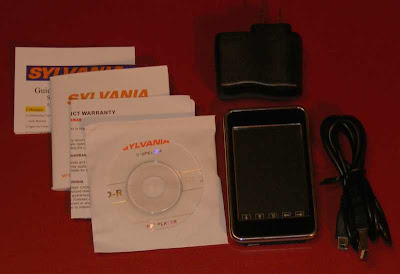
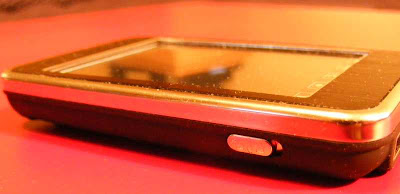
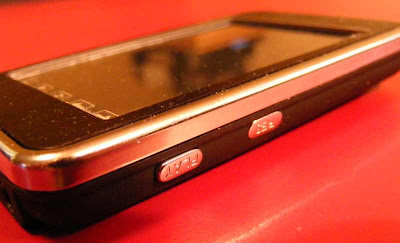
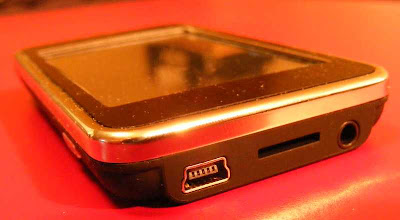
It seems as though everyone is getting into the TouchScreen media player games these days. I caught a glimpse of this 2.8" player at my local Walgreens, and thought I should take a deeper look. The package included the device, USB cable, AC USB charger, software CD, Manual, Quick Start, and warranty. There are minimal controls on the shell. The bottom end has the headphone jack, USB jack, and a microSD card slot. The left side show the Lock switch, and the right side has a Play (power) and Res (reset) button. The top edge houses a small telescoping stylus.The body is a flat black which seems pretty good at not showing fingerprints. The face is also black with a chrome frame. It makes a nice setting for the screen.
This is as basic a touchscreen player as there is. It will play MP3 and WMA music, AVI videos at 20fps, JPG photos, and TXT text files. There's an FM radio with FM recording. There is apparently a microphone somewhere, although I couldn't find it. The Sylvania does do voice recording. You can play back audio through a tiny speaker visible on the back of the device. Not worth doing though, IMO.

There is a Games icon on the home screen, and supposedly some games, however all I got was a gray screen when I selected games. Looks like this device needs a firmware update.

UPDATE: I received an email from the company (Curtisint.com) with info on the games:

You may download the following Rockchip games from Google which will play fine on your player:

1. Pirates of the Caribbean.rkp
2. Fighting Space.rkp
3. Tank.rkp
4. Rumble Cube.rkp

I found those games easily using Google, and after unarchiving them put them into a GAME folder I had to create on the player. All played, although the small control icons don't make for the easiest control.

Music playback is adequate. There is no sorting. Tapping the Music icon starts the player. You can tap a back arrow to get to the directory on the device, and find the music folders. No cover art.

Photos look fine on the 320 x 240 screen, although my player seemed to freeze trying to load some. I understand why there is a prominant RESET button on the side of the device. The firmware on this device is not quite ready for prime time.

I haven't put a video on it, but the included software suggests it will only support 20 frames per second. AVI is the only format supported.

FM radio is perhaps the best application. It will autosearch and store up to 20 stations. Reception is good, and you can record right from the tuner screen.

Voice recording works. I suspect it uses the speaker as the mic, and with the speaker on the back side of the unit does not seem to pick up very well. You can pause and resume your recording.

Should you buy this Sylvania touchscreen player? The manufacturer informed me about adding games. As such, it's a fine but simple player. It went on sale at Walgreeens this week (8/17/2008), and at it's sale price it's OK for a media player. On a 10 scale, I give it a 6. Plenty of room for improvement, but still passes.

4D

Thursday, July 17, 2008

StyleX 4GB Media Player: Many Features in a Small Package!

I was very skeptical when I saw this StyleX 4gb media player at WalMart for $69. Yet the features list intrigued me, so I ordered one. It took about 7 days and one backordered notice to get to me, but here it is. As you can see, what it promises to do is pretty amazing for such an inexpensive player. You may notice the 960 x 240 screen specification. Turns out that's a little creative marketing by the Chinese manufacturer. The 4:3 ratio screen is indeed 240 pixels high, but they counted each red, green, and blue pixel component horizontally to come up with 960. The net effect is a 320 (960/3) x 240 screen. It IS a very sharp and detailed image produced though, easily sharp enough for reading ebooks. The other high points include the microphone, camera, built-in speaker, and microSD slot.

Include in the package is an AC adapter, USB cable, earbuds, manual, CD, and the player. The player is suprisingly small. At 3.2" x 2" and .5" thick, the StyleX fits easily in a shirt pocket. The case seems to be chrome plated plastic, and the whole thing is very lightweight. Less than the weight of a deck of cards. There is a generally cheap feel to it, consistant with it's price.

The main controls are on the right end, and include Menu, Play/Pause, Forward and Back. There is also a slot to attach a lanyard or wrist strap through. The bottom edge reveals the microSD slot, a Volume button, and the microphone hole.

The top edge reveals the Camera trigger. The left end reveals the USB jack, ON/OFF lock, and earphone jack. Audio output is strong, no doubt to compensate for the cheap earbuds it comes with. I have to keep it on the lowest possible setting or it overwhelms my good headphones. Audio quality is very good, with strong bass, and fairly even levels across the audible frequency range.

The screen is sharp. I haven't put any videos on it, but the few photos I took with the onboard camera appear crisp. The photo viewer does a nice sideways slide from photo to photo, much like the iPod Touch.

The camera has a pinhole lens, and doesn't let in much light. 1.3 megapixels (up to 1600x1200), with 4x digital zoom capability. No flash, so to take a good photo you'll need a bright setting, preferably out in the sunlight. The camera can take photos or video. There is also a multi-shot photo mode. The camera can also serve as a USB PC camera. This is a shot taken from the camera:


The Stylex includes three games, and suggests that it plays NES games. I'll have to see it to believe it. The three games are "Explode Pigboat" a submarine hunt game, "Color Block", and "Russian Diamond". You can disable game audio if you want to listen to music instead.

The FM radio will tune to Eurpean, Japanese, and American frequencies, although the American setting is not mentioned in the manual or on the packaging. Capable of 40 channel presets. So far I'm not that thrilled with the FM radio application. It didn't want to remember my settings, and is almost too loud for my headphones. It also overpowered a small self-amplified speaker I tried with it. Don't buy the StyleX for the FM radio.

The little microphone can record WAV files, and serves to capture the audio component of videos taken with the StyleX. In contrast to the FM radio, the microphone is not sensitive enough.

There are four equalizer presets to choose from, including Jaz, Pop, Rock, and Classic. You can also set to to the unaltered Normal setting. There is also a play speed setting, from .5 to 1.5 of normal speed in .1 steps. There is a pre-listen mode, where you can set the device to play only 5,10,15, or 20 seconds of each song. Lastly, you can save any audio file as your power-on and/or power-off sound.

The StyleX can also play videos, display ebooks, show you the month on it's simple calendar, and Explore files with the option of deleting any file.

I'm impressed with the sharpness of the little screen and audio quality via my good JVC headphones. The StyleX is NOT a touchscreen device, and like most of the other devices I've reviewed does not have a very intuitive user interface. Rather than two volume buttons, the StyleX has ONE volume trigger. You press it once, then can use the forward/back buttons for volume up/down. Clutsy.

The user manual is pretty thorough, but you'll need a magnifying glass to read it.

Is the Stylex 4gb Media player worth $69? Yes. If you want the least expensive, fully featured, pocketable, expandible, camera-included device out there, this is it. A 2gb Apple Shuffle costs the same with 1/2 the memory and 1/4 the features. The User Interface gets a C. Features get an A. Audio quality gets a B, but only for being louder than my headphones needed. FM radio gets a D. Still, this one goes with me when I know I'll want to take a picture.

4D