Showing posts with label Touchscreen. Show all posts

Monday, October 3, 2011

Amazon's Kindle Fire. Is it Worth $199?


Kindle Fire
It's official.  Amazon has a few new Kindles, and one is the color Android-based Kindle Fire. The press was stunned when the Fire's $199 price was announced.  The hardware specs are competitive but missing a few standard components.  Some estimate 5 million or so will be sold before the end of this year. The Fire isn't the first 7" tablet out there, and it isn't even the cheapest one. Walmart.com has a half dozen 7" tablets available for under $200. You can buy the Maylong 7" tablet for as little as $97.

Here are a few:
So what magic makes the press think Amazon's Fire will sell better than any of these?  Sure, most of these have worse specs than the Fire.  Yet many also have hardware features (Cameras, HDMI-out) the Fire doesn't include. All have WiFi.  All are touchscreen Android tablets.  All run apps including all of Amazon's apps. Lined up spec for spec the Fire doesn't glow for what it can do.  It blushes for what it doesn't do.

So what is the secret?   I'm blaming it on Respect.  Amazon, like Apple, has built up a reputation for treating customers well. They have both simplified the process of buying media and products from them. We respect Apple and we respect Amazon. They are both American originals. We surrender our beliefs to Apple in exchange for designful and productive devices we didn't know we needed. The press and Amazon fans have done the same concerning the Fire. I've pre-ordered mine out of the same respect.

Let's do a reality check though.   The Fire is a first generation device.  Remember the first wedge Kindle?   Original, but far from evolved. The second and later generations were better in every way.  My experience repeatedly demonstrates that 1st generation devices are poor investments. This is more often true for ground-breakers, and Amazon is a ground-breaker. Late comers/Followers can learn from the mistakes made by others.  I expect the second generation Fire to be thinner, faster, and have a few more features than this first gen Fire.  It may also be less expensive.  Previous Kindles have gotten cheaper each year since the first one came out at around $400.

So is the Kindle Fire a good investment?  I'm going to rate it a tentative "yes". From what I can tell the hardware is similar to the Blackberry Playbook. Made by the same manufacturer I'm expecting the Fire to be similarly well-made. The dimensions are a little different, but the details are very similar.  Each specification the Fire lists is equal to or better than the competition. A 1024 x 600 screen when many have 800 x 480 screens. Capacitive multi-touch when many have resistive single-touch input. A dual core processor when many have single core chips.  The Fire will have a liquid user interface (UI) and shouldn't stutter or pixelate displaying movies or photos. The screen will react instantly to your touch, and using it should become a mere extension of your thoughts.   I expect Amazon to do it right.  The Fire should delight the user. Should it not you can certainly expect the 2nd generation to.

Yes,  I believe the new Kindle Fire is worth $199.   The Blackberry Playbook and HTC Flyer are more capable tablets, and at $299 they are also priced proportionally correct given their additional features.  If you think you might want a Fire, don't wait. Reviews will be out before new orders are shipped and you can always cancel should you change your mind.

Comments are welcome.  Feel free to contribute.
4D


P.S.: If you enjoy my blog, please consider clicking on an Ad or two.  Thanks!

Tuesday, August 16, 2011

Cowon C2 Review

Cowon's latest offering is a little hard to figure out. The C2 looks like a smaller thinner version of their D2. A throwback (after their Android D3) to the basics perhaps. Something new to buy for those wanting Cowon's great playback quality but at a far more reasonable cost than the Android based D3. The C2 is compact and  well built. Mine arrived 7/21/2011 and opening up the package felt a little like Christmas in July. In the (reusable cardboard drawer) box I found:
Optional accessories (available at jetmall.net and amazon.com) include:
Hardware Features:
  • MicroSD expansion slot (for up to 32gb cards).
  • 2.6" Clear Color LCD touchscreen (240x320)
  • FM Radio and radio recording (but with no RDS).
  • Speaker.
  • Microphone.
  • 55 hour battery for music). 10 hours for video.
  • Metal back.
  • External Volume +/-,  Menu, and Power/Hold buttons.
UI: You have two choices. One uses icons that you may have seen on the Cowon D3. The other is a simpler text-based set of icons that will take a bit to get used to.

Music:  File formats supported include MP3/2, WMA, OGG, FLAC, APE, and WAV.  I can verify that the C2 will play WMA lossless, which is a challenge for most media players. The only format I haven't tested is APE.  All other play fine and sound great. The now playing screen doesn't sit still.  Instead it puts your cover art on an LP and spins it around to keep you entertained visually.

Music's Now-Playing features are a little more cryptic to find than they were on the J3, and they required an extensive examination to figure out. You can find Favorites and Bookmarks, but not easily. There is an alphabetic search option (limited to 12 characters) as well. You have the typical playback shuffle and repeat, speed and pitch controls. You can also access extensive EQ/JetEffect settings including 4 User configurations, Normal, and 34 unique presets.  The music app is full featured, but far from intuitive to use if you really want to master it.

Videos:  File formats supported include AVI, WMV, ASF (and MP4 unofficially).  The video app is also fairly complete, but given the small screen perhaps not the best excuse for getting a Cowon C2.

The settings in the video app are nearly the same as on Cowon's other players, but again a little bit of a mystery as to where to find. A single tap on the screen brings up the play controls.  Those include Prev/Rewind, Play, and Next/Fast_Forward.  There is a slider to let you move to any position in the video, as well as Position (time) and Length (time) info.  You can tap the lower corners to for "next" or "prev" pages which will take you to more video settings including Subtitle, Display, Playback, and Speed (to the right), with  Loop, Brightness, Capture, and JetEffect (EQ) settings (to the left).

Back to that first tap on the Now Playing screen:  To the right after that first tap is an Open icon which when tapped will bring up a list of the available videos.  From that list a tap on the tiny "next" icon moves you to Video Favorites if you've marked any, and one more tap gets you to Video Bookmarks.  A tap on "Prev" brings you to an alphabetic search page.

Pictures: JPGs appear to be the only picture format supported. You get all the basic features with the Pictures app including incremental and double-tap to Zoom, Pan, SlideShow (with transitions), and Rotate. 

Documents: You can view  .TXT files on the C2 with the Documents app. You can also hand write notes to yourself with the included NotePad app. Lastly, you can type notes with the Typist app.  Both would be fine for making notes to yourself. The NotePad app is limited to 30 pages, and of course there is no printing from the C2. The Typist app has 60 available pages.  I highly recommend using a stylus with these apps on the C2.  Any PDA stylus should work, and you don't need an expensive capacitive stylus with the resistive screen.

Radio:  You'll need to have the earphones plugged in to serve as antenna for the radio. All the expected features are there. A panel to the left (tap ) include region and stereo/mono options.  The upper left corner of each panel has a speaker icon you can tap to silence the radio.  

Games: Flash games are supported on the C2.  No samples came with it, and I didn't have any examples to try.

Clock: There is a timer and alarm in the Settings>Time app, with a Stopwatch (or Countdown timer) as a separate StopWatch app. Very handy.  You can also use it as a simple clock.  It would make a great travel companion. Add a simple stand for greatest convenience. The default theme has it's first page as a clock with inspirational sayings.  Tap on the upper right corner of this page to cycle through them.  I find the clock and related features to be one of the best excuses for a C2.

Summary:  For codec support and audio output quality, the C2 gets an A+.  The User Interface and app options are something you'll need to study awhile to get used to.  All the features are there, just hard to find.  I'm enjoying my C2 for its small size, light weight, and great sound.  I'm not using the included earbuds though.  Find a great set of  headphones for the C2 and you'll be in audio heaven.

4D

PS:  If you enjoy reading my posts, please consider clicking on an Ad or two.   Thanks!

Tuesday, April 26, 2011

Creative's Zen Touch 2 gets an Upgrade to Android 2.2!

It didn't take them long.  Creative appears to be serious about the android tablet market.  Their 7" and 10" Ziio tablets have recently received update to android 2.2.  It came with additional features that make them better values than they were when first releases.  The Touch 2 is a pocket player.  It comes in three versions.  I reviewed the one with GPS a few weeks ago.

Enhancements:
  • Upgrades the OS from Android 2.1 (Eclair) to Android 2.2 (Froyo).
  • Adds the Audible application (for selected regions only).

So how much is the UI improved?  

  • No apparent improvements to the Music app. No EQ to be found.
  • The Power Widget is buggy.  After three reboots it "almost" works right again.             
  • Powered down while plugged into USB shows a nice battery status display with backlight dimmed.
  • 5 Home pages now, an improvement over the three available in the last version of the firmware.
  • On-screen dots to indicate the current page as well as allow a tap to move to other pages.  
  • The BestTube (YouTube) app runs but crashes trying to preview videos and freezes trying to download videos.
As I come across any new or broken features I'll add them here. Leave a comment if you have one. Not sure if anyone but me has bothered.

4D

Thursday, March 10, 2011

iOS 4.3 Home Sharing. The Good and the Bad.

My Archos devices have been able to stream media from my home network for more than a year now.  Apple finally saw the writing on the wall and added that capability to their latest iPhone, iPod Touch, and iPads. So how did they do?

To start, Apple doesn't just copy a feature they like. I give them credit for trying to add some value and capability when a feature finally shows up on their iDevices. My iPod Touch 4th generation received iOS firmware 4.3 yesterday.  Today I've been running the streaming capability through its paces.

To start, I had to enable it on both my desktop iTunes software as well as in Music Settings on the Touch.  The setting is under Advanced in iTunes.  On the Touch I had to input my Apple ID and Password under Settings>Music>Home Sharing.  None of these options will show up unless WiFi is ON and connected.

What I like?  My Touch is the 8gb version.  I bumped into the limited storage the first time I synced it with iTunes.  My music collect is over 20gb, and finding a 6gb or so subset of that to fit on the Touch came with compromises. Now as long as I'm home I can access, search through, and play any song in my collection.  Once you select your library it will take some time to populate the Touch with album art and other database info about the songs. In the image below no art has yet been added from my local library.

Inconveniences?   The PC has to be on. You need to have WiFi ON on your Touch or iPad or iPhone. Even if your content is on a network shared external drive.   iTunes has to be running. If you try to close iTunes it will warn you that closing it will disconnect anyone who is sharing your music at the time.

What else will it do?  You can share videos so long as your iTunes library knows about them. I had one 720p sample that played fine.  Anything with lower resolution also played fine.

There was no sharing option in the Photo app though.  Rather disappointed.  Videos playing over WiFi play fine, but the few I tried could not be resized or stretched to fit the screen. 

How does it compare to home streaming on the latest Archos devices?   To start, you don't need iTunes.  My 43 found and could play Music, Video, and Photos in any shared folder on my PC.  It would also find and play my shared media on my network drive when my PC was OFF. Win there.  Unfortunately you can't access shared content in the media apps.  Media is easily found using the file browser though.  Any you find will play when tapped on. Videos were a better fit on my 43's screen, and would re-size with a simple press on the screen. Win there.  Apple's strategy makes it easier to sort and search through songs so long as you don't mind having iTunes running when sharing.  Win there.

Conclusion?  iOS 4.3 is a worthy update. If for no other reason than Home Sharing. Well done.

4D

PS:  If you enjoy my blog, please consider clicking on an Ad or two.  Thanks!

Sunday, March 6, 2011

Creative Zen Touch 2 with GPS. My Review.


Creative is now making an Android-based Zen media player.  I'm delighted to see more companies jumping on the android bandwagon. When the Zen Touch 2 (I'll referred to it as the T2) with GPS became available on their web site (you can also order them on Amazon.com) I ordered one.  Mine arrived 2/28/2011, and since then I've been going through it in detail, hoping to find what special touches Creative could add to Android, if any.  As of now,  I'm not sure they did anything beyond putting their name on this device.
Aesthetically the only interesting detail Creative added to an otherwise boring T2 is a faceted back derived from their Zen Mosaic.   Don't consider this player if you want to impress your friends with your stylish choices.  The nicest software touch they added was a quick graphic on boot-up advising you to "Touch the Sound of Perfection".  After that you get another annoying slide-to-unlock screen then a typical Android UI. 

What's in the Box?  In addition to the 8gb (only 4.1gb available) Zen Touch 2 you get:
Dimensions
  • 120mm x 69mm x 13mm, 122g.  
  • 4.72" x  2.72" x .5", 4.3oz
  • For comparison:
    • The Cowon D3 is 116.4mm x 64.2mm x 11.8mm, 120g.
    • The Archos 43 is 135.0mm x 65.0mm x 9.00 mm, 132g
OS: Android 2.1, with hints (no promises) that it may eventually be updated to 2.2.
Controls and Ports (held horizontally with the Home button on the right):
  • Power button (left end). Hold in to power the T2 on or off.  Tap to toggle just the screen off/on.
  • Volume +/- (top edge)
  • Search, Back, and Menu/List buttons (touch sensitive, to the right of the LCD screen)
  • HOME button (oddly a mechanical push button on the front face)
  • Speaker port (5/16" x 1/16" slot on back)
  • Camera Lens (on back)
  • Mini USB port (right end)
  • Headphone jack (right end)
  • Video output (Composite, uses headphone jack and custom cable)
  • MicroSD slot (bottom edge under a rubber pull tab)
  • Microphone (small hole on bottom edge, labeled by white microphone icon)
This Zen's media apps:
  • Music: The T2 will play music in these formats:  MP3, AAC, WMA9, FLAC, OGG, ADPCM, MIDI, WAV, and Audible.  I was shocked to discover there is no Equalizer. No Presets. No user settings.  I had to dig out my ancient Zen 4gb to see if this was Creative's pattern or not (it is NOT).   The audio output was powerful enough to easily drive my large Sennheiser HD595 headphones. No gapless playback though.   Just the basics it seems.  On the Now Playing screen you get a small album art view. Controls are all visible and active including List, Shuffle and Repeat buttons, as well as the typical Prev(Rewind when held)/Play(pause)/Next(Fast Forward when held) buttons. Info displayed includes a song length/position slider bar, artist, album, and song title. A long press on the last three brings up a Music/Browser Search window to find all songs or web info that matches the item touched. The Now Playing screen simply rearranges the same info for landscape or portrait view.  A tap on the T2's menu icon will bring up options for Party Shuffle, Add to Playlist, Delete, and Library.  With no Equalizer though the Music app gets a B.
  • Gallery (used for video and photos): Both Video formats supported include H.264, MPEG4, WMV9, and AVI video.  Photo types include JPG, BMP, and PNG.  My Touch 2 played WMV, AVI, and MP4 video files fine,  although those that weren't the same width/height ratio as the screen had no way to be stretched to fit the screen. All you get when playing videos is the standard video Rew/Play/Ffwd and a length/position slider bar. No info, no submenu options, nothing. Don't buy the Touch 2 for videos.  Video gets a C- from me.  The Photo capabilities are only a little more useful.  No swipe to the next photo.  You have to tap on the screen to get a next or previous triangle to tap on. You also get a zoom (magnifying) in/out bar, a share icon, and a delete icon. Tap Share to bring up options for Bluetooth Object Push and Email.  You can also double-tap on the screen for one step of zooming in. Once zoomed in it is easy to pan around the photo.  Using the magnifying bar there are 13 steps of zoom, which does a fine job of bringing up the tiniest details in a photo.   Tap the T2's menu button for a few more options including Rotate, Delete, Crop, Details, and More. More adds Show on Maps, Slideshow, Settings (for slideshow), and another Push Image by Bluetooth choice. Slideshow Settings are more complete than usual.  Where both Videos and Photo suffer is from the poor screen quality.  Photos get a B- from me for leaving out the easiest way to see the next photo.
  • FM Radio with RDS!  You need headphones plugged in to use the radio.  The Radio app will warn you to plug them in if they are not, and although the radio app will open it won't turn on without the headphones.  The app is fairly complete. You get a station slider bar, Off/On button, scan forward and back buttons, frequency up and down (in .05 steps) buttons, an add-to- presets (+) button, and a Presets List button which includes the AutoTune choice. If the station tuned to includes RDS info it will display above the frequency displayed. No HD-Radio reception. No option to delete a preset from the list that I could find. No recording of Radio that I could find. Radio will play in the background while you run other apps that don't have their own audio.  To turn it off you need to tap the power icon in the app, or run another program with its own audio (like Music). With no recording or preset delete I have to give FM Radio a B.
Other hardware features include:
  • Bluetooth - 2.1 EDR:  So far I've found it supports file transfer, stereo audio to headphone or speakers.  My bluetooth keyboards would pair but not connect. Audio quality over bluetooth to my Sony BT50s is on the better side of typical. All controls over media play worked both from the headset and the player.
  • WiFi - IEEE 802.11 b/g/n:  No problems connecting to my Dlink n-capable router. Signal strength is as good as on any other 802.11n device I've reviewed, no matter where in my house I wandered to.    
  • GPS: I'll need to find a GPS enabled app to give this a test.  Stay tuned.
  • Compass: Seems to work.  Found north just fine using a compass app.  Not sure how useful it will be, but am optimistic it will eventually come in handy.
  • Accelerometer: The UI and direction-sensitive apps react quickly when the T2 is rotated. Nothing else to test it with.  Another "stay tuned".
  • Camera:  The camera will take still photos at 1600 x 1200 (2mp) or 640 x 480 as JPGs. Video taken is MP4 (H.264) at 21fps and 360kbps, 640 x 480 pixels. Video doesn't play back very smooth.  The camera app is pretty complete, with white balance, quality, GPS (location) tagging, effects settings, crop and delete, etc.. No zoom to speak of.  No flash.  The lens is fixed-focus and cheap. It is also easily blocked by your finger when holding the T2 naturally.
Web Browser: Works best with mobile web pages.  The low resolution hinders usefulness on classic web pages. A double tap works as expected, stretching columns to fit the screen width. Panning and scrolling is responsive and smooth. I recommend using a stylus if you expect to be accurate tapping on tiny links. Settings include options to Add a bookmark, Find on Page, Select Text, Page Info, Share Page, Downloads, and page content settings.  You can choose from Text Size, Default Zoom, Text Encoding,   Open Pages in overview, Block Pop-up windows, Load images, Landscape only, Enable Javascript, Enable Plug-ins, Open in Background, and Set Home Page.  In addition there are privacy settings to Clear cache, Clear History, Accept cookies, Clear all cookie data, Remember form data, Clear form data, Enable location, Clear location access, Remember passwords, Clear passwords, Show security settings, and even more advanced options. With exceptions for the low-res screen The Web Browser is very complete. Almost a joy to use on the Touch 2. Web Browser earns an A.

UI:  The android UI will turn horizontal or vertical depending on how you hold the T2, but only 90 degrees one way. The screen is sensitive and very responsive, but graphics do not instantly react like those on an iPod Touch. There are only three home page screens.  This will prove limiting after you start adding apps.   You get just 4 widgets including an analog clock, bluetooth control (PureAndroidAudio),  Power Control, and Search.  You can add Widgets, Shortcuts, or Folders to any or all home screens.  You can also choose the wallpaper (background) from 10 included photos, your own photos, or 4 different colors.  You can adjust the brightness of the screen from Settings-Display or the Power Widget.   Viewing angles are decent in one axis and limited in the other, typical for the inexpensive LCD screen used.   Other than for the poor choice of screen the UI response is as good as any other android device I've reviewed. Limited pages and included apps/widgets lead me to giving UI a B-.
Conclusion:  For a device with so many hardware features it is a shame Creative went with such a poor screen. The Touch 2 is almost as large as my Archos 43, but the 3.2" 480 x 320 screen is significantly smaller and less than half the resolution. Poor video playback and no audio equalizer round out the flaws.  There appears to be plenty of processing power. Audio output is strong. Bluetooth is great and FM radio with RDS is appreciated.  Is it worth $199?  The 8g Archos 43 is also $199 but comes with a better screen, better UI, more functional WiFi and Bluetooth features and remains my favorite device for now. So NO. The Touch-2 with GPS is NOT a good value at its current price.

4D

PS: If you enjoy my blog, please consider clicking on an Ad or two.   Thanks!

Thursday, February 3, 2011

Cowon D3 Review. Getting Better Daily.

My Cowon D3 arrived straight from Korea on Monday 1/31/2011. The D3 is the first device from Cowon running Android. At the moment it is running Android 2.1 (I think), although I'm hoping they'll upgrade it to 2.2 (or higher) eventually. I've actually seen no proof anywhere of what version Android is on the D3.  To distinguish their android devices Cowon has adopted Plenue for the class name. According to them it means "Create Pleasure".

Cowon is known for their media players, and the D3 has benefited from their media experience.  The standard Android media apps have been replaced by Cowon versions.  Nearly every available codec is supported, and so little or no transcoding will be needed to play your music and video files.

Hardware
-  Capacitive AMOLED 3.7" screen with 800 x 480 pixel resolution.
-  WiFi 802.11 b/g support.
-  FM radio, along with recording from FM.
-  Bluetooth 2.1 + EDR, A2DP/AVRCP/OPP
-  Speaker
-  Microphone for audio recording.
-  G-Sensor
-  Multiple touch sensing.
-  Touch (haptic) feedback.
-  MicroSD-HC expansion slot.
-  Dimensions: 64.2mm x 116.4 x 11.8mm, 120g. or  2.53" x 4.58" x .465" thick, 4.233 ounces.

Include in the plain brown box was a proprietary USB sync cable, a Korean AC 220v Power supply, Cowon typical earbuds, and a quick guide (in Korean).   According to Cowons website  a manual CD should have been included.  It was not.
Right Edge

Bottom End


The D3 is capable of both HDMI and Composite video output, but it appears those will require separate custom cables from Cowon. I have not yet found a source for them.

Charging will take 7 hours over USB (with the screen OFF) and 3.5 hours with an AC Adapter.   You'll get an average of 21 hours music play or 10 hours video play on one battery charge.

Music: The D3 supports MP3/2/1, WMA, OGG, WAV, ASF, FLAC, APE, and M4A file formats. If you have lyrics in LDB format they can also be displayed. There are 35 JetEffect 3.0 EQ presets and 4 User configurable EQ settings available.  As with other Cowon players, a tap on the music icon takes you into the Now Playing screen. There is a big arrow in the upper right corner you can tap to take you back to the list of songs, which can be sorted by Album, Artist, Song, Folder, and Genre. The now playing screen itself has icon access to EQ presets, Shuffle and Repeat toggles, a Play ALL/1/Folder toggle, a playback speed setting that will speed up or slow down playback in 10% steps from 150% to 50% of normal speed.  Pitch doesn't change which is nice.
You also have the typical Play/Pause,  Next Track/FFwd and Previous Track/Rew buttons. Throw in a track position bar with total time and position time visible in fine print on the high resolution screen.  Songs that include the information will display their Title, Album, and Artist right below the album art. Tap on the album art to reveal Lyrics if any exist for the current song. Press down on the title, album, or artist, and after a few seconds the D3 has sorted through the entire song list for songs that match that item.
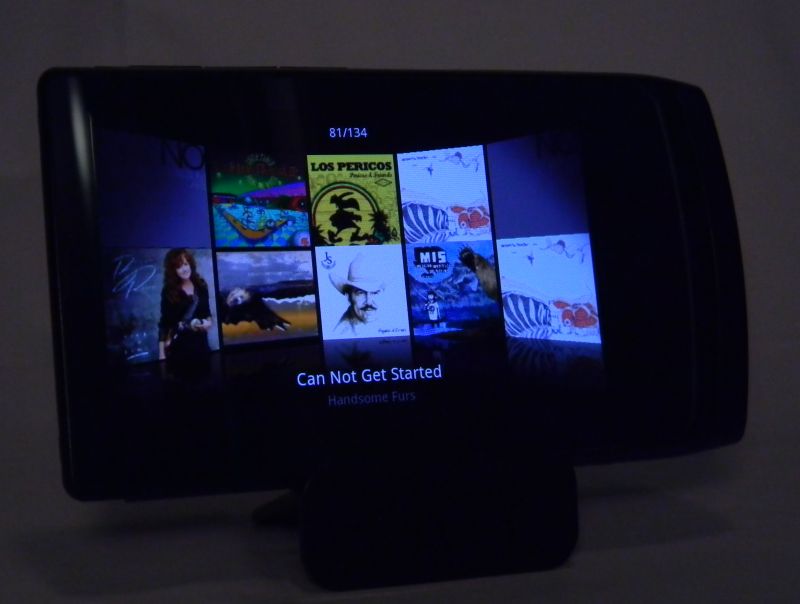
Lastly, When you tip the D3 on its side the display changes to a 3D-ish cover art arc. On this display you'll see the title of the current song, and your position number among the total number of albums. Tap on any visible cover to have it flip out and display the songs it contains (below). You can tap on any song you see listed to start playing it.  Tap the top bar of the list to flip back to the arc. Swipe left or right to rotate through all the albums.  You can turn this landscape display off in Preferences. When you do the Now Playing screen doesn't re-orient at all when the D3 is rotated.
This Music application is (almost) as thorough as the one on the J3. You can bookmark (press the D3's Menu button) any song from any list, and any position within a song.  The D3 doesn't do gapless playback.  I give Music an A-.  The sound quality is great when it isn't cutting out.  There is a need for on-board playlist/favorites creation or I'd give it an A+.

Video:  The D3 will play video formats including: AVI, WMV, ASF, MP4, MKV, MPG, DAT, TS, TP, TRP, and 3GP. Maximum resolution it will play is 1920x1080 (full High Definition), although not every resolution and audio and video codec combination up to that is guaranteed to play. It has played every video file I've thrown at it so far though. Those didn't include DAT, TP, or TRP files yet, as I have no sample files in those formats. VOB (DVD) files play if you change their extension from .VOB to .TS

You can resize many videos to fit the screen with a press on the screen or two.  Doesn't work if the videos have their own black bars. You can find videos by Folder or Thumbnail images or Bookmarks you may have previously set. The Thumbnail list (image below) adds video length to the info presented.  A long press on any movie file pops up more info, with Add to Bookmarks, Delete, and Details options.  Details will include the file name, file size, and resolution of the video.
Controls on the video Now Playing screen include AB marking, a play speed option (50% to 150% of original speed), and the usual play/pause FFwd/REW-next/previous buttons. The video title is displayed on the top edge of the screen.  Press the android menu button and you get several more options. Direct links to the list, details, and Add to Bookmarks are there, as well as Screen capture, AV-Out, and screen/subtitle settings.  Video play on the D3 gets an A+.  Better than on the J3 thanks to the larger screen size, higher resolution, and added codec support.
Pictures: The D3 will display your JPG, PNG, GIF, and BMP photo files on its beautiful AMOLED screen. The Photo app is typical Cowon.  Tapping on it you begin with the last Photo that was displayed. It will tell you the total number and position within that number of the photos in the current folder.  The big arrow in the upper right corner will take you to your photo list(s). Photos can be separated into folders, and folders can be selected individually. There is a nice slideshow feature with transitions and transition time choices.  You can manually rotate photos to best fit the screen, and they will also rotate when the D3 is itself rotated from landscape to portrait view or back.  Two-finger pinch or spread can be used to zoom out or in on details, and a double tap on the photo will also zoom in on it in steps.
Pictures can be used as contact icons or Wallpaper. Tap the photo to bring up the controls if they are not already visible.  Then tap the bottom right icon to get a pop-up window for the choices.  Now if only the D3 had a camera that contact icon feature would have been great.  As it stands, the Pictures app is fine.  Nothing overwhelming.  I'll give Pictures a B+.

FM Radio: The radio app is a welcome addition to the D3.  So far this is the only android-based  player I've got with FM radio. You'll need to have headphones plugged in to serve as antenna, and the radio will not output over bluetooth.   Options include auto-scanning for channels, Preset List, Add Preset, Preset Off, Start Recording, and Settings.   Under Settings you can set your region, and turn stereo on or off.  You also get an OFF switch.  I'll give Radio a B, as there is no RDS feature.

User Interface:  Cowon has decided they need to improve on the standard Android interface. It starts with a bottom bar that shows the available memory and amount left on the D3, next to a slider to switch between the Apps page (image below) and the home page. The left side of the bottom bar toggles between displaying the free space available, the number of running apps, and the day/date. The rest of the interface is rather normal for Android, with widgets and shortcuts and bookmarks as icons spread over 5 possible pages. On start-up the D3 wants to scan for new media you might have added, and it warns you that the system may not be responsive until it is finished.  There have been four firmware updates since I started writing this blog post, and with each the screen response and fluidity has improved. I have no doubt that Cowon will keep working on the D3 until its interface performance is on par with the iPod Touch. It is very close right now.
One thing I find annoying is the lock screen Cowon insists on using for the D3. My Archos Android players don't have it, and swipe-to-unlock is an unnecessary extra step in an otherwise competent execution.
On the good side, the D3 has external buttons for power/hold (image below), and volume +/-, play/pause, and FFwd/Rev (right side).  There are off-screen touch buttons for Back, Menu, and Home.
You can almost completely control media play without touching the screen.  A single press of the PLAY button will usually start playing music without unlocking the screen.  The power button will lock the touchscreen with one tap, turn the screen OFF with a quick double-tap, and bring up the power OFF option with a two second hold.
Bluetooth: I had no trouble pairing the D3 with my bluetooth headphones. I was disappointed to discover there is no gapless playback using bluetooth. Controls worked fine from the headphones or the D3, including volume. Additionally, in the Music app's preferences, you can turn off the headphone's ability to control the D3.  I tried pairing a bluetooth keyboard to the D3 and although it paired it reported there was no support for keyboards.  The D3 does support file transfers over bluetooth, but my first few attempts (with my PC and an Archos 43)  have failed after downloads got past 80%. I have succeeded since.  I'll blame it on the earlier firmware.  At this point bluetooth for headphones is still a little buggy.  I had the occasional cut-out or momentary freeze while listening to music, and I've never experienced the same on any other player. As such, Bluetooth gets a C+.  Hopefully it will improve with firmware updates.

Internet:  I had no trouble connecting to my home or work Wifi. The web browser works reasonably well, and multitouch zooming is greatly appreciated.  There is a slight response delay after tapping on any on-screen link. It is as if the screen sensor has to think for a second before responding.  Side-by-side with my iPod Touch the difference is notable. Scrolls are just a bit choppy on the D3 where they are smooth on the Touch.  The D3 will show more info on a screen than the iPod Touch as the Touch adds an options bar on every web screen.  The 800 x 480 screen is good, but not as crisp in detail as the Touch's 960 x 640 Retina display.  Many web pages recognize the Touch and reformat to a Mobile view for it.  The D3 usually gets a more typical PC page view on the same pages.  Double-tap and finger-spead to zoom both work as expected.   The web browser experience is better than on any lower resolution device, and better than any device without multitouch. It still isn't up to the standard set by Safari on an iPod Touch or iPhone, so Internet gets a B from me.

Apps:  No app store on the D3.  I've been able to side-load applications to my D3, and most have installed with no problem, the lack of an on-board market is a serious shortcoming Cowon needs to address.  Out of the box the D3 includes your typical music, video, pictures, and radio media apps.  You get email, web browser, YouTube, calculator (including simple and scientific versions), task manager, document (.txt) viewer, alarm clock, paint, voice recorder, calendar, contacts, comix, and twitter too. There are a few more apps on the Korean version of the D3 that disappeared when I installed the North American firmware.  Until either Cowon or hackers get a Market app working on the D3 I have to give it a C B for Apps.

Update 3/23/2011: Amazon.com has opened their Android Appstore now, and although the number of apps available is small you can expect it to grow exponentially. Easy to add their app to the D3.

Conclusions:  The D3 is a nice package with decent hardware and great potential. It has the power to drive my large Sennhieser headphones with authority. Music and Video codec support is the best you'll find. There are two reasons I won't recommend the D3 right now:  Price and maturity.  Amazon.com lists the D3 with 32gb of memory for $358.  A 32gb iPod Touch is $275. The new D3 is NOT $83 better than a new Touch.  The price is too high, even if every feature worked perfectly.   As I stated previously, Cowon has updated the D3 Firmware 4 times since I received it. It still exhibits random freezes, audio cut-outs, slow touch response, and no easy access to Android apps.   I assume Cowon will eventually resolve these issues, but right now the D3 performs worse than my old HTC Hero Android phone. Cowon needs more experience with Android.  Hopefully they are learning fast, as the D3 is not quite ready for prime time.

2/10 EDIT:  Cowon updated the firmware on 2/10/2011 to version x.27.  I've installed 3.27 on my D3, and the audio cut-outs I mentioned seem to have been eliminated.   Still no gapless playback, and no apps store.

4D.

P.S.  If you appreciate my blog, please consider clicking on one of the ads.   Thanks! 

Wednesday, January 26, 2011

Archos' Latest Tablets got a Firmware Update Today.

If you are still undecided about getting one of Archos' latest tablets, then you don't have any more excuses. Today they updated the firmware to version 2.2.1.  It includes 30 individual fixes for the tablets including:
  • Video: fix some audio glitches after seeking WMA files
  • Video: add support for MTS files
  • Video: bring UTF-8 and UTF-16 encoded subtitles format support
  • Video: fix SUB subtitles sometimes truncated
  • Video: add IDX/SUB subtitle handling
  • Video: fix http://.*mpeg playback
  • Video: support resume and bookmark for network shares
  • Video: fix some FLV files not playing
  • Youtube: fix mobile site video not playing
  • Multimedia: fix RTSP support for Android applications
  • Multimedia: fix some web radio applications by adding basic M3U support
  • Audio: apply shorter steps in audio balance tuning
  • Audio: fix sound glitch on system notification while playing music
  • Music browser: fix album view crash on scroll with a lot of albums
  • Music: support samba protected directory access
  • Thumbnails: resolve thumbs generation freeze
  • Indexing: improve rescan robustness
  • Indexing: fix scanning not restarting after connecting device on PC or ejecting SDCard
  • Network shares: large files (>2GB) can now be played
  • Wi-Fi: fix disabling power saving not working
  • Wi-Fi: enable IEEE802.11n support
  • Wi-Fi: achieve faster reconnection
  • SD Card: fix sd card removal not being taken into account
  • Storage: enable EXT3 file system support and migration
  • USB keyboard: fix external directional keys layout when rotating the device
  • Memory: enable 32MB swap by default and increase it to 64MB after Android reset or full device reformat
  • Applications: fix applications disappearing sometimes between reboots
  • Applications: fix unit not responsive after Google voice search use
  • Power management: allow to define deep sleep mode by default in settings/about device/power management
  • VPN: PPTP VPN support has been fixed  
What it means is that Archos is standing behind this generation of tablet devices with all their resources.  The same download will work for their 28it, 32it, 43it, 70it, and 101it. To install it just copy the downloaded file to the uppermost folder on your device. Then disconnect from the USB cable to have it begin the install.   Many users have reported the devices themselves will find and download it directly, as well as install it.

Enjoy!
4D

Thursday, December 30, 2010

iPod Touch vs Archos 43 Showdown!

I've been looking for a strong alternative to the iPod Touch for a long time.  The original had several shortcomings, although there were no decent competitors to it at that time. Some challengers have shown up since.  Apple didn't rest on its laurels, and the latest Touch answers almost every complaint I had with the first one.

Archos appears to have decided to win back bragging rights for tablet media players, and the Archos 43 Internet Tablet looks like it shoots straight at the Touch. I have both, and am getting many questions about which is better. This is my showdown. I'll rank for technology, media support, ease of use, build, and a few other things. You may not agree with every conclusion, but hopefully this showdown will help you make your own decision.

I have reviewed both.  The Archos 43 has been updated since that review. Here is how they compare price-wise:

iPod Touch 8gb for $229. 32gb for $299.
Archos 43 16gb for $249. 16gb MicroSD-HC card for $36. Total for 32gb = $285.

Hardware:
- Processor: Tie
    Touch: Apple A4 1GHz processor running iOS 4
    43: ARM Cortex A8 at 1 GHz with DSP running Android 2.21 
- WiFi: Tie
    Touch: 802.11b/g/n  (802.11n 2.4GHz only). 802.11n no speed
    improvement over G.
    43: 802.11 b/g/n (including 5GHz for 802.11n) 802.11n doesn't work
    at the moment.  Archos is looking into it.
- Bluetooth devices supported: 43 wins.
    Touch: Profiles include A2DP, AVRCP, PAN, HID. Headphones, Keyboard, some accessories.
    43: Profiles include A2DP, AVRCP, HID, PAN, Headphones, Keyboard, Mouse, GPS, File Transfer,
    Phone tethering. 
- Screen size: 43 wins.
    Touch: 3.5" diagonal. 1.984375" x 2.9375", 5.83 square inches.
    43: 4.3" diagonal,  2.09375" x 3.75",  7.85 square inches.
- Screen resolution: Touch wins.
    Touch: 960 x 640
    43: 854 x 480
- External controls: Both have volume toggle power/hold button. Tie 
- Power button options43 wins.
    Touch: Simple press to turn screen off.  Long press for power OFF
    screen.
    43: Simple press to turn screen off. Long press brings up several
    device options including Airplane Mode, Buttons Mode, Power
    Off, and Silent Mode. Choosing Power OFF brings up a second
    set of choices including Deep Sleep, Reboot, and Power Off.
- Ports: Inputs, outputs, and memory expansion.  43 wins.
    Touch: Dock port, headphone jack.
    43: Micro USB sync port, HDMI output, MicroSD-HC slot, headphone jack.  USB storage drives  and devices supported with adapter cable (not included, typically under $10).
- Cameras: Touch wins with 2.  Both devices require great lighting to take good photos. The 43's camera app was updated in the latest firmware with 6 white-balance settings, resolution/quality choices, color effects, and (video) unbanding choices.  It has a Photo/Video toggle as well.   The Touch has a choice of cameras (front or back), the shutter button, and a digital zoom slider that shows up when you tap the screen.  Both have links to their photo galleries from within camera app.  
    Touch: Front facing VGA 640 x 480 resolution. Rear facing 960 x 720 for Photos, 1280 x 720 for Video.
    43: Rear facing 1280 x 720 photos and video.
- Speakers: The 43's speaker reaches to lower frequencies. The iPod's speaker is louder at the same position along the volume slider (about 50%). Both serve fine for notices, games and chat, but are not recommended for music listening. Tie.
- Microphone: Touch wins.  Its microphone is more sensitive, and the voice memo app is better integrated than the Audio Recorder app on the 43 is.

Media Support:
- Music File Types: Tie. Differences in what is supported by each, though.
    Touch: AAC, Protected AAC, HE-AAC, MP3, MP3 VBR, Audible (formats 2, 3, 4, Audible Enhanced Audio, AAX, and AAX+), Apple Lossless, AIFF, and WAV. 9
    43: Stereo MP3, MP3 VBR, WMA, WAV (PCM/ADPCM), AAC3, AAC+ stereo audio files, OGG Vorbis, FLAC, AC3, AC3 stereo audio(options plugin required). 9 or 10

- Video File Types: 43 wins. Many file types are simply containers. Still the 43 is easily most capable. It also can play videos from shared folders on your home network. Above are scenes from videos playing on both. The MULAN video on the 43 was streaming from my PC over my home WiFi network.
    Touch: M4v, MP4, MOV, AVI
    43: M4v, MP4, MOV, AVI, MKV, WMV, MPG, PS, TS, VOB, FLV, RM, RMVB, ASF, 3GP.
- Photo File Types: Tie  
    Touch: JPEG, BMP, PNG, GIF
    43: JPEG, BMP, PNG, GIF
- Photo apps: 43 wins.
    Touch: Pictures app. Sources include local, from cameras, from email, and from Web that you've downloaded.
    43: Galley and Photo Frame apps.
- Music Sort Options: Tie.  Differences. On the 43 you can find separate apps for Audiobooks and Podcasts.
    Touch: Albums, Artists, Songs, Playlists, Audiobooks, Compilations, Composers, Genres, Podcasts, iTunes U, Seach
    43: Albums, Artists, Songs, Playlists, Recently added, Recently played, Favorites, Storage, Party shuffle, Search.
- Music Now Playing: 43 wins.  Info and Features accessible directly from within the Now Playing screen.
    Touch: Artist, Album name, Song name, Position slider/info, Volume slider, Next/Previous, FF/REV, Play/Pause, Shuffle toggle, Repeat options, Album art, Shortcut to song list, Song x of Total, Back. 17. Music app changes to limited cover flow view in landscape position.
    43: Artist, Album name, Song name, Position slider/info/absolute, Volume slide/up-down/position bar,  Next/Previous, FF/REV, Play/Pause, Shuffle toggle, Repeat Options, Album Art, Shortcut to Song List, Shortcut to initial Library screen. Tap menu for Info, Party Shuffle, Add to Playlist, Add to favorites, Delete, and Audio Settings choices, Search (any text on the screen for related info using) Music/Web/Pandora/YouTube, Back.  30.  Music app presents same options in landscape and Profile views.

Experience:
- User Interface: Ease of use.  Finding what you want. Managing your files and apps. 43 wins. Neither device is intuitive, despite YouTube videos of toddlers play with an iPad. Many options are hidden in Settings, and the only way to know about them is to search through them one by one.  Android apps generally have related settings accessible within the app.  On the Touch, you have to leave the app and then open Settings to find related options.
    Touch: Folder support. Multiple (11) App pages.  System wide search. Capacitive screen +. Multitouch. Uninstall downloaded apps.  Multitasking.  Bookmarks as icons. 8
    43: Folder support.  Multiple (5) App pages.  System wide search.  Resistive screen -. Uninstall downloaded apps. Multitasking. File browser.  Delete file capability. Put icons anywhere on a screen. Widgets. App icons (shortcuts) and widgets on more than one page if you want. Shortcuts to contacts, bookmarks, direct messages, directions, an email, Gmail label, Latitude, any setting, Google Voice toggle as icons on a home page. 18

- Build: The Touch (below) is too thin.  I find myself getting hand cramps when holding it more than a few minutes.  The 43 weighs a little more, but with its larger screen the weight is expected.  Both are well built, but Apple again demonstrates that they are on top of engineering and production. The 43 is well made.  I greatly appreciate the built-in kickstand (above).  The Touch is a beautiful piece of work. Both are fingerprint magnets.  Although not the easiest to hold or use, the Touch wins build.
    Touch: 7.2 millimeters thin. Engineered glass front and stainless steel back.
    43: 9 millimeters thin. Glass front with plastic body molded over a steel frame.

- Reliability: Tie. The Touch I have now is a replacement for my original purchase.  The power button failed and Apple replaced it for me. So far my 43 doesn't work using 802.11n for WiFi connectivity as it claims to. It still connects using 802.11g. Archos is aware and hopefully will fix it in an upcoming firmware release.  Of three iPod Touches I've owned, two have gone back to Apple as defective. Of the 6 Archos product I have none has needed to be sent back as defective, yet nagging firmware glitches so far keep this 43 from being all that it can be.  Both products thus appear tied for reliability.

Summary:
43 = 16.  Touch = 12. Wins worth 1.  Ties worth 1 point to each device.  By numbers the 43 is easily the winner. Android 2.21 is a more versatile OS than iOS 4. Since my 43 arrived it has become the one device I prefer to use over everything else you can find reviewed on my blog. The larger screen of the 43 is more welcome than the higher-resolution screen of the new Touch. Applications are available for both. The range of android apps, despite fewer in number than Touch apps, covers every category well.  With no restrictions there are Android apps that do things Apple doesn't allow Touch/iPhone apps to do.   The Touch is a great piece of hardware.  Archos has a better device in its 43 though. In fact, Archos can't seem to make them fast enough to satisfy demand.

4D

If you enjoy my blog, please consider clicking on an Ad or two.  Thanks!