
My Cowon D3 arrived straight from Korea on Monday 1/31/2011. The D3 is the first device from Cowon running Android. At the moment it is running Android 2.1 (I think), although I'm hoping they'll upgrade it to 2.2 (or higher) eventually. I've actually seen no proof anywhere of what version Android is on the D3. To distinguish their android devices Cowon has adopted Plenue for the class name. According to them it means "Create Pleasure".
arrived straight from Korea on Monday 1/31/2011. The D3 is the first device from Cowon running Android. At the moment it is running Android 2.1 (I think), although I'm hoping they'll upgrade it to 2.2 (or higher) eventually. I've actually seen no proof anywhere of what version Android is on the D3. To distinguish their android devices Cowon has adopted Plenue for the class name. According to them it means "Create Pleasure". Cowon is known for their media players, and the D3 has benefited from their media experience. The standard Android media apps have been replaced by Cowon versions. Nearly every available codec is supported, and so little or no transcoding will be needed to play your music and video files.
 Hardware:
- Capacitive AMOLED 3.7" screen with 800 x 480 pixel resolution.
- WiFi 802.11 b/g support.
- FM radio, along with recording from FM.
- Bluetooth 2.1 + EDR, A2DP/AVRCP/OPP
- Speaker
- Microphone for audio recording.
- G-Sensor
- Multiple touch sensing.
- Touch (haptic) feedback.
- MicroSD-HC expansion slot.
- Dimensions: 64.2mm x 116.4 x 11.8mm, 120g. or 2.53" x 4.58" x .465" thick, 4.233 ounces.
Include in the plain brown box was a proprietary USB sync cable, a Korean AC 220v Power supply, Cowon typical earbuds, and a quick guide (in Korean). According to Cowons website a manual CD should have been included. It was not.
 |
| Right Edge |
 |
| Bottom End |
The D3 is capable of both HDMI and Composite video output, but it appears those will require separate custom cables from Cowon. I have not yet found a source for them.
Charging will take 7 hours over USB (with the screen OFF) and 3.5 hours with an AC Adapter. You'll get an average of 21 hours music play or 10 hours video play on one battery charge.
Music: The D3 supports MP3/2/1, WMA, OGG, WAV, ASF, FLAC, APE, and M4A file formats. If you have lyrics in LDB format they can also be displayed. There are 35 JetEffect 3.0 EQ presets and 4 User configurable EQ settings available. As with other Cowon players, a tap on the music icon takes you into the Now Playing screen. There is a big arrow in the upper right corner you can tap to take you back to the list of songs, which can be sorted by Album, Artist, Song, Folder, and Genre. The now playing screen itself has icon access to EQ presets, Shuffle and Repeat toggles, a Play ALL/1/Folder toggle, a playback speed setting that will speed up or slow down playback in 10% steps from 150% to 50% of normal speed. Pitch doesn't change which is nice.

You also have the typical Play/Pause, Next Track/FFwd and Previous Track/Rew buttons. Throw in a track position bar with total time and position time visible in fine print on the high resolution screen. Songs that include the information will display their Title, Album, and Artist right below the album art. Tap on the album art to reveal Lyrics if any exist for the current song. Press down on the title, album, or artist, and after a few seconds the D3 has sorted through the entire song list for songs that match that item.
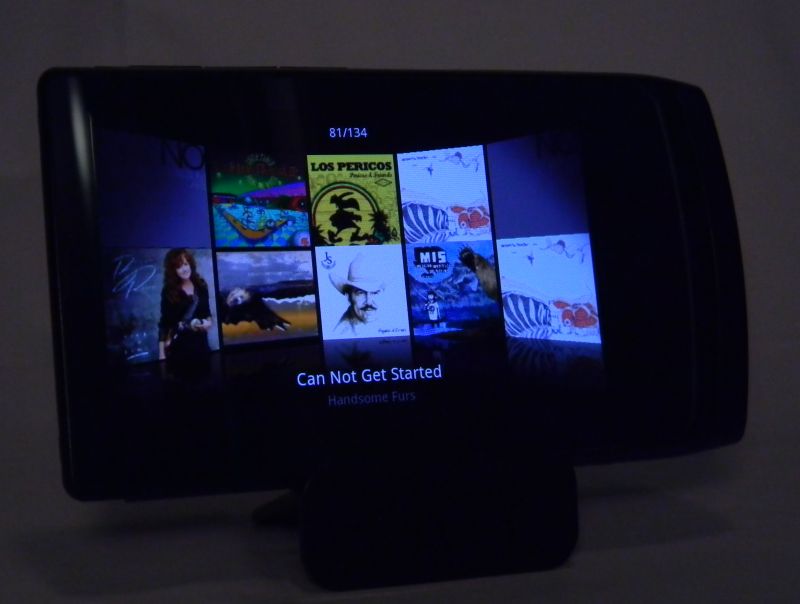
Lastly, When you tip the D3 on its side the display changes to a 3D-ish cover art arc. On this display you'll see the title of the current song, and your position number among the total number of albums. Tap on any visible cover to have it flip out and display the songs it contains (below). You can tap on any song you see listed to start playing it. Tap the top bar of the list to flip back to the arc. Swipe left or right to rotate through all the albums. You can turn this landscape display off in Preferences. When you do the Now Playing screen doesn't re-orient at all when the D3 is rotated.

This Music application is (almost) as thorough as the one on the J3. You can bookmark (press the D3's Menu button) any song from any list, and any position within a song. The D3 doesn't do gapless playback. I give Music an A-. The sound quality is great when it isn't cutting out. There is a need for on-board playlist/favorites creation or I'd give it an A+.
Video: The D3 will play video formats including: AVI, WMV, ASF, MP4, MKV, MPG, DAT, TS, TP, TRP, and 3GP. Maximum resolution it will play is 1920x1080 (full High Definition), although not every resolution and audio and video codec combination up to that is guaranteed to play. It has played every video file I've thrown at it so far though. Those didn't include DAT, TP, or TRP files yet, as I have no sample files in those formats. VOB (DVD) files play if you change their extension from .VOB to .TS


You can resize many videos to fit the screen with a press on the screen or two. Doesn't work if the videos have their own black bars. You can find videos by Folder or Thumbnail images or Bookmarks you may have previously set. The Thumbnail list (image below) adds video length to the info presented. A long press on any movie file pops up more info, with Add to Bookmarks, Delete, and Details options. Details will include the file name, file size, and resolution of the video.

Controls on the video Now Playing screen include AB marking, a play speed option (50% to 150% of original speed), and the usual play/pause FFwd/REW-next/previous buttons. The video title is displayed on the top edge of the screen. Press the android menu button and you get several more options. Direct links to the list, details, and Add to Bookmarks are there, as well as Screen capture, AV-Out, and screen/subtitle settings. Video play on the D3 gets an A+. Better than on the J3 thanks to the larger screen size, higher resolution, and added codec support.

Pictures: The D3 will display your JPG, PNG, GIF, and BMP photo files on its beautiful AMOLED screen. The Photo app is typical Cowon. Tapping on it you begin with the last Photo that was displayed. It will tell you the total number and position within that number of the photos in the current folder. The big arrow in the upper right corner will take you to your photo list(s). Photos can be separated into folders, and folders can be selected individually. There is a nice slideshow feature with transitions and transition time choices. You can manually rotate photos to best fit the screen, and they will also rotate when the D3 is itself rotated from landscape to portrait view or back. Two-finger pinch or spread can be used to zoom out or in on details, and a double tap on the photo will also zoom in on it in steps.

Pictures can be used as contact icons or Wallpaper. Tap the photo to bring up the controls if they are not already visible. Then tap the bottom right icon to get a pop-up window for the choices. Now if only the D3 had a camera that contact icon feature would have been great. As it stands, the Pictures app is fine. Nothing overwhelming. I'll give Pictures a B+.
FM Radio: The radio app is a welcome addition to the D3. So far this is the only android-based player I've got with FM radio. You'll need to have headphones plugged in to serve as antenna, and the radio will not output over bluetooth. Options include auto-scanning for channels, Preset List, Add Preset, Preset Off, Start Recording, and Settings. Under Settings you can set your region, and turn stereo on or off. You also get an OFF switch. I'll give Radio a B, as there is no RDS feature.
 . It is very close right now.
 players don't have it, and swipe-to-unlock is an unnecessary extra step in an otherwise competent execution.
On the good side, the D3 has external buttons for power/hold (image below), and volume +/-, play/pause, and FFwd/Rev (right side). There are off-screen touch buttons for Back, Menu, and Home.
You can almost completely control media play without touching the screen. A single press of the PLAY button will usually start playing music without unlocking the screen. The power button will lock the touchscreen with one tap, turn the screen OFF with a quick double-tap, and bring up the power OFF option with a two second hold.

Internet: I had no trouble connecting to my home or work Wifi. The web browser works reasonably well, and multitouch zooming is greatly appreciated. There is a slight response delay after tapping on any on-screen link. It is as if the screen sensor has to think for a second before responding. Side-by-side with my iPod Touch the difference is notable. Scrolls are just a bit choppy on the D3 where they are smooth on the Touch. The D3 will show more info on a screen than the iPod Touch as the Touch adds an options bar on every web screen. The 800 x 480 screen is good, but not as crisp in detail as the Touch's 960 x 640 Retina display. Many web pages recognize the Touch and reformat to a Mobile view for it. The D3 usually gets a more typical PC page view on the same pages. Double-tap and finger-spead to zoom both work as expected. The web browser experience is better than on any lower resolution device, and better than any device without multitouch. It still isn't up to the standard set by Safari on an iPod Touch or iPhone
 , so Internet gets a B from me.

Apps: No app store on the D3. I've been able to side-load applications to my D3, and most have installed with no problem, the lack of an on-board market is a serious shortcoming Cowon needs to address. Out of the box the D3 includes your typical music, video, pictures, and radio media apps. You get email, web browser, YouTube, calculator (including simple and scientific versions), task manager, document (.txt) viewer, alarm clock, paint, voice recorder, calendar, contacts, comix, and twitter too. There are a few more apps on the Korean version of the D3 that disappeared when I installed the North American firmware. Until either Cowon or hackers get a Market app working on the D3 I have to give it a
Update 3/23/2011: Amazon.com has opened their Android Appstore now, and although the number of apps available is small you can expect it to grow exponentially. Easy to add their app to the D3.
Conclusions: The D3 is a nice package with decent hardware and great potential. It has the power to drive my large Sennhieser headphones with authority. Music and Video codec support is the best you'll find. There are two reasons I won't recommend the D3 right now: Price and maturity. Amazon.com lists the D3 with 32gb of memory for $358. A 32gb iPod Touch is $275. The new D3 is NOT $83 better than a new Touch. The price is too high, even if every feature worked perfectly. As I stated previously, Cowon has updated the D3 Firmware 4 times since I received it. It still exhibits random freezes, audio cut-outs, slow touch response, and no easy access to Android apps. I assume Cowon will eventually resolve these issues, but right now the D3 performs worse than my old HTC Hero Android phone. Cowon needs more experience with Android. Hopefully they are learning fast, as the D3 is not quite ready for prime time.
2/10 EDIT: Cowon updated the firmware on 2/10/2011 to version x.27. I've installed 3.27 on my D3, and the audio cut-outs I mentioned seem to have been eliminated. Still no gapless playback, and no apps store.
of memory for $358. A 32gb iPod Touch is $275. The new D3 is NOT $83 better than a new Touch. The price is too high, even if every feature worked perfectly. As I stated previously, Cowon has updated the D3 Firmware 4 times since I received it. It still exhibits random freezes, audio cut-outs, slow touch response, and no easy access to Android apps. I assume Cowon will eventually resolve these issues, but right now the D3 performs worse than my old HTC Hero Android phone. Cowon needs more experience with Android. Hopefully they are learning fast, as the D3 is not quite ready for prime time. 2/10 EDIT: Cowon updated the firmware on 2/10/2011 to version x.27. I've installed 3.27 on my D3, and the audio cut-outs I mentioned seem to have been eliminated. Still no gapless playback, and no apps store.
4D.
P.S. If you appreciate my blog, please consider clicking on one of the ads. Thanks!


 w/250gb arrived Thursday 12/16/2010, and I had it updated to
 over Bluetooth, and the printer will then print them out. Lastly, you can send the audio output of the 70 to Bluetooth headphones or speaker docks.
 (
(

 , this $318
  a look.


 also comes with



 Posts
Posts


