Showing posts with label WiFi. Show all posts

Saturday, May 7, 2016

Sony HDR-CX455 HANDYCAM Review

I own several of Sony's previous video cameras, and have been happy with their performance over the years.  My only complaint now has been the 8mm tape and battery standards used then.

My more modern photo cameras, and even my phone can shoot video. Their form factors, internal microphones, and the ergonomics of holding them steady makes them less than ideal (in my opinion) for shooting more than a quick casual video. Rarely do phones or photo cameras come with built-in image stabilization.

A student of mine mentioned that his current digital camera could connect via wifi to his phone for transferring photos he'd shot. This intrigued me to research this current connectivity trend.


Enter the Sony HDR-CX455 Video camera:

This camera is much smaller and lighter than my previous Analog and Digital-8 cameras from Sony, The CX455 weighs 8.55oz with battery and media card installed.  My Digital-8 camera weighs 34.2oz with tape and battery installed. The CX455 is 1/4 the weight of the older Digital-8! The CX455 has a larger/better view screen, runs longer on a battery charge, has better optics, and has many modern features that weren't conceived of 10 years ago.

I can control the CX455 over WiFi from the touch screen on my Sony Tablet. Many other phones and tablets are also supported.  I can see on my tablet what the camera lens sees.  I can zoom in and out from the tablet. I can start and stop video recording from the tablet, and I can take digital photos of what the camera sees.  Anything the camera records will transfer to the tablet.  Although as far as I can tell the tablet application is limited to those controls, the camera itself has many more features.

For those wanting the technical details, these specs are straight from Sony:

  • 3.0" LCD (Touch panel), Wi-Fi/NFC, 8GB memory internal memory, Dual Video Format Recording
  • ZEISS Lens (26.8mm), 30x optical zoom, 60x Clear Image Zoom
  • Full HD with XAVC-S, 9.2MP, Exmor R sensor, Optical steady shot
  • Sony NP-FV50 battery included.  Sony FV70/FV100 batteries are optional for longer recording time between charges. There are also compatible batteries made by other companies that can power this camera. 
  • It has a short on-board USB cable, and comes with a USB extension cable.
  • It also comes with a micro HDMI to HDMI cable for sending recorded content to a connected HDTV. 
  • Dimensions: 3.5 x 4.72 x 6.3 inches
  • microSD card slot for greater recording capacity. 

The optical steady shot feature is excellent at keeping the video steady even when zoomed out all the way (30x). .  Dual format recording means it can record a 1080p version as well as a lower resolution version of the same video at the same time. The lower resolution version is more compressed/compact and intended for posting to the web. You can turn OFF dual recording. 

This camera has time lapse recording capability, but NOT slow motion.

In use I am surprised and impressed by how lightweight this camera is. Flipping out the touch screen turns the camera ON, but you can turn the camera OFF using a button on the camera body. The screen rotates up or down, and even flips to forward facing.  The screen image flips when the screen itself is flipped. 


If you have a phone or tablet that can create a wifi hotspot, then several Sony cameras including the CX455 can be controlled at the same time from that phone or tablet.  I could not get my wifi-only tablet to work with the multi-camera feature, but I could get it to switch back and forth between two CX455s over WiFi. 

Layout of the main camera physical controls, and holding the camera are well thought-out.  The side strap is adjustable to fit most sizes of hands, though only for right-handed holding. The short USB cable hides and stores in the hand strap. 
The Record start/stop button is under your thumb. Wide angle/Zoom is a rocking lever on the top of the camera where my index finger naturally fell upon it. Zooming in and out is variable speed, depending on how far you rock the lever.  .A button for taking a still photo is in front of the zoom rocker, and harder to reach. All these features are duplicated by on-screen icons.
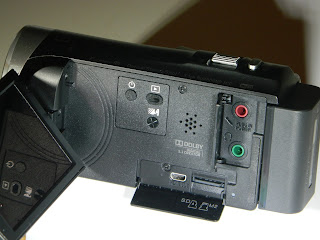
 Unfolding the screen will turn the camera ON.  It also reveals additional controls and ports. One hinged door covers a microphone input and headphone output jack.  Another hinged door reveals the HDMI output jack and the microSD card slot. A Power button, Playback button, and Talk button are next to a speaker hole array. 


On the strap side of the camera you'll find doors hiding a DC-in jack, and a Multi (micro-USB)  port.   
I have yet to shoot anything more than a few test videos and photos with my CX455.  My intent is to record myself using various woodworking tools as examples/demonstration for my college students. I'm pleased so far with the quality of the video and photos I've recorded so far. When I have a few with content worthy of posting on Youtube I'll add links to them here.  

Let me know if there is anything more specific you want to know about this camera from Sony.  I will respond to comments if I have an answer for you.

4D 

Saturday, September 17, 2011

Sony Tablet S. My Review.

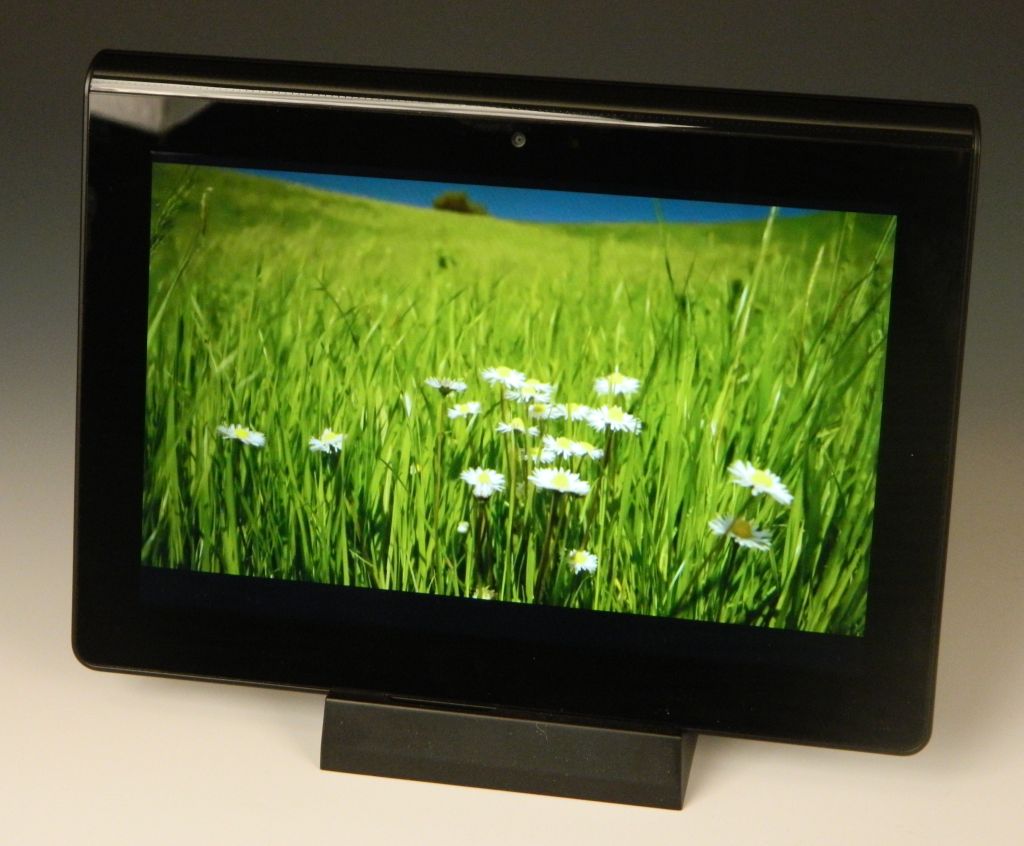
Sony took their time entering the Android tablet race.  At first glance their patience was not wasted.  This Sony S Wi-Fi Tablet (16GB)  has some clever features and an original look that makes it stand out from the pack.

Mine arrived the 14th of September. Well packaged.  The box includes a Quick Start Guide,  A pictoral guide to the power switch, unlocking the screen, calling up the onscreen keyboard, signing in for the first time, and swiping between home pages. The AC adapter appears straight from one of Sony's laptops with a long AC cord, a power brick, and a long cord from the brick to the proprietary charge point on the bottom edge of the S. I'm not a fan of the dock connection used, as it is snaps in and is a challenge to get out.   You also get a wrist lanyard, but there was no USB/syncing cable in the box.  Lastly there was all the usual boilerplate of warnings, licenses, and disclaimers.

Hardware features:
 - Universal IR remote/transmitter
 - Battery Type : Li-Ion 5000mAh
       + Battery Life when browsing web with Wi-Fi - 6.2 hours
       + Battery charge time - 5.0 hours.
 - Camera : Front – 0.3 Megapixel Rear – 5.0 Megapixel
 - Bluetooth version 2.1 +
 - Wi-Fi : IEEE802.11b/g/n
 - Full-size SD Card slot
 - TruBlack 1280 x 800 9.4" screen.
 - Internal, Monaural microphone
 - Internal, Stereo speakers
 - Dimensions: 9.5" x 6.87" x 0.82" (thick end), and 1.29375 lbs (by my scale, no SD card inserted).
 - User manual available here: PDF Link
Left Edge
Right Edge
SDHC & microUSB port

A bit smaller than the 10.1 tablets out there, it looks like Sony didn't want to have to compete for 10.1 inch screens in case this tablet was a hit. Their 9.4" screen is still 16:10 wide screen rather than 4:3 like the iPad.  It is better for movie playback and any other wide-screen media (like PlayStation games). I personally like the size. Lighter than the iPad2 and Samsung Galaxy 10.1 tablet I have, the weight plus the shape makes it almost delightful to hold.  Sony also looks to have considered ergonomics in their design, and I'm very appreciative. None of the large tablets I've reviewed so far have been easy to hold up long enough to watch a movie or read a book. They tend to cramp the hand that holds them by the edge. It's not natural or comfortable.  I've suggested adding a handle mount to the center back.  Sony may have a better solution though, and it comes from a simple redistribution of weight.  I have the thick end at about 55% of the weight and the thin end 45%.  The wedge shape makes it obvious how to hold the S for best results as well.  The back also has a texture and a friction coating to eliminate any slipperyness.
Video Frame
Media capability seems to be thorough. The TruBlack screen is beautiful.  Mine has played WMV, MP4, M4V, 3GP video files with no problem.  Other formats/codecs are playable with downloadable apps.  MP3, WMA (including WMA lossless), FLAC, OGG, WAV, MID, XMF music files played with no trouble.  Sony has also thrown in access to it's own Entertainment Network.  There are apps for Video Unlimited and Music Unlimited. Plus the Crackle app where you can view full-length Hollywood movies and TV series for free and on demand.  Finish it off with the Reader™ Store from Sony for ebooks galore.
YouTube App
Camera: The 5.0 megapixel rear camera doesn't include a flash.  It takes sunlight or photo lights indoors to coax a good picture from it, but it can be done.  Like all my other tablets with cameras you shouldn't consider the cameras on the S a replacement for even an inexpensive pocket camera. The S's cameras are better than those on my iPad2, but about the same as what came on any of my other tablets. Below are samples from my yard taken with the rear camera.  The front camera is best used for video chat.
Build quality is typical Sony.  This tablet is light but solid. No flex or squeaks in use. The rear surface has a texture to it that is less slippery than most. Ports and buttons hide inside the crease on the sides, and visually keep the look clean.  They are a bit more challenging to press or plug into though, although not enough to be an ongoing challenge.   The screen appears to roll right around to the back surface.  A nice affect.  The edge is undercut and gives the appearance that this tablet is thinner than an iPad from the front.  Under a flap on the left edge there is a micro-USB and full-sized SDHC card slot.  You'll also find the headphone jack on the left.  There are speaker vents on both edges. There is also a reset hole, which I've had to stick a paper clip into once so far.
Applications Screen
Apps: The included app assortment is impressive.  Most of my android tablets have had less than one page worth of apps to start with. There looks to be 45 or so apps on the S.  You can sort them newest first, A-Z, or a custom way. The downside?  The remaining memory space is only about 9gb.  So much for thinking I could get six or seven 2gb movies on board.  There were a few music, photo, and video samples included though. Roughly 430mb's worth.  When you get tired of those you can move them to your PC to clear up some of that used storage space.
AC Charger Connection Point

Problems?   Sony's Music and Video stores aren't ready at the time of this post.  The screen won't rotate with the thick (heavier) end down. I've also had off and on WiFi connectability problems.  The AC charger is a lump to deal with. No USB cable included. Crash Bandicoot keeps dying on me (OK, my fault not the S's), and yet I'm spending more time than usual enjoying this tablet.
Crash Bandicoot

Conclusions?  At the same prices as the WiFi iPad gen2s, Sony's Tablet S is the best shot I've tested yet to directly steal some sales from Apple. It has a great screen, clever physical design, great media support, Built-in DLNA capability, and a great size/weight. Add PlayStation game playing as well.  Easier to hang on to than any of my other tablets too. Battery life is a little short compared to most of the 10.1s and the iPad.  It's a first generation tablet though, and probably compares better to the iPad-1. With that iPad selling for $399 or less, Sony has this tablet just a little too highly priced.  I saved 10% on mine with a coupon code (now expired) and thought $450 was a fair price for it.  Look for discounts.  If you can save anything off the current MSRP then get one.  I'm keeping mine.

4D


PS:  If you enjoyed this review, please consider clicking on an Ad or two.  Thanks!

Monday, August 15, 2011

Latte Ice Smart Review.


Latte Ice Smart
LatteZone has released an Android-based media player with a 5" screen.  It has been impossible to find Samsung's 5" Android player in the U.S. and the specs on the Latte ICE Smart look impressive on the surface. I decided to give one a look.

The basics include a 5" LCD TFT dual-touch resistive screen showing 800x480 pixels, an 800mHz CPU with 3D accelerator, speaker and microphone, and 8gb of internal memory.  There is a microSD slot for up to 32gb more of add-on storage. There is no camera or GPS or Bluetooth or FM radio. The Smart weighs 0.8lbs, and is 5.2x3.4 inches and roughly 1/2" thick. Pretty hefty and a (big) handful. The battery is rated at 5.0 hours of use on a charge. Not very impressive for a media player, but should get you through a movie or two. The HDMI-output will mirror anything on the Smart's screen to your HDTV.  It comes with a (proprietary) 5v AC charger.  It also appears to recharge when plugged into a powered USB port despite the official LatteZone claim that it won't.

Apps: This tank of a player comes with both the Google Android Market and the Amazon AppStore. You also have both the Gmail email app and the standard Android email app.  Nothing unusual among the included applications.  Of the android apps I've tried only the Google Music beta app and a Mahjong game (for tablets) didn't play perfectly.  The Music Beta app wouldn't stream my own music over wifi from the web, although I was able to associate it with the account and see my music.  All I got was a spinning circle.  The Mahjong game wouldn't display text properly, showing only blank white boxes where text prompts should have been. Angry Birds in all versions plays, but I couldn't get the advertised two-finger zoom to work in those games.

Media capabilities are a mixed bag.  One disappointing flaw was in the gallery app, where some of my photos would show up poorly on the screen. It was almost as if the app wasn't fully decoding the JPG files.   JPG, BMP, PNG, and TIFF files are all supported.  Although the two-finger zoom worked, it worked slowly and was not as efficient as a double-tap or tapping on the (-) or (+) icons.  Music playback was on par with any other android device. No gapless playback, but that can be remedied with a download of the rockbox app for android.  Several music codecs/formats are supported including WAV, WMA, ASF, FLAC, and MP3.   Audio quality from the single speaker is weak, but depending on the headphones you use Music playback should be satisfactory to most. Only 4 preset EQ profiles in settings and user EQ options. No sort by Genre in the stock music app either. Video playback is a strong feature.  I had no trouble playing AVI, MP4, WMV, MKV, RMVB, and FLV video files.  No MPG support out-of-the-box though.  Video playback stands out as a good excuse for owning this player. With HDMI-out you can play the videos on the Smart through your HDTV.

Cons: The firmware appears as if was taken right from a phone.  There are mobile data connection options (Data enabled, Data roaming, Use only 2G networks, etc.) in settings, and one of the largest drains on the battery is Cell Standby. There is also the possibility it is missing some standard android fonts, which may explain why text didn't show up in my favorite Mahjong game.  One of the advertised capabilities is the use of wireless keyboard and mouse, but with no Bluetooth and only mini and micro USB ports on board that would only be possible with at least one USB OnTheGo adapter ($5+ shipping) and the wireless USB dongle from a keyboard/mouse combo.   Lastly, the Back/Menu/Home/Search buttons are afixed to one right-biased spot on the bezel.  They don't rotate with you when you rotate the device.

Conclusion?   At $190 (8gb) this is a bit pricy for the included capabilities.  It works as advertised though.  If you can live without the few android apps that don't work well, and don't mind paying for it, then it'll satisfy your media, PDA, and game needs fine. I'm personally hoping they'll upgrade it to remove the android phone features, but not confident LatteZone will ever get around to that.  There is no firmware update option in the settings.

4D

Wednesday, June 8, 2011

Acer Iconia Tablet Details (With Photos).


1280 x 800. Plenty of room!
Acer's 10.1" Honeycomb tablet weighs a bit more than most competitors. For that small weight penalty you get a tank of a tablet with more features than most.   I've had my A500 for a few weeks now (Target.com) , and am greatly appreciating the included full-sized USB port, 5mp Camera (with flash),  and solid construction. You can find more information about it at Acer.com.
Brushed Aluminum Back.  Stereo Speaker.
Audio output is surprisingly good with the two built-in speakers.  Not the best for music as there is no low frequency output, but fine for podcasts, audio books, and even movies. There is a standard headphone jack on the left end.  The A500 also sports an LED flash next to the 5mp rear camera!
MicroSD slot under the top-edge flap. Future 3G SIM slot on the right. 
 You get a volume rocker and screen rotation lock on the top edge, left. The power button and headphone jack are on the left end near the top.  That is a Micro HDMI jack near the bottom of the left end (below).
Power, Headphone jack, and HDMI jack.
The right end holds the rest of the goodies.  The AC power jack is near the top, with microUSB and standard USB ports near the bottom (below).
USB, microUSB, Reset, and Power jack.
You can enjoy ALL of the web with Adobe Flash support and full sized web pages on the large screen. Angry birds is a joy to play on the 10.1" screen, and even more to watch on your HDTV via the HDMI out port. The USB port supports USB keyboards, USB mice, removable storage devices, and (when android 3.1 arrives) USB joysticks and game controllers.
Google.  Not their Mobile version.
Angry Birds Rio!
Music and Video are well served by this Iconia.  The 16:10 screen is far better than any 4:3 screen on a tablet for wide screen movies. The Google Music app works great!  Photos look wonderful in portrait or landscape view.
A scene from Mulan fills the screen.
Google Music app.  Now-Playing portrait view.
Photo of a Rocking Hammock.  Designed by Lydia Palma.
Conclusion:  Acer's Iconia A500 is a winner here.  At $449 for the 16gb version it is $50 less expensive than a comparable Apple iPad 2 yet far more capable. You can easily expand its memory with up to a 32GB microSDHC Memory Card. Access media or documents off a connected USB thumb drive  or external USB hard drive.  You'll find thousands of Android apps certified to work with Honeycomb (Android 3.0/3.1). I was able to find parallels of every critical app I have on my iPad2. The dual-core Tegra 2 processor inside will play any game on the android market with ease. Plug in a USB keyboard and get some work done with the included Document to Go programs. Put your inner artist to work with Autodesk's Sketchbook or any of a dozen other drawing programs for Android. Send your sketch over Bluetooth or in an email to your friend's phone or tablet.  If you are looking for a great tablet, this is a serious contender.  Acer has promised an update to Android 3.1 before the end of June (2011). 

I'm keeping mine!
4D

PS: If you enjoy my blog, please consider clicking on an Ad.  Thanks!

Thursday, March 10, 2011

iOS 4.3 Home Sharing. The Good and the Bad.

My Archos devices have been able to stream media from my home network for more than a year now.  Apple finally saw the writing on the wall and added that capability to their latest iPhone, iPod Touch, and iPads. So how did they do?

To start, Apple doesn't just copy a feature they like. I give them credit for trying to add some value and capability when a feature finally shows up on their iDevices. My iPod Touch 4th generation received iOS firmware 4.3 yesterday.  Today I've been running the streaming capability through its paces.

To start, I had to enable it on both my desktop iTunes software as well as in Music Settings on the Touch.  The setting is under Advanced in iTunes.  On the Touch I had to input my Apple ID and Password under Settings>Music>Home Sharing.  None of these options will show up unless WiFi is ON and connected.

What I like?  My Touch is the 8gb version.  I bumped into the limited storage the first time I synced it with iTunes.  My music collect is over 20gb, and finding a 6gb or so subset of that to fit on the Touch came with compromises. Now as long as I'm home I can access, search through, and play any song in my collection.  Once you select your library it will take some time to populate the Touch with album art and other database info about the songs. In the image below no art has yet been added from my local library.

Inconveniences?   The PC has to be on. You need to have WiFi ON on your Touch or iPad or iPhone. Even if your content is on a network shared external drive.   iTunes has to be running. If you try to close iTunes it will warn you that closing it will disconnect anyone who is sharing your music at the time.

What else will it do?  You can share videos so long as your iTunes library knows about them. I had one 720p sample that played fine.  Anything with lower resolution also played fine.

There was no sharing option in the Photo app though.  Rather disappointed.  Videos playing over WiFi play fine, but the few I tried could not be resized or stretched to fit the screen. 

How does it compare to home streaming on the latest Archos devices?   To start, you don't need iTunes.  My 43 found and could play Music, Video, and Photos in any shared folder on my PC.  It would also find and play my shared media on my network drive when my PC was OFF. Win there.  Unfortunately you can't access shared content in the media apps.  Media is easily found using the file browser though.  Any you find will play when tapped on. Videos were a better fit on my 43's screen, and would re-size with a simple press on the screen. Win there.  Apple's strategy makes it easier to sort and search through songs so long as you don't mind having iTunes running when sharing.  Win there.

Conclusion?  iOS 4.3 is a worthy update. If for no other reason than Home Sharing. Well done.

4D

PS:  If you enjoy my blog, please consider clicking on an Ad or two.  Thanks!