Showing posts with label FM Radio. Show all posts

Friday, March 25, 2011

Sansa Fuze+ Review.

The Sansa Fuze+ MP3 Player (Black)is the successor to Sansa's original and legendary Fuze. This model eliminated mechanical controls for the hopefully more reliable touch sensitive alternative. The gloss black plastic body is nicely sculpted, but aggressively attracts fingerprints. In general it is a fine MP3 player. It will also play videos, shows photos, and has FM radio for your entertainment. Use it to record a voice memo as well. I found it a decent player, although the UI takes a little time to get used to and there is no easy way to scroll through a long number of songs. Mine came from my local Target store. Sansa players are available almost everywhere you can find an iPod for sale.

Specifications: 2.4” QVGA LCD(320x240) screen. Capacitive touch control pad. The rechargeable battery lasts for up to 24 hours of audio playback or 5 hours of video playback. Your results will vary (downward) depending on your usage habits and the properties of the content consumed. External controls include Volume +/- and Power/Hold. The control pad has Play/Pause, Back, and a 4-way direction pad with center Enter/Select. MicroSD-HC slot holds cards up to 32gb. The firmware version on the Fuze+ reviewed here is 2.36.03A.
Dimensions: 3.8" tall x 2" wide x 7/16" thick, and weighs 2.26oz(64g).  You can find the Fuze+ in 4gb, 8gb, and 16gb versions. It has a microSD card slot with support for up to another 32gb.  Color choices depend on which version you get.  The 16gb version is only available in black.
UI: Getting around the Fuze+ is a little confusing. At the upper level you have the main media apps side-by-side, and can slide to each with a left/right slide or tap. Tap the center of the direction pad to make a selection. Once you enter into the music app you can slide/tap left or right to move from Artist to Album to Song to Genre and so on. On each sort option the list will rebuild using the selected ID3 tag. Scroll up/down to make your selection from the items listed. I often get the Back button confused with the Left button. Once in the Now Playing screen of any media app you'll need to tap or hold Back to go back to your content list.  The Power button on the top edge will lock/unlock the controls with a quick press, but turn OFF the Fuse+ if you linger just a little longer on the button. I strongly recommend reading the User Manual, as there are several functions that use a double-tap or long press on a control button.

Music: Formats supported include MP3, WMA, secure WMA, FLAC, AAC/M4A, (DRM-free iTunes® music files), WAV, and OGG-Vorbis. In addition, the device supports Audible and audiobook formats. You can sort your music by Artist, Album, Song Title, Genre, or Playlists. If you have a few thousand or so songs expect it to take several dozen swipes to find a specific song. No textual search, and no alpha-numeric shortcuts. Sound quality is good. Not the best I've listened to but up near the top. One pleasant surprise was gapless playback. No break in the audio between consecutive songs in a live album where applause or prattle carries across tracks. Delightful! Music gets an A from me. If there had been a quicker way to scroll/search/locate songs it would have been an A+.

Video: The Fuze+ plays H.264, MPEG4, and WMV file types (320 x 240). Additional file formats including 3gp/3gpp2, ASF, AVI, DAT, DivX(ver 6.0), DVR-MS, MOV, MP4, MPEG 1, MPEG 2, MJPEG, FLV, and Flip® file formats can be added to the player easily using the optional free downloadable Sansa Media Converter (SMC).  The 320 x 240 resolution limits the value of the Fuze+ as a Video player. Yes, it plays them.  Odds are that you'll need SMC and lots of patience just to get playable videos installed on the + though. Don't buy it as a video player. I'll give videos a C+. Average for other devices with the same screen.

Photos: The Fuse+ will display JPG and BMP images. The screen isn't the best I've seen. The low resolution also reduces its value as a photo wallet. You do get a slideshow option. You can add any photo as background. You can reorient them. You can also select music for your slideshow, and also delete any photo.You start with a thumbnail array of the photos on board, then can swipe or tap to move from one to another. I'll give photos a C+. No zoom capability and the small screen suggests you don't buy the Fuze+ for its photo capability.

Radio: RDS support. Swipe left or tap right for Presets list. Hold center to Add or Delete current frequency from presets list. Double-Tap center to bring up options listed below. With RDS and recording capability, as well as great sound, I'll give radio an A.
  • Add or Delete Preset status of current frequency.
  • Record Radio
  • Play Recordings
  • Auto-Scan for Presets
  • Seek Mode On/Off
  • Delete all Presets
  • Delete all Radio Recordings
Podcast: Podcasts play just like any music on the Fuse+.  No special features like bookmarking I could find.  You do get fast or slow playback as an options, but I can't tell how MUCH it speeds up/down the playback.  You can also delete a podcast from the Podcast player. With no bookmarking I have to give podcast playback a C.

Voice (Recorder): The voice recorder does a good job of recording from within a foot or two of the Fuze+. Notably clear when played back with no static or buzz. You can Pause and Resume, or STOP and save the recording easily. The recordings are 44kHz Stereo WAV files. MUCH better than most players that use 128kbps mono MP3 format. You can play them back with a right tap or left swipe to the playback side of the Voice app. Double-tap the center of the pad to bring up an option to delete the recording if you wish.

Card: Media on an inserted microSD card is combined with onboard media in the music/photo/video apps. If for some reason you need to seperately access content on any inserted microSD card you can choose the CARD option.  It will give limited options for card content.  Music by Artist Search only.  Videos, Photos, and Books if there are any on the card.

Settings: You get reasonable control over the capabilities of the Fuse+ in Settings. Here is a summary:
  • Music: Repeat and Shuffle toggles.
  • Video: Brightness and Orientation.
  • Photo: Slide show timing, Shuffle and Repeat toggles, Music choice, and Orientation.
  • Podcast and Book: Playback Speed and Chapter Skip On/Off.
  • Radio: Set Region, Mono/Stereo, or Delete Presets.
  • Background: Use one of three patterns or any on-board image.
  • Backlight: 15 to 90 seconds.
  • Brightness:
  • Power Saver: None, or from 5 to 120 Minutes
  • Sleep: 10, 20, 30, 45, 60, 90, or 120 minutes.
  • Customize Menu: Allows turning OFF or ON any media feature from showing in the main menu cycle.
  • Equalizer
    • Normal,
    • Rock, Pop, Jazz, Classical, Funk, Hip Hop, Dance,
    • Full Bass, Full Treble
    • Custom EQ (5 bar)
  • Replay Gain
  • Volume Level Limit
  • Language
  • USB Mode: Auto Detect, MTP, or MSC.
  • Date:
  • Time
  • Format
  • Restore
  • info

Summary: If all you need is an affordable and easy to find MP3 player, then the Fuze+ is a good option. Music playback was stellar and gapless. Easy to add music to it. No iTunes or Zune software required. You can drag and drop or use Windows Media Player to sync music to it. You can download Sansa's Media Converter for free if you want videos on your Fuze and need them converted to work. I prefer touchscreen rather than touchpad UIs, but you won't find a decent touchscreen player at the prices you can find the Fuze+ at.  Amazon.com's prices: Sansa Fuze+ 8gb

4D.

P.S. If you enjoy my blog, please consider clicking on one or more of the ads.  Thanks!

Friday, June 4, 2010

Samsung YP-M1 Review.

I can't fathom why Samsung doesn't sell the YP-M1 media player in the U.S.. The 3.3" OLED screen over a Tegra processor has the stones to compete with the offerings of Cowon and iRiver and any other Korean maker, as well as Sony. Perhaps it is Apple's dominance that has them too timid to go head to head. No way of knowing, of course. I ordered this M1 from ExportPrive.com in South Korea, and it arrived within a week or so of my order. Pricey though for an 8gb touchscreen PMP.

So, what can a Tegra processor do for a pocket media player? In this Samsung it can process just about any media you can throw at it. From lossless audio files to 720p video, the M1 doesn't blink. Files that other devices choke on the M1 plays with no complaint. Samsung packs this power in a device smaller than last year's YP-P3 yet with a bigger screen. They've retained the P3's key features, but one-upped it in every media type application. Music and Video play, and even photo display are broadened and more visually entertaining.

Dimensions: 53.6 x 99.6 x 9.9mm. Weight 3.4 oz. or 95 grams (with microSD card inserted).
Included: Bundled earphones (EP390), USB Cable, PDF manual (on the M1), and a Quick Guide. Controls include Volume +/- and a Power/Hold button on the top edge with the microphone hole.

There is a microSD slot on the left side, with USB and headphone jacks on the bottom edge.

The M1 is stainless steel and tempered glass. Built like a tank. Some features:
  • G-Sensor. Well utilized, with landscape and portrait modes of most main apps.
  • Haptic Feedback. "Vibe Woofer", and tactile feedback of screen taps.
  • Speakers. Top and bottom of the screen. Better than most.
  • Microphone. Voice recording and phone calls.
  • MicroSD-HC slot (not well integrated).
  • Bluetooth, including headphone/file transfer/and phone.
  • 1280 x 720 video support.
  • TV-out (not HD, sorry). NTSC or PAL. Accessory cable not included.


Music: The M1 handles MP3, WMA, OGG, ASF, AAC, M4A (not lossless), and FLAC files. I've gotten a sample of every codec to play, although some high bitrate (lossless) versions generate an error message. The M1 is rated for up to 30 hours of music playback on a battery charge.TThe Now Playing screen is complete, with full width album art. The title, artist, album, file format, Play Mode, song length are also displayed. You have to tap the screen once to call up shuttle controls. The bottom row gives you quick access to the Music Settings and A-B marking.
·
The Settings include DNSe, Play Mode, Music Play Screen, Horizontal Stroke, Add to Playlist (up to 5 user playlists), Add to Alarm, and Play Speed. EQ (DNSe) preset options include Auto, Normal, Studio, Rock, Classical, Jazz, Ballad, Club, Dance, Cade, Concert Hall, and Church. There are two user EQ (MyDNSe) settings available.
·I found the Music Player very complete. The output from on-board speakers is better than most. Using good headphones the sound is excellent. Throw in Bluetooth output and you've got an A+ music app.
·
Video: Samsung claims the M1 will play WMV, DivX, Xvid, SWF, H.264, ASF, and MPEG4. I have no doubt. The M1 is rated for up to 5 hours of video playback on a battery charge. It played every form of video file I threw at it. There is video out with the right cable, but sadly it only supports SD resolutions over NTSC or PAL.
·
Notice the little camera icon on the left above. When video is paused a tap on that icon will save an image the M1 will use to identify the movie when listing them. There are three list modes including a text list, an icons lists, and something like a coverflow list.·
Videos look stunning on the 3.3 inch OLED screen. You can see complete info about the video playing with a tap on the screen. The Settings menu includes DNSe, Display, Horizontal Stroke, Play Speed, and TV Out. You have Normal, Drama, Action, and Theater presets under DNSe. Display includes Brightess, Screen Size, and Subtitle options. You can a Bookmark one location in any video. Trying to add a second bookmark will over-write the first. It is a great video app, but not quite as complete as that on my Cowon J3. For that reason video gets an A-.
·
Photos: The M1 will display JPEG, BMP, and PNG files. There are two graphic preview styles. The one on the right above is dynamic, panning vertically up and down to reveal your photo thumbnails. Photos are automatically rotated to best fill the screen. You have the option to manually rotate them in 90 degree increments. Zoom is available up to 3X. Tap on a magnifying glass icon to bring up a vertical zoom slider. Photos that are higher resolution than the screen appear to zoom without pixelating. You can actually use this photo app for zooming in on detail in a photo. There are several clever visual transition options for slide shows. No doubt thanks to the Tegra chip. The delay between photos in a slide show seems to be fixed at 5 seconds though. I like the Photo app. It is fairly complete. Surprisingly it is not quite as full featured as that on the earlier Samsung P3. The OLED screen is much better looking though. I give the M1's Photo capability a B+.
Documents: The Samsung P2 and P3 have great txt file readers, and the M1 follows in that tradition. You get a coverflow style list of the documents on board in the landscape mode. Text will rotate as the M1 rotates. You can change the background (paper type) and text colors, as well as the text size (small, medium, large). There is a nice graphic page flip animation when turning pages. You get one bookmark setting for each file. Again, there is nothing apparent in this application that looks improved over the P3's version, except of course the larger screen and clever graphic list view. It remains one of the best text reader you'll find on any PMP, so I give it an A. The Samsung P3 is an amazing player. This M1 is slightly better, but mainly in the graphic effects the Tegra chip apparently encourages. There is far more than Music, Video, Photos, and Text you can enjoy with the M1 though. In the 2nd half of this review I'll cover the more esoteric features. So far, the M1 is looking good.
Stay Tuned.
4D

Saturday, May 22, 2010

Philips 8gb GoGear Cam. My Review.

This isn't the only media player out there with a camera in it. It looks like Philips' first try though. The Philips Cam, also known as the SA2CAM08K/37, is a mix of media player and a media creation device. If you're in the market for an alternative to the iPad Nano with video camera, this one is readily available at most Target Stores or Amazon.com and sells for $60 less than a Nano with the same capacity. The Cam won't compete on sexiness, but it's got a few features that the Nano doesn't. It can hold microSDHC cards for added storage space. It'll shoot photos too. It comes with a combined USB/TV output cable. Throw in Philips Full Sound technology for great audio playback and you've got a decent player/creator at a reasonable price.

Dimensions are 1.9 x 0.5 x 3.8 inches ; 2.9 ounces (only a hair more than the Nano at 2.82 ounces). The screen is 2 inches diagonally. Screen resolution is 220 x 176, 262K colors.

Controls: The Cam's front has a ring around the direction pad to select between playback, photo camera, video camera, and settings. You also get a Back and a Menu button. The center of the direction pad serves as photo shutter, video record button, and play/pause depending on what mode you're in. You'll find the volume rocker and power/lock slider on the top edge.
The microSD slot and reset hole are on the bottom edge. USB and headphone jacks are on the right. The microphone is on the back next to the camera lens.
Included in the package with the GoGear Cam is a combined USB sync/TV-out cable, inexpensive earbuds, a quick-start guide, and warranty/registration info. Songbird software is included on the player to be installed on your PC, but it is not required. Playtime on internal battery is up to 12 hours audio or 4 hours video.
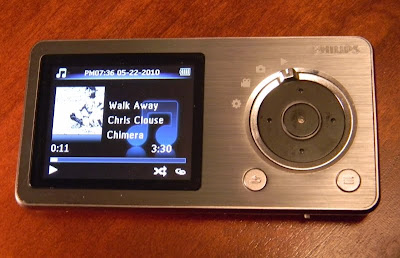
Music: The Cam will play MP3 and WMA files (but not lossless WMA). It supports sorting by Song title, artist, album, and genre. It will display a small image of the album art if the file has art included. You get the normal Shuffle and Repeat play modes. Sound settings include setting a volume limit, picking one of the six included Equalizer presets or the one custom EQ setting. Doing so will turn off FullSound. You can also delete files from the player. The player doesn't take good advantage of the small screen, but it does display the play mode, if FullSound is active, the song name, album, and title, and song length and you position in it. The control pad will advance tracks (left or right), and pause the song if you hit the center button. Holding down on the left or right will rewind or fast forward though the current song until you release it. Music formats are very limited, and lossless files won't play at all, but the music player is otherwise all there. I give music play a B.

FullSound (From Philips' web site): Innovative FullSound technology faithfully restores sonic details to compressed MP3 music, dramatically enriching and enhancing it, so you can experience CD music without any distortion. Based on an audio post-processing algorithm, FullSound combines Philips' renowned expertise in music reproduction with the power of the latest generation Digital Signal Processor (DSP). The result is fuller bass with more depth and impact, boosted voice and instrument clarity, and rich detail. Rediscover your compressed MP3 music in true-to-life sound that will touch your soul and move your feet.
Photo: The small screen of the Cam isn't the best I've seen for photo viewing. The screen looses accurate color reproduction when viewed off-axis. The Cam is better at taking photos than displaying them. You get a slide show option with variable timing from 2 to 20 seconds between photos. You can display them in sequence or shuffled in order. You can also delete them from the player. Photos up to 1600 x 1200 will display, although there is no zoom function and all you see is a 220 x 176 representation of them. I give photo display on the Cam a D for below average.
Camera: Photos taken are 1600 x 1200, or 1.9 megapixel at 24 bits (16 million colors). The lens isn't great and there is no flash, but it'll do when you need a quick photo and the lighting is good. Above is an example taken with the Cam. You can shoot with 4 visual effects including Black & White, Sepia, Special Color, and Negative. You can digitally zoom in .1 increments up to 2x. Warning: There is a loud shutter sound played through the headphones when you take a photo, with no apparent way to lower the volume. Photos are decent, and better than I've gotten with the few other photo-taking MP3 players I've tested. It's nothing a basic pocket camera has to worry about, but you can take photos with the Cam. Average for what I've seen in a media player.
Video: The single sample video included was 640 x 360 at 25 frames in AVI, and played back flawlessly (but small) on the 2" display. I was also able play a 640 x 360 MP4 file (from my iPod Touch) and a 480 x 272 AVI file (from my Samsung P3). It appears with video out included Philips did their best to make the Cam a good video player. It will stretch video to fit the 4:3 screen, or play it at its actual ratio with black bars. You can also display some basic info about the file playing including date it was made, length, and file size. Holding down the left or right buttons on the control pad will step back or forward through the video in 6 second leaps. Lastly, you can initiate video output to a TV from within the video player app's options. Although the tiny screen isn't very satisfying to watch (unless there is no other alternative), I give video playback a B+.

TV out: No High definition HDMI for this player. You can choose between composite PAL or NTSC for output to any TV with Red/White audio and Yellow Video RCA Inputs. Once the video is directed to a TV using the included cable you still have pause/play and ff/rw control on the player. I ran into a bug playing an MP4 file though, where the video froze while I was trying to fast forward. The audio will play though both the headphone jack and the TV connection which is nice. Quality will be about the same as watching an old VCR on your new HDTV though. TV output is nice to have, but not the best choice here. Videos the Cam can play will look better playing on your PC. I guess it might come in handy if you were on vacation and desperate to watch a movie you had on board. Just don't forget to bring that cable with you.

Camcorder: Video is taken at 640 x 480 (VGA) and 30 frames per second. When I tested the Cam's capability my video (above) showed dropped frames leaving stuttery gaps as it played back. It appears when recording the Cam isn't capable of keeping up with even moderate action in the video scene. At this point I have to give video recording an F.
FM Radio: The FM radio on the Cam was easy to autotune and did a good job of ignoring weak signals or nearby frequencies of strong channels. There are 20 possible preset openings. The control pad makes it easy to change frequencies by presets (left and right) or .1 increments (up and down). Tap the center button to mute the radio. That's about it. No FM record (at least in this version of the firmware). Reception was good with the included earbuds acting as antenna. The radio will continue to play after returning to the main menu unless you choose another music or video playback option. It will play while you browse through photos. FM gets a B. It works. Not the best for features I've seen though.
·
Voice Recorder: The recorder option records to mono MP3 format. The mic did a good job of picking up my voice despite being on the back of the Cam. You can pause and resume a recording before saving it. You get easy access to the recorded files where you can review or delete them. Better voice recorder would give you 2 or 3 quality options, and maybe a recording level choice. As such I give the voice recorder a C for average.
·
File Browser: You can also browse the Cam's memory and use it as a portable hard drive if you like.
·
Summary: Given that Philips named this the Cam I was expecting more from this. Yes it was only $90, but it still falls short as a video camera. As a pocket media player, ignoring the camera, it is average at best. Still, if you are looking for a player that could take a candid photo on occasion you should consider the Latte iVu. It has a better screen, plays more media formats, and includes speakers and an FM transmitter. You can find the 8gb version at Walmart.com for even less than the Cam is selling for. JR.com also has them. My advice? Skip this player.
·
4D

Thursday, September 17, 2009

iPod Nano with Video Camera

Yes, Apple updated iPods again. The Touch is faster with a larger capacity. The Classic is has more capacity. The Shuffle can be had in more colors and at a lower price/capacity. All pretty boring. The only iPod that cornered my attention this September is the Nano. Let's look at the 16gb version:

- Lower price. $179 down from $199.
- Video camera.
- Pedometer. Coordinates with Nike+ if you use it.
- Microphone. No headphone microphone required for voice notes.
- Speaker.
- FM radio with RDS and song tagging for later purchase (Zune ripoff) and 15 minute buffer (iPod original).
- Voice prompts (optional).
- Larger screen. Always a good idea.
- Polished colors. Yes, more fingerprint prone.

If all you do is the math, the new Nano is by far the best iPod value you can find today. Compare to the 4gb Shuffle at $79. Add $100 to get 4 times the capacity and all the features I listed above.

This Nano is nearly a miracle from Apple. FM radio? That was a "pigs fly" moment. Not only did it get a radio, but that 15 minute buffer makes it THE best FM radio out there at the moment. Of course it's not the first player to have an FM radio. It doesn't have FM recording capability. It doesn't have HD radio like the new Zune HD does. There are other players with these features if you need or want them.

In case I forgot to mention, the Nano also plays movies and music and podcasts, displays photos Contains a calendar, Contacts list, Notes display, 3 games, clocks, and a To Do list. It's also beautiful. I'll leave complaining about the camera lens placement to others. I'm skipping an audio quality comparison. No grades for individual apps.
Should you buy yourself a new Nano? There are dozens of other players that cost less money. There is nothing else on the market with this mix of hardware and features though, so YES. I bought the blue 16gb Nano, engraved. Last thing I needed. The only new iPod I wanted.

4D

Monday, June 29, 2009

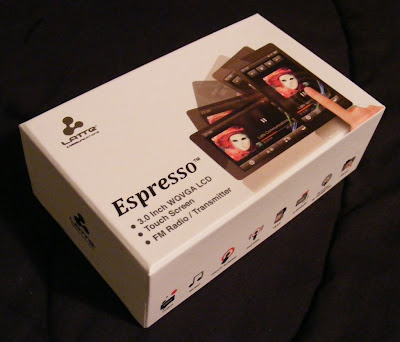
Latte Espresso Touchscreen Media Player, 16gb. My Review!

Latte looks like they want to move up the ladder in the touchscreen player market. Target.com sells this beautiful 3" touchscreen Espresso model in 8gb and 16gb versions for $120 and $150 respectively. No cutting costs on hardware features, as this player features a G-sensor, Haptic Feedback, Voice and FM Recording, and FM broadcast to any nearby FM radio. Target listed a microSD card slot, but my Espresso DID NOT have one. Target also lists a calendar app which doesn't exist on the Espresso.
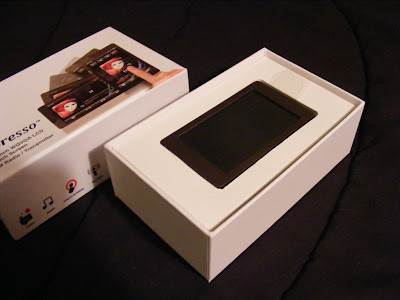
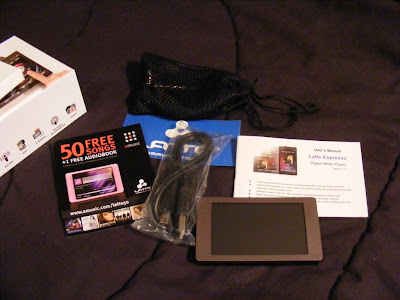
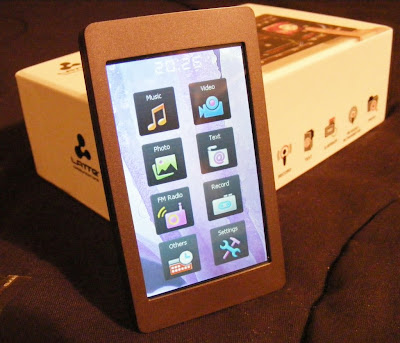
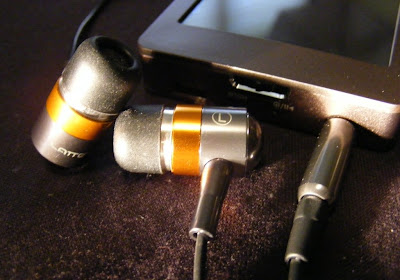
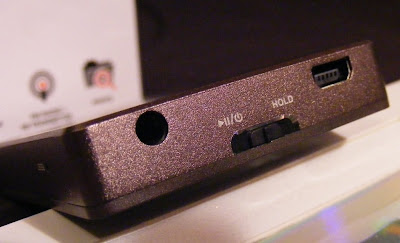
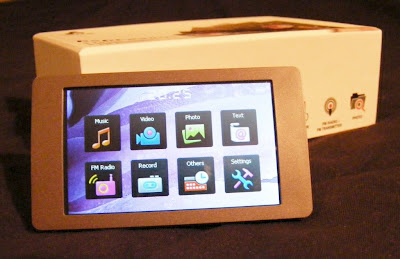
The packaging is a nice change from plastic blister packs. Slide the top off to find the player. Lift out the player to find the normal contents beneath. You'll find a standard USB to mini-USB cable, some nice sounding in-canal earbuds, a user manual, warranty card, and coupon for 50 free songs. The earbuds appear to be well made and designed to compliment the Espresso's style. They come with uneven length cables to the buds which makes them easy to wrap behind your head. They also came with a nice net bag and spare set of tips. As a bonus they also sound Great. Good bass, plenty loud, external sound isolating, no audible noise, and expressive across the audio spectrum. They are on sale for $5.99 at Lattezone.com (regular $14.99) though, so don't be upset if they sound or look cheap to you. The only external control is the Power/Play/Pause/Hold slider. On the same end you'll find the USB and headphone jack. There is a small reset hole just around the corner. I love the way the Espresso looks, with a clean simple bronze body evenly framing the 3" touchscreen. The back and sides appear to be aluminum with a fine bevel between them . The front screen surround is plastic. The back is brushed, and the overall finish does a good job at not showing fingerprints. If you care about where your headphone jack is, then the Espresso has the perfect solution. The internal G-sensor knows where down is, and no matter how your rotate it the icons and apps all rotate to stay upright. The main menu is a simple array of icons. A tap takes you to either the files list for the app or right into the (radio) player. There is a nice haptic vibration to confirm your selection. Music. This Latte will play back MP3, WMA, FLAC, APE, and AAC (no DRM) files. I've tried MP3, WAV, WMA, and FLAC with success, although it wouldn't play lossless WMA files. The music app is nearly complete. Missing is the ability to advance to any part of a song. There doesn't appear to be gapless playback. I couldn't find any playlist support in the manual or on the device, but there is an option to add songs to a single favorites list. The now-playing screen lets you tap between album art, a graphic equalizer, EQ/bitrate/repeat/shuffle info, or the ID3 info including title, album, and artist. There is a large PLAY/PAUSE button, with track and volume buttons smaller and along the right side (or top in portrait view). You also get an A-B button, lyrics toggle, settings icon, and BACK (previous screen) icon. Finding a single song in a long list is a tedious process. There is no reliable way to jump to a relative position in a list, and with no swipe or fast scroll of the list the touchscreen capabilities are underutilized. Yet this music app is better than most I've seen on budget Chinese media players. I've been enjoying a shuffle though my music collection as I write this. Music gets a B+.
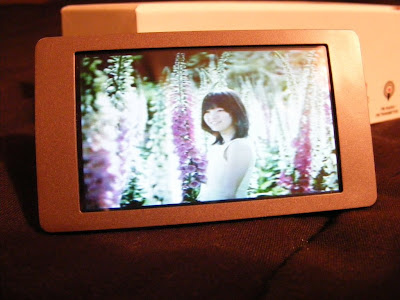
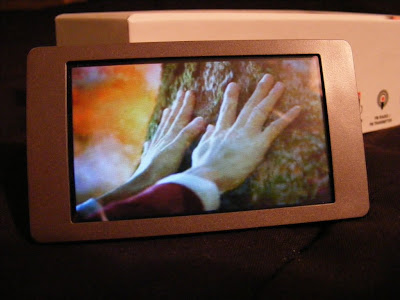
Video. Video format includes AVI, WMV, RM, RMVB, and FLV. Video is the only visual media to not rotate to portrait view. You can still flip the headphone end from right to left and the video will flip. I've tried WMV and AVI files on the Espresso, and although they play there is occasional frame drop. Audio will also get slighly out-of-sync. This may be no problem with videos formatted to fit the native resolution of the screen. My videos were all 480 x 272 or larger. The screen resolution is 420 x 240, but the user manual claims videos up to 800 x 480 (AVI) will play. This is no OLED screen, but videos look decent, and are certainly watchable. The resolution is slighty below what other 3" players feature, but on such a small screen the difference is not apparent. On a side note, the new (and expensive) Sony Walkman 3" t0uchscreen player has the same resolution yet worse video codec/format support. Video playback gets a B-.
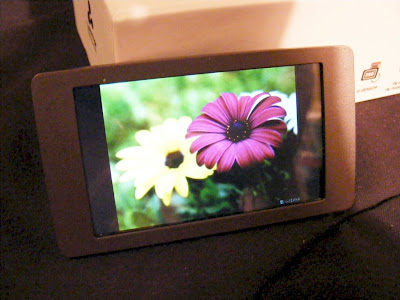
Photos. You can view JPEG, BMP, and GIF images. You can rotate the screen, but images don't auto-rotate to fit the screen, nor will they reliably rotate as the screen rotates. There is a one-step zoom option. You can pan around a zoomed image, but screen response is slow and a bit unpredictable. Images looks fine on the screen though, when you can avoid glare. This app is immature, and my experience suggests it won't be updated. Photo display gets a C+.
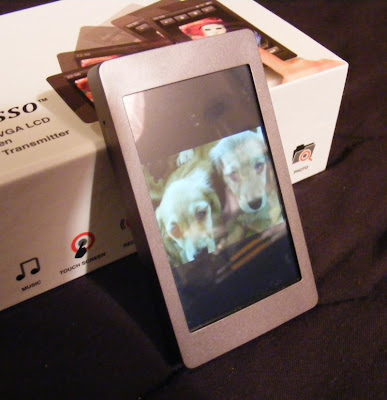
Text. TXT files can be read. You get three font sizes, as three font colors to choose from. The text will rotate as you turn the player for landscape or horizontal views. Legibility depends on the background and font color you choose, but text is crisp on the 420 x 240 screen. Moving through a large text file isn't as easy as it could be. It should be easy enough to throw a grocery list on the player, though you can't create one on the player itself. Text gets a C+.

FM Radio. Works as expected. You can tune manually or let it autotune and select by preset stations. The presets page irritatingly doesn't let you pick a preset and jump to it, but it does let you delete or add stations easily. No RDS info. No HD radio tuning. Reception will vary depending on your headphones and orientation, as the headphone cable serves as the FM antenna. You can also record off of FM. You get two quality settings. To my ears the high quality WAV recording produced sounds just like the song did playing over the air. It take RDS to get an A from me, so FM Radio gets a B.

Voice Recording. There are two quality settings and five level settings. Recordings are in the .WAV format. I have no idea where the mic is on the Espresso but facing the screen the pickup seemed to be fine. There was noticeable 'static' in my recording. I could hear it through the headphone both while recording and playing back what I'd recorded. Not enough to make the recording useless, but something that will keep this feature of the Espresso from replacing your dictation machine. You can pause and resume while recording, and choose to save or not save a recording you've just made. You'll need to go into the music app or explorer to find an play back your recordings. Voice Recording gets a C-.

Stopwatch is your bonus app. Very basic. No lap times, and only a single timer. It displays time down to 100ths of a second. You can pause and resume a timing. There is also a reset icon. The display will rotate as the device rotates. That's it. Nothing special. C.

Explorer is what explorer does. Have a grand tour of the files you've put on your player.

Settings. Among other things the Settings option lets you turn on or off haptic response and the G-sensor. You can change or disable the backlight and power OFF timings. You'll also find your background choices here. Photo slide show timing is also here, although it would have been more useful in the Photo app.
·
Summary. I strongly suggest you use a soft tipped stylus with the Espresso. It's hard to be precise enough with a fat finger as the small icon/targets demand. Otherwise I find this Latte a good value for the money. FM broadcast from a media player is very convenient, and it works well on the Espresso. You can set the frequency you want to broadcast at, and any FM radio with 30 feet or so should be able to play your music. A cheaper alternative to wireless audio than Bluetooth although not as versatile. It's not as nice a player as the Samsung P2 or P3, but you get twice as much memory capacity for the same money. Target seems to have the best price on them right now, but don't trust their description. There is NO memory slot and no calendar on the Espresso. If you can get over that, I highly recommend Latte's Espresso.
4D

Wednesday, June 24, 2009

Ematic 3 Inch Touchscreen Media Player

Three inch touchscreen players are coming out of the walls these days. Now Ematic gets into the game with it's own 8gb effort. Available from Walmart.com, the $79.99 price seems pretty amazing for what you get. For beginners there is the 8gb capacity. Add in a MicroSD slot for added future capacity. Now sum up the rest of the hardware features:
FM Radio and FM recording.
Built-in speaker.
Rechargeable Li-Polymer Battery.
E-Book (text) support.
Microphone for Voice Recording.
USB 2.0 Storage Device capable.

Did I mention it's a 3" touchscreen player? The package includes the expected (standard) mini USB charge/sync cable, in-canal earbuds, warranty card and user manual. There is also a small stylus and cleaning cloth.

For a touchscreen interface, Ematic's is still immature. There is no swipe action support. To scroll through lists you have to tap a down or up icon. It's clear they took the buttons from their non-touchscreen players and made graphic replicas of them on the screen. No advanced thinking here. You can select a file or function by tapping on it, but sorting through a long list of songs will be painful. Tapping the down or up arrow only moves one line at a time instead of one page at a time. If you have 500 songs on the player it may take you 250 taps to get to the one in the middle. Fortunately there is ID3 tag support, and you can sort your music by All Music, Album, Artist, Genre, Favorites, and Recordings. When you've got a song playing there is a Current Play option as well. Move to the bottom of the options and you find a Hold Recollection choice, Dir List choice, and MediaLib Update choice. I commend Ematic for being thorough here.
·
Music: There is no album art support, but the Music app is otherwise complete. The Now Playing screen displays ID3 information, Volume, progression, a graphic equalizer, count (138/473), and Filename. You have buttons to access music settings, back to the file list, and main menu. You can even turn these buttons OFF if you don't want to see them at the top of the screen.
This Ematic will play MP3, WMA, WAV, and ASF files. It'll display lyrics if your songs have them (in the right format). I had no trouble playing MP3, WMA, and WAV files. The quality was surprisingly good. You get several equalizer presets including Rock, Pop, Classic, Bass, and Jazz. There is a single 5-band user equalizer you can customize. You'll find a 3D and BASS option too. I prefer my Music "Normal", but whatever you choose will be indicated on the now-playing screen. There is no gapless playback, but the delay between consecutive songs is small. Output is loud. With in-canal earplugs I found a measly "4" setting was loud enough for my old ears. This Ematic could easily cause hearing damage on it's higher settings. It should have no trouble with larger headphones. The Music app gets an A- , primarily for lack of album art support.
Video: The Ematic claims to play AVI, RM, RMVB, FLV, and WMV video files. I threw a 480 x 272 AVI file and it played fine. It also played (some of) my MP4 files and WMV videos. Don't trust the specs on the box or in the user manual. The Ematic appears to be better than they claim. I would occasionally notice a little audio/video sync error, but a tap of the Pause then Play again would clear it up. The reflective glass over the screen was the biggest flaw for video playback, as it causes glare in all but the darkest room. I'm impressed with video playback on this Ematic. For the broad codec and resolution support, as well as large 3" screen, the Ematic get's an A- for Video. It was only the glare that detracts.
Photo: The Ematic displayed any .JPG photo I threw on it. The crude UI makes zooming and rotating a photo very cumbersome, but you can at least do both. Zoom appears to be limited to 2x though. There doesn't appear to be a slide show option. No Swipe to change photos. You can have music playing while photos display, but with no automatic slide show it's pretty boring. Photos don't look as good on the LCD'd Ematic as they do an my AMOLED Cowon S9 or Iriver SPINN, but they'll impress anyone who hasn't seen an OLED display yet. Still a screen glare problem as with videos. It appears Photo display is the weakest effort on this player. Photo Display gets a C+. There is far more touchscreen potential.

FM Radio: The Radio app is straight forward and easy to use. Like every other player the FM radio requires headphones to be plugged in for it's antenna. Reception will vary with your location and the headphones you use. In the radio settings menu you set your region. Then have it auto-search for stations. Once it has located your channels they can be individually deleted from or added to. ON the radio screen there is a small record icon next to the station number. Tap it to open the record screen. There is only one quality choice (Low), and the recordings will be in WAV format. Sadly this will be a 32kbps 8KHz Mono Lossy file. For FM Music this is not acceptable, and far below the standard set by other players that can record from FM. It might suffice for talk radio, but what you'll hear from the recording will sound different from what you heard on the radio. There is no RDS support, and with such poor recording quality the radio app gets a B-.

E-Book: Text can be viewed but not edited on this Ematic. You get 3 font sizes. You get three font colors to choose from. Text can be manually paged through or will auto-page at a fixed rate. Lines are automatically wrapped to fit, and it appears tabs in the text are supported. The e-book app is better than most, so E-Book gets an A-. It would have been nice to view in portrait mode.

Voice Recording: Yes, you can record your voice with this Ematic. There is a record level setting, and I'll recommend you set in on the largest number right away. Voice is recorded in Low quality mono WAV format. There is no visible mic, so they might be using the speaker on the rear for input. I got much better results talking into the back of the player. You'll also need to be close, as it won't easily pick up noises from more than a foot or so away. It doesn't look like this could be used to record lectures. You can pause then resume a recording. You'll have to leave the recorder app to listen to your recordings. Voice recording gets a C. Average, with no exceptional value.

Extra(s?): There is only one "extra" on this Ematic, and it's a very basic stopwatch. You get one play button that will start or pause the timer. To reset it you have to exit out of the app. That's it.

Settings: In the settings menu you have a few things you can customize. You can change the timing and brightness of the backlight. You can hide or display the battery status icon. You can change between 8 different background/desktop images. You can set an auto-shutdown timer. There is also a system information option.

Build Quality: I'm 50-50 here. The earbuds that came with my Ematic are defective. The player itself seems well made and solid, if not a bit light. The User Interface is adequate, but dated. The back is what appears to be brushed aluminum, and does a decent job of not showing fingerprints. The gloss black plastic front is just the opposite. The little stylus proves valuable, as some of the targets are small on the screen. There is no external control. The only switch on one end is the Power/Hold slider. Build Quality of the Ematic gets a B. I'd have given it an A if the earbuds had worked.

Value: It has it's flaws, but this little Ematic does a far better job than earlier inexpensive touchscreen players I've reviewed. It won't compete with the Samsung P2 or P3, the Cowon S9, or the iPod Touch. For $80 its one hell of a good value though. I've been listening to mine all day, and the music is just a little sweeter knowing I only shed $80 for the privilege. Value is an A. Get one if you're considering one. Keep that receipt though, as you may need to exchange your earbuds.

4D