
Creative is now making an Android-based Zen media player. I'm delighted to see more companies jumping on the android bandwagon. When the Zen Touch 2 (I'll referred to it as the T2) with GPS became available on their web site (you can also order them on Amazon.com ) I ordered one. Mine arrived 2/28/2011, and since then I've been going through it in detail, hoping to find what special touches Creative could add to Android, if any. As of now, I'm not sure they did anything beyond putting their name on this device.
) I ordered one. Mine arrived 2/28/2011, and since then I've been going through it in detail, hoping to find what special touches Creative could add to Android, if any. As of now, I'm not sure they did anything beyond putting their name on this device. 
 . Don't consider this player if you want to impress your friends with your stylish choices. The nicest software touch they added was a quick graphic on boot-up advising you to "Touch the Sound of Perfection". After that you get another annoying slide-to-unlock screen then a typical Android UI.
 What's in the Box? In addition to the 8gb (only 4.1gb available) Zen Touch 2 you get:
- A mini USB cable, although I hope you have a USB port on the front of your PC as it is only 4" long.
- In-Ear headphones. Better than what usually comes with MP3 players.
- Warranty sheet (one year).
- Quick Start Guide.
- An ad for Creative accessories.
- $10 EMusic card.
- One free Audiobook offer.
- and advice on protecting your hearing.
- 120mm x 69mm x 13mm, 122g.
- 4.72" x 2.72" x .5", 4.3oz
- For comparison:
Controls and Ports (held horizontally with the Home button on the right):
- Power button (left end). Hold in to power the T2 on or off. Tap to toggle just the screen off/on.
- Volume +/- (top edge)
- Search, Back, and Menu/List buttons (touch sensitive, to the right of the LCD screen)
- HOME button (oddly a mechanical push button on the front face)
- Speaker port (5/16" x 1/16" slot on back)
- Camera Lens (on back)
- Mini USB port (right end)
- Headphone jack (right end)
- Video output (Composite, uses headphone jack and custom cable)
- MicroSD slot (bottom edge under a rubber pull tab)
- Microphone (small hole on bottom edge, labeled by white microphone icon)

This Zen's media apps:
- Music: The T2 will play music in these formats: MP3, AAC, WMA9, FLAC, OGG, ADPCM, MIDI, WAV, and Audible. I was shocked to discover there is no Equalizer. No Presets. No user settings. I had to dig out my ancient Zen 4gb to see if this was Creative's pattern or not (it is NOT). The audio output was powerful enough to easily drive my large Sennheiser HD595 headphones. No gapless playback though. Just the basics it seems. On the Now Playing screen you get a small album art view. Controls are all visible and active including List, Shuffle and Repeat buttons, as well as the typical Prev(Rewind when held)/Play(pause)/Next(Fast Forward when held) buttons. Info displayed includes a song length/position slider bar, artist, album, and song title. A long press on the last three brings up a Music/Browser Search window to find all songs or web info that matches the item touched. The Now Playing screen simply rearranges the same info for landscape or portrait view. A tap on the T2's menu icon will bring up options for Party Shuffle, Add to Playlist, Delete, and Library. With no Equalizer though the Music app gets a B.
- Gallery (used for video and photos): Both Video formats supported include H.264, MPEG4, WMV9, and AVI video. Photo types include JPG, BMP, and PNG. My Touch 2 played WMV, AVI, and MP4 video files fine, although those that weren't the same width/height ratio as the screen had no way to be stretched to fit the screen. All you get when playing videos is the standard video Rew/Play/Ffwd and a length/position slider bar. No info, no submenu options, nothing. Don't buy the Touch 2 for videos. Video gets a C- from me. The Photo capabilities are only a little more useful. No swipe to the next photo. You have to tap on the screen to get a next or previous triangle to tap on. You also get a zoom (magnifying) in/out bar, a share icon, and a delete icon. Tap Share to bring up options for Bluetooth Object Push and Email. You can also double-tap on the screen for one step of zooming in. Once zoomed in it is easy to pan around the photo. Using the magnifying bar there are 13 steps of zoom, which does a fine job of bringing up the tiniest details in a photo. Tap the T2's menu button for a few more options including Rotate, Delete, Crop, Details, and More. More adds Show on Maps, Slideshow, Settings (for slideshow), and another Push Image by Bluetooth choice. Slideshow Settings are more complete than usual. Where both Videos and Photo suffer is from the poor screen quality. Photos get a B- from me for leaving out the easiest way to see the next photo.

- FM Radio with RDS! You need headphones plugged in to use the radio. The Radio app will warn you to plug them in if they are not, and although the radio app will open it won't turn on without the headphones. The app is fairly complete. You get a station slider bar, Off/On button, scan forward and back buttons, frequency up and down (in .05 steps) buttons, an add-to- presets (+) button, and a Presets List button which includes the AutoTune choice. If the station tuned to includes RDS info it will display above the frequency displayed. No HD-Radio reception. No option to delete a preset from the list that I could find. No recording of Radio that I could find. Radio will play in the background while you run other apps that don't have their own audio. To turn it off you need to tap the power icon in the app, or run another program with its own audio (like Music). With no recording or preset delete I have to give FM Radio a B.


- Bluetooth - 2.1 EDR: So far I've found it supports file transfer, stereo audio to headphone or speakers. My bluetooth keyboards would pair but not connect. Audio quality over bluetooth to my Sony BT50s is on the better side of typical. All controls over media play worked both from the headset and the player.
- WiFi - IEEE 802.11 b/g/n: No problems connecting to my Dlink n-capable router. Signal strength is as good as on any other 802.11n device I've reviewed, no matter where in my house I wandered to.
- GPS: I'll need to find a GPS enabled app to give this a test. Stay tuned.
- Compass: Seems to work. Found north just fine using a compass app. Not sure how useful it will be, but am optimistic it will eventually come in handy.
- Accelerometer: The UI and direction-sensitive apps react quickly when the T2 is rotated. Nothing else to test it with. Another "stay tuned".
- Camera: The camera will take still photos at 1600 x 1200 (2mp) or 640 x 480 as JPGs. Video taken is MP4 (H.264) at 21fps and 360kbps, 640 x 480 pixels. Video doesn't play back very smooth. The camera app is pretty complete, with white balance, quality, GPS (location) tagging, effects settings, crop and delete, etc.. No zoom to speak of. No flash. The lens is fixed-focus and cheap. It is also easily blocked by your finger when holding the T2 naturally.


Web Browser: Works best with mobile web pages. The low resolution hinders usefulness on classic web pages. A double tap works as expected, stretching columns to fit the screen width. Panning and scrolling is responsive and smooth. I recommend using a stylus if you expect to be accurate tapping on tiny links. Settings include options to Add a bookmark, Find on Page, Select Text, Page Info, Share Page, Downloads, and page content settings. You can choose from Text Size, Default Zoom, Text Encoding, Open Pages in overview, Block Pop-up windows, Load images, Landscape only, Enable Javascript, Enable Plug-ins, Open in Background, and Set Home Page. In addition there are privacy settings to Clear cache, Clear History, Accept cookies, Clear all cookie data, Remember form data, Clear form data, Enable location, Clear location access, Remember passwords, Clear passwords, Show security settings, and even more advanced options. With exceptions for the low-res screen The Web Browser is very complete. Almost a joy to use on the Touch 2. Web Browser earns an A.
UI: The android UI will turn horizontal or vertical depending on how you hold the T2, but only 90 degrees one way. The screen is sensitive and very responsive, but graphics do not instantly react like those on an iPod Touch. There are only three home page screens. This will prove limiting after you start adding apps. You get just 4 widgets including an analog clock, bluetooth control (PureAndroidAudio), Power Control, and Search. You can add Widgets, Shortcuts, or Folders to any or all home screens. You can also choose the wallpaper (background) from 10 included photos, your own photos, or 4 different colors. You can adjust the brightness of the screen from Settings-Display or the Power Widget. Viewing angles are decent in one axis and limited in the other, typical for the inexpensive LCD screen used. Other than for the poor choice of screen the UI response is as good as any other android device I've reviewed. Limited pages and included apps/widgets lead me to giving UI a B-.

Conclusion: For a device with so many hardware features it is a shame Creative went with such a poor screen. The Touch 2 is almost as large as my Archos 43 , but the 3.2" 480 x 320 screen is significantly smaller and less than half the resolution. Poor video playback and no audio equalizer round out the flaws. There appears to be plenty of processing power. Audio output is strong. Bluetooth is great and FM radio with RDS is appreciated. Is it worth $199? The 8g Archos 43
 is also $199 but comes with a better screen, better UI, more functional WiFi and Bluetooth features and remains my favorite device for now. So NO. The Touch-2 with GPS is NOT a good value at its current price.
, but the 3.2" 480 x 320 screen is significantly smaller and less than half the resolution. Poor video playback and no audio equalizer round out the flaws. There appears to be plenty of processing power. Audio output is strong. Bluetooth is great and FM radio with RDS is appreciated. Is it worth $199? The 8g Archos 43 is also $199 but comes with a better screen, better UI, more functional WiFi and Bluetooth features and remains my favorite device for now. So NO. The Touch-2 with GPS is NOT a good value at its current price. 4D
PS: If you enjoy my blog, please consider clicking on an Ad or two. Thanks!


 This isn't the only media player out there with a camera in it. It looks like Philips' first try though. The Philips Cam, also known as the

 The microSD slot and reset hole are on the bottom edge. USB and headphone jacks are on the right. The microphone is on the back next to the camera lens.
 Included in the package with the GoGear Cam is a combined USB sync/TV-out cable, inexpensive earbuds, a quick-start guide, and warranty/registration info. Songbird software is included on the player to be installed on your PC, but it is not required. Playtime on internal battery is up to 12 hours audio or 4 hours video.
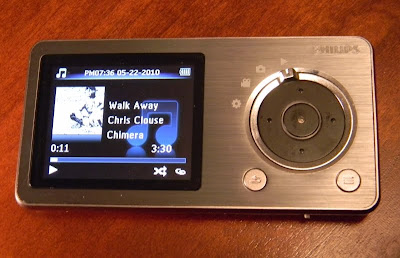 Music: The Cam will play MP3 and WMA files (but not lossless WMA). It supports sorting by Song title, artist, album, and genre. It will display a small image of the album art if the file has art included. You get the normal Shuffle and Repeat play modes. Sound settings include setting a volume limit, picking one of the six included Equalizer presets or the one custom EQ setting. Doing so will turn off FullSound. You can also delete files from the player. The player doesn't take good advantage of the small screen, but it does display the play mode, if FullSound is active, the song name, album, and title, and song length and you position in it. The control pad will advance tracks (left or right), and pause the song if you hit the center button. Holding down on the left or right will rewind or fast forward though the current song until you release it. Music formats are very limited, and lossless files won't play at all, but the music player is otherwise all there. I give music play a B.
 Photo: The small screen of the Cam isn't the best I've seen for photo viewing. The screen looses accurate color reproduction when viewed off-axis. The Cam is better at taking photos than displaying them. You get a slide show option with variable timing from 2 to 20 seconds between photos. You can display them in sequence or shuffled in order. You can also delete them from the player. Photos up to 1600 x 1200 will display, although there is no zoom function and all you see is a 220 x 176 representation of them. I give photo display on the Cam a D for below average.
 Camera: Photos taken are 1600 x 1200, or 1.9 megapixel at 24 bits (16 million colors). The lens isn't great and there is no flash, but it'll do when you need a quick photo and the lighting is good. Above is an example taken with the Cam. You can shoot with 4 visual effects including Black & White, Sepia, Special Color, and Negative. You can digitally zoom in .1 increments up to 2x. Warning: There is a loud shutter sound played through the headphones when you take a photo, with no apparent way to lower the volume. Photos are decent, and better than I've gotten with the few other photo-taking MP3 players I've tested. It's nothing a basic pocket camera has to worry about, but you can take photos with the Cam. Average for what I've seen in a media player.
 Video: The single sample video included was 640 x 360 at 25 frames in AVI, and played back flawlessly (but small) on the 2" display. I was also able play a 640 x 360 MP4 file (from my iPod Touch) and a 480 x 272 AVI file (from
  FM Radio: The FM radio on the Cam was easy to autotune and did a good job of ignoring weak signals or nearby frequencies of strong channels. There are 20 possible preset openings. The control pad makes it easy to change frequencies by presets (left and right) or .1 increments (up and down). Tap the center button to mute the radio. That's about it. No FM record (at least in this version of the firmware). Reception was good with the included earbuds acting as antenna. The radio will continue to play after returning to the main menu unless you choose another music or video playback option. It will play while you browse through photos. FM gets a B. It works. Not the best for features I've seen though.
 That's right. I plunked down my money for the SDK and 32gb Zii Egg, and here are my first impressions. The bottom end is where you'll find the headphone jack, Mini, USB jack, and Zii proprietary connector jack. The top edge shows the power button, and you can see the HD camera lens near the top on the Zii's back. I've left the little plastic protection tab on it until I see an app that can actually make use of this camera.
 According to Zii Labs, this is very impressive hardware. However there is no way to demonstrate or evaluate many of the features at this point. No Apps to use the cameras. No apps to use the GPS. Not even a setting to turn bluetooth on. What we did get is a Music app, a Video app, a Photo app, a web browser, a some basic settings to play with.
 It's a case of Amazing Potential that is still Undeveloped.

 The Music App handles MP3, M4a, and WAV files so far. Sound quality is great when using decent headphones. I haven't seen the screen display cover art yet. You get all the necessary controls within the music app. There are no preset or user definable equalizer options. You can sort by Album, Artist, Genres, or All Tracks. The now playing screen can cycle between three sets of options including with track position slider, with volume slider, and just album art to view. I'll state again that so far I haven't been able to display any album art in the Music app though.
 The Video app is quite capable. I threw AVI, MP4, and WMV movies on the Zii and all played fine. No audio/video sync issues. No frame drops. The Zii came with a sample MP4 video that was 1280 x 720. I tried 540 x 360 WMV and 320 x 180 AVI movies with no difficulty. There is certainly room for improvement in the Video app, but those would only be settings for brightness and perhaps playback speed. This Zii should be able to output HD movies directly to your TV over HDMI. I've got the required HDMI cable coming, so we'll see. I don't know where I'll find any 1920 x 1080 video content, but am confident the Zii's processor is up to that task. Below is a scene from Mulan. You can see a reflection of my Camera lens on the very glossy screen.
  UI. There is not much to say about the User Interface. You've got app icons. You tap on those icons to open the app. When done with the app you hit the Home button to return to this home menu. Nothing innovative or creative here. Screen response is at times hesitant, as if the Zii is not paying attention. Yet when it wants to the response can be instant. There is NO multitasking yet. Even the Music app stops playing if you return to the Home menu.
 As you can see, what it promises to do is pretty amazing for such an inexpensive player. You may notice the 960 x 240 screen specification. Turns out that's a little creative marketing by the Chinese manufacturer. The 4:3 ratio screen is indeed 240 pixels high, but they counted each red, green, and blue pixel component horizontally to come up with 960. The net effect is a 320 (960/3) x 240 screen. It IS a very sharp and detailed image produced though, easily sharp enough for reading ebooks. The other high points include the microphone, camera, built-in speaker, and microSD slot.
 The player is suprisingly small. At 3.2" x 2" and .5" thick, the StyleX fits easily in a shirt pocket. The case seems to be chrome plated plastic, and the whole thing is very lightweight. Less than the weight of a deck of cards. There is a generally cheap feel to it, consistant with it's price.
 The bottom edge reveals the microSD slot, a Volume button, and the microphone hole.

 Audio output is strong, no doubt to compensate for the cheap earbuds it comes with. I have to keep it on the lowest possible setting or it overwhelms my good headphones. Audio quality is very good, with strong bass, and fairly even levels across the audible frequency range.
  The camera has a pinhole lens, and doesn't let in much light. 1.3 megapixels (up to 1600x1200), with 4x digital zoom capability. No flash, so to take a good photo you'll need a bright setting, preferably out in the sunlight. The camera can take photos or video. There is also a multi-shot photo mode. The camera can also serve as a USB PC camera. This is a shot taken from the camera:


 Posts
Posts


