My Slider arrived via UPS on 9/29/2011. I bought it from CircuitCity.com as they had it in stock ready for shipping. The box was typical Asus with the tablet in a plastic tray and included accessories stored beneath it. All the glossy surfaces had clear plastic to protect them that you'll get to peel off. It came with an AC/USB Power Supply, USB cable, warranty card and a User's Manual. "Inspiring Innovation Persistent Perfection" printed on the last two to put you in a good mood.
The Slider came with Android 3.1 installed, but started downloading the 3.2 update as soon as I had it connected to my wifi router. 20 minutes later or so 3.2 was installed. Out of the box and unpeeled the Slider is a thing of beauty. The front, of course, is mostly a big piece of glass. The setting for this glass is a wide bezel that bows out on the ends with a brushed metal edging on the sides and top. A spin around the edge discovers the power button, volume rocker, and microSD slot on the left end. Asus's docking port and a mini-HDMI port are along the top. The headphone jack and USB port are nicely articulated on the right end.
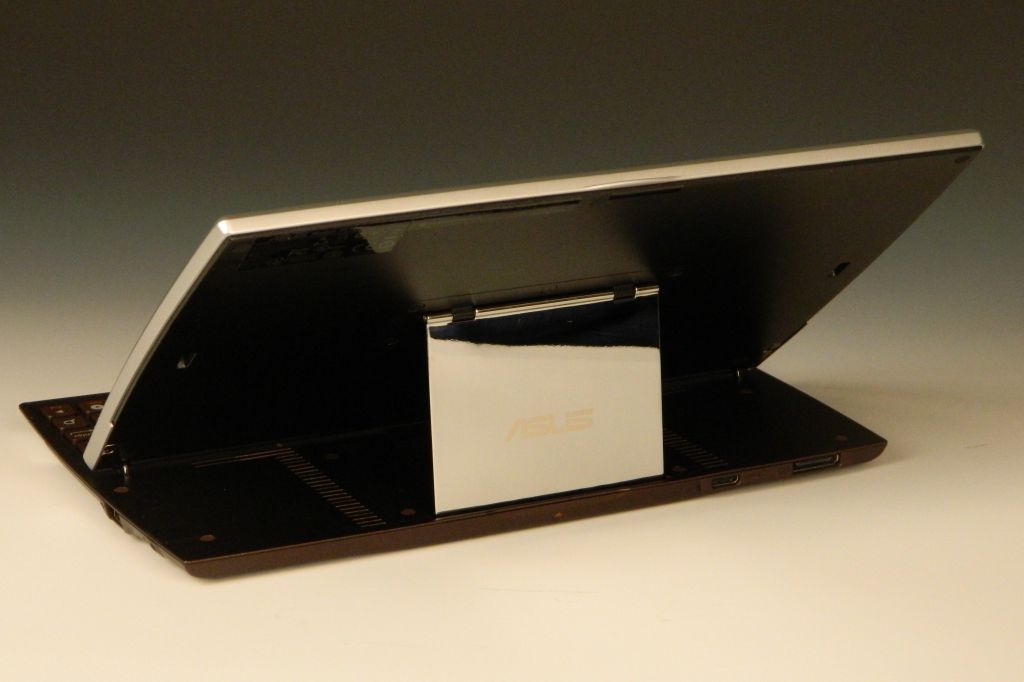
That metal edging wraps around to the back where it widens to a 1.375" band across the bottom. A chrome strip seperates the brushed metal from a bronze field with the camera lens centered near the top. The top center edge has a raised lip at the seam between the front and back, with an arrow hinting something will happen if you pull here. Indeed, with a slight lift the front half rotates up to park itself above the newly exposed keyboard. The screen comes on and confronts you. The screen's resting angle is roughly 38 degrees above horizontal and not further adjustable.
The keyboard keys are smaller than usual, but have a good action and nice feel to them in action. There are a few android-specific keys. They have included the number keys along the top row. The One and Six have a bright circle around them to provide a visual location aid. It appears as if it is carved from a bronze ingot, but is likely a high density plastic. Not the best keyboard for android tablet use, but it is certainly handy. Folding under the screen as it does leaves the screen exposed. I'll definitely need a case for this tablet.
Dimensions: 10.75 x 7.1 x .72 inches. 2.21 lbs. Not light. Not thin.
Hardware:
- Screen: 10.1" IPS, 10 point multitouch, 1280 x 800, Gorilla Glass Screen.
- Processor: NVIDIA Tegra 2 dual core mobile processor 1Ghz.
- Battery: 25W/h Li-Polymer. Estimated 8hrs between charges.
- Cameras: 1.2MP front. 5MP rear
- WLAN: 802.11 b/g/n@2.4GHz
- Bluetooth: V2.1+EDR
- Memory: 1GB,
- Storage: 16GB/32GB + MicroSD card reader (up to 32GB). 12.63GB available when new.
- Ports: mini-HDMI port, Full size USB 2.0.
- Single (mono) speaker.
- Microphone.
- G-Sensor
- Light Sensor
- Gyroscope
- E-Compass
- GPS
- Volume +/- rocker
- Headphone/Mic jack.
- Keyboard: Android-specific keys include Home, Back, Search, and Menu. You also have Brightness up/down, and Wifi & Bluetooth toggles.
Build Quality: Impressive. When folded the top and bottom are a graceful compliment to each other. The front edge chamfers down then tapers to round over the back edge. The body is a composite of brushed metal, bronze (paint), and a little chrome. Cable connections are nicely articulated from the bottom edge. Buttons are inset yet project just enough to exhibit their function and permit their use. Reset is a button rather than a hole on this tablet. Speakers are a bit muffled when the tablet is closed, but perk up when you lift the screen to reveal two columns of slots as speaker grills. Strong magnets hold the screen down and up. The user manual warns against leaving your credit cards too close to the Slider. The lift mechanism is an offset parallelogram. The exposed face of this brace is a mirror polished rectangle with "ASUS" etched into it. The IPS screen is easy to see from any practical angle.
Media capabilities: AAC, MP3, MIDI, OGG, and WAV music codecs are all listed as supported in the User's Manual. I was also able to play WMA and WMA lossless files, along with FLAC files with no problem straight from the file browser and in the Music app. H.263/H.264 MPEG4 is the only video codec listed as supported. I was able to play MP4 videos with no trouble. AVIs played but with pixilation. MWV movies wouldn't open. There are apps available in the Market that will play just about any video though so don't let the limited initial video support disturb you.
Audio output from what sounds like a mono speaker source is limited to middle and upper frequencies. Audio levels only dropped a little with the keyboard closed tablet down. Quality out the headphone jack to good headphones is a pleasure though. Their "Supreme SRS Sound with max bass response" is a step or two better than the typical android tablet sound quality with no enhancements. I'll warn you to turn the sound down if you've been listening to the onboard speaker when you switch to headphone or you're in for an ear-busting surprise. This tablet can easily get loud enough to drive the most demanding headphones I have.
Asus applications: ASUS Launcher, MyLibrary, MyNet, MyCloud, ASUS Sync, Asus @Vibe
Other Include Apps: File manager, Kindle books, Zinio Magazine, PressReader, Polaris Office
Google Apps: GMail, Google Maps, Google Places, Google Navigate, Google Latitude, Android Market, Google Music, Google Videos, Google Books, ...
In use it is a heavy tablet but as capable as any of the competitors out there. Unless you'll always have a horizontal surface to open the keyboard up on, the extra weight is a bit of a penalty to have to carry. Yet if you plan to use the Slider as a laptop/notebook replacement it may be the perfect solution. The included Polaris Office app (word/spreadsheet/presentation) and that keyboard will let you get some serious work done. When folded away you have tablet simplicity behind a beautiful touchscreen to entertain yourself with. This tablet also has bluetooth and a USB port on the side. It is easy to add a full-sized keyboard and mouse if you really want to get serious. HDMI-out lets you mirror the android UI onto any HDTV or computer monitor with an HDMI port. Don't buy it if you only want to check email and play a game of Angry Birds. Consider it if you were considering a netbook to shrink your travel load. This has a nicer screen and broader array of uses than any netbook, and you can still get your work done on it for half the carry-on weight. It'll fit perfectly on that seat-back table too.
Conclusions? I've spent the last few days with my Slider. It is easier to lug around than my Asus Transformer and it's keyboard dock. Far easier to tote than my notebook PC. It connected quickly and reliably to my home and work WiFi networks. It allowed me to check and reply to my email. I could browse the web when I needed to. I passed the boring moments playing Soduko or Angry Birds on it. That clever keyboard let me work on this review with relative ease. The screen is great. The Build is great. The engineering is clever. With nothing bad to say and only the size and weight to pick on I have to give the Asus EEE Slider an A+ Great Buy. It's unique features require a unique user though. If you fit that description then this is the tablet for you. Don't buy it if you want thin and light.
4D
PS: If you enjoy my reviews, please consider clicking on an Ad or two. Thanks!
Wednesday, September 28, 2011
Friday, September 23, 2011
Cradle for Sony Tablet S. My Review.
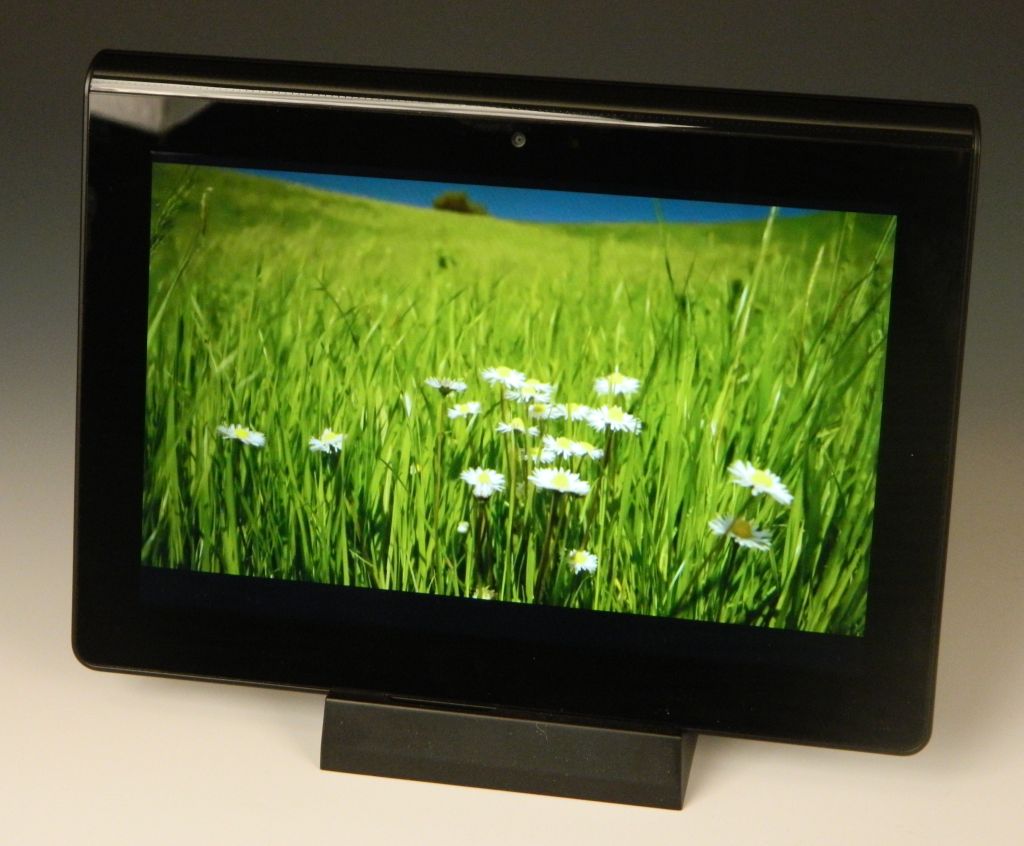
Sony's S Tablet includes the Chumby app, an alarm clock app, as well as a great TruBlack screen for movie and photo viewing. When you put your tablet on the dock it pops up the choice of Desk Clock, Chumby app, or Gallery. Laying flat on a table isn't the best position for taking advantage of these features, so Sony has now released a dock to hold the S upright and charge it at the same time. My dock arrived the Sept. 20. I've had a chance to use it a few days now.
It doesn't come with an AC adapter of its own. You have to commit the one that came with your tablet or purchase a spare from Sony. A shame, really, as I had intended to keep the dock at home and take my charger to work so I could top my S off when I wasn't using it.
The dock also allows two slightly different support angles. One best for passive viewing functions and the second a better angle if you'll need to tap on the screen repeatedly. Made of a stiff plastic and all black except for the rear support, it does a fine job of holding up the tablet in landscape with the thin edge down. The tablet's charge port aligns with the connection on the dock. You plug your adapter into the bottom. There is no way to use this cradle with the tablet in portait (vertical) mode. There are no other ports or outputs.
For $39 this cradle/dock is a useful accessory and fairly priced compared to docks I have purchased for other tablets. I wish it had been more capable (HDMI-out perhaps?) and had come with its own power supply. If you need a cradle for the Sony Tablet S though this is your only choice at the moment, and it is considerably better than a picture stand.
My recommendation? If you need it get it. It works as advertised. Best recommended for your bedside table. A great alternative and improvement over the standard alarm clock.
4D
P.S. : If you enjoy my reviews, please consider clicking on an Ad or two. Thanks!
![]() |
| Desk Clock/Alarm |
![]() |
| high angle |
![]() |
| low angle |
The dock also allows two slightly different support angles. One best for passive viewing functions and the second a better angle if you'll need to tap on the screen repeatedly. Made of a stiff plastic and all black except for the rear support, it does a fine job of holding up the tablet in landscape with the thin edge down. The tablet's charge port aligns with the connection on the dock. You plug your adapter into the bottom. There is no way to use this cradle with the tablet in portait (vertical) mode. There are no other ports or outputs.
![]() |
| Bottom cable jack. |
My recommendation? If you need it get it. It works as advertised. Best recommended for your bedside table. A great alternative and improvement over the standard alarm clock.
4D
P.S. : If you enjoy my reviews, please consider clicking on an Ad or two. Thanks!
Labels:
"Review",
Dock,
headphone-out,
Sony Tablet S
Sunday, September 18, 2011
Sony Tablet S gets Updated to Android 3.2!
That's right. The S has only been out for a day or two, but mine is downloading an update to Android 3.2. No indication if there is are any Sony enhancements on top of what 3.2 brings, but you have to give Sony props for getting this tablet updated so quickly.
The update is 183.1mb, and will take awhile to download. Mine looks like it'll finish after 20 minutes or so. It will warn you to plug in the AC charger before continuing. Once ready the tablet reboots to install the update.
OK, now all updated. No new apps I can see. Looks like all we get is the few new features Android 3.2 brings.
For my full review scroll down or hit this LINK. Thanks for visiting!
4D
The update is 183.1mb, and will take awhile to download. Mine looks like it'll finish after 20 minutes or so. It will warn you to plug in the AC charger before continuing. Once ready the tablet reboots to install the update.
OK, now all updated. No new apps I can see. Looks like all we get is the few new features Android 3.2 brings.
For my full review scroll down or hit this LINK. Thanks for visiting!
4D
Labels:
Android 3.2. Firmware,
Sony Tablet S,
update
Saturday, September 17, 2011
Sony Tablet S. My Review.
Sony took their time entering the Android tablet race. At first glance their patience was not wasted. This Sony S Wi-Fi Tablet (16GB) has some clever features and an original look that makes it stand out from the pack.
Mine arrived the 14th of September. Well packaged. The box includes a Quick Start Guide, A pictoral guide to the power switch, unlocking the screen, calling up the onscreen keyboard, signing in for the first time, and swiping between home pages. The AC adapter appears straight from one of Sony's laptops with a long AC cord, a power brick, and a long cord from the brick to the proprietary charge point on the bottom edge of the S. I'm not a fan of the dock connection used, as it is snaps in and is a challenge to get out. You also get a wrist lanyard, but there was no USB/syncing cable in the box. Lastly there was all the usual boilerplate of warnings, licenses, and disclaimers.
Hardware features:
- Universal IR remote/transmitter
- Battery Type : Li-Ion 5000mAh
+ Battery Life when browsing web with Wi-Fi - 6.2 hours
+ Battery charge time - 5.0 hours.
- Camera : Front – 0.3 Megapixel Rear – 5.0 Megapixel
- Bluetooth version 2.1 +
- Wi-Fi : IEEE802.11b/g/n
- Full-size SD Card slot
- TruBlack 1280 x 800 9.4" screen.
- Internal, Monaural microphone
- Internal, Stereo speakers
- Dimensions: 9.5" x 6.87" x 0.82" (thick end), and 1.29375 lbs (by my scale, no SD card inserted).
- User manual available here: PDF Link
A bit smaller than the 10.1 tablets out there, it looks like Sony didn't want to have to compete for 10.1 inch screens in case this tablet was a hit. Their 9.4" screen is still 16:10 wide screen rather than 4:3 like the iPad. It is better for movie playback and any other wide-screen media (like PlayStation games). I personally like the size. Lighter than the iPad2 and Samsung Galaxy 10.1 tablet I have, the weight plus the shape makes it almost delightful to hold. Sony also looks to have considered ergonomics in their design, and I'm very appreciative. None of the large tablets I've reviewed so far have been easy to hold up long enough to watch a movie or read a book. They tend to cramp the hand that holds them by the edge. It's not natural or comfortable. I've suggested adding a handle mount to the center back. Sony may have a better solution though, and it comes from a simple redistribution of weight. I have the thick end at about 55% of the weight and the thin end 45%. The wedge shape makes it obvious how to hold the S for best results as well. The back also has a texture and a friction coating to eliminate any slipperyness.
Media capability seems to be thorough. The TruBlack screen is beautiful. Mine has played WMV, MP4, M4V, 3GP video files with no problem. Other formats/codecs are playable with downloadable apps. MP3, WMA (including WMA lossless), FLAC, OGG, WAV, MID, XMF music files played with no trouble. Sony has also thrown in access to it's own Entertainment Network. There are apps for Video Unlimited and Music Unlimited. Plus the Crackle app where you can view full-length Hollywood movies and TV series for free and on demand. Finish it off with the Reader™ Store from Sony for ebooks galore.
Camera: The 5.0 megapixel rear camera doesn't include a flash. It takes sunlight or photo lights indoors to coax a good picture from it, but it can be done. Like all my other tablets with cameras you shouldn't consider the cameras on the S a replacement for even an inexpensive pocket camera. The S's cameras are better than those on my iPad2, but about the same as what came on any of my other tablets. Below are samples from my yard taken with the rear camera. The front camera is best used for video chat.
Build quality is typical Sony. This tablet is light but solid. No flex or squeaks in use. The rear surface has a texture to it that is less slippery than most. Ports and buttons hide inside the crease on the sides, and visually keep the look clean. They are a bit more challenging to press or plug into though, although not enough to be an ongoing challenge. The screen appears to roll right around to the back surface. A nice affect. The edge is undercut and gives the appearance that this tablet is thinner than an iPad from the front. Under a flap on the left edge there is a micro-USB and full-sized SDHC card slot. You'll also find the headphone jack on the left. There are speaker vents on both edges. There is also a reset hole, which I've had to stick a paper clip into once so far.
Apps: The included app assortment is impressive. Most of my android tablets have had less than one page worth of apps to start with. There looks to be 45 or so apps on the S. You can sort them newest first, A-Z, or a custom way. The downside? The remaining memory space is only about 9gb. So much for thinking I could get six or seven 2gb movies on board. There were a few music, photo, and video samples included though. Roughly 430mb's worth. When you get tired of those you can move them to your PC to clear up some of that used storage space.
Problems? Sony's Music and Video stores aren't ready at the time of this post. The screen won't rotate with the thick (heavier) end down. I've also had off and on WiFi connectability problems. The AC charger is a lump to deal with. No USB cable included. Crash Bandicoot keeps dying on me (OK, my fault not the S's), and yet I'm spending more time than usual enjoying this tablet.
Conclusions? At the same prices as the WiFi iPad gen2s, Sony's Tablet S is the best shot I've tested yet to directly steal some sales from Apple. It has a great screen, clever physical design, great media support, Built-in DLNA capability, and a great size/weight. Add PlayStation game playing as well. Easier to hang on to than any of my other tablets too. Battery life is a little short compared to most of the 10.1s and the iPad. It's a first generation tablet though, and probably compares better to the iPad-1. With that iPad selling for $399 or less, Sony has this tablet just a little too highly priced. I saved 10% on mine with a coupon code (now expired) and thought $450 was a fair price for it. Look for discounts. If you can save anything off the current MSRP then get one. I'm keeping mine.
4D
PS: If you enjoyed this review, please consider clicking on an Ad or two. Thanks!
Mine arrived the 14th of September. Well packaged. The box includes a Quick Start Guide, A pictoral guide to the power switch, unlocking the screen, calling up the onscreen keyboard, signing in for the first time, and swiping between home pages. The AC adapter appears straight from one of Sony's laptops with a long AC cord, a power brick, and a long cord from the brick to the proprietary charge point on the bottom edge of the S. I'm not a fan of the dock connection used, as it is snaps in and is a challenge to get out. You also get a wrist lanyard, but there was no USB/syncing cable in the box. Lastly there was all the usual boilerplate of warnings, licenses, and disclaimers.
Hardware features:
- Universal IR remote/transmitter
- Battery Type : Li-Ion 5000mAh
+ Battery Life when browsing web with Wi-Fi - 6.2 hours
+ Battery charge time - 5.0 hours.
- Camera : Front – 0.3 Megapixel Rear – 5.0 Megapixel
- Bluetooth version 2.1 +
- Wi-Fi : IEEE802.11b/g/n
- Full-size SD Card slot
- TruBlack 1280 x 800 9.4" screen.
- Internal, Monaural microphone
- Internal, Stereo speakers
- Dimensions: 9.5" x 6.87" x 0.82" (thick end), and 1.29375 lbs (by my scale, no SD card inserted).
- User manual available here: PDF Link
![]() |
| Left Edge |
![]() |
| Right Edge |
![]() |
| SDHC & microUSB port |
A bit smaller than the 10.1 tablets out there, it looks like Sony didn't want to have to compete for 10.1 inch screens in case this tablet was a hit. Their 9.4" screen is still 16:10 wide screen rather than 4:3 like the iPad. It is better for movie playback and any other wide-screen media (like PlayStation games). I personally like the size. Lighter than the iPad2 and Samsung Galaxy 10.1 tablet I have, the weight plus the shape makes it almost delightful to hold. Sony also looks to have considered ergonomics in their design, and I'm very appreciative. None of the large tablets I've reviewed so far have been easy to hold up long enough to watch a movie or read a book. They tend to cramp the hand that holds them by the edge. It's not natural or comfortable. I've suggested adding a handle mount to the center back. Sony may have a better solution though, and it comes from a simple redistribution of weight. I have the thick end at about 55% of the weight and the thin end 45%. The wedge shape makes it obvious how to hold the S for best results as well. The back also has a texture and a friction coating to eliminate any slipperyness.
![]() |
| Video Frame |
![]() |
| YouTube App |
Build quality is typical Sony. This tablet is light but solid. No flex or squeaks in use. The rear surface has a texture to it that is less slippery than most. Ports and buttons hide inside the crease on the sides, and visually keep the look clean. They are a bit more challenging to press or plug into though, although not enough to be an ongoing challenge. The screen appears to roll right around to the back surface. A nice affect. The edge is undercut and gives the appearance that this tablet is thinner than an iPad from the front. Under a flap on the left edge there is a micro-USB and full-sized SDHC card slot. You'll also find the headphone jack on the left. There are speaker vents on both edges. There is also a reset hole, which I've had to stick a paper clip into once so far.
![]() |
| Applications Screen |
![]() |
| AC Charger Connection Point |
Problems? Sony's Music and Video stores aren't ready at the time of this post. The screen won't rotate with the thick (heavier) end down. I've also had off and on WiFi connectability problems. The AC charger is a lump to deal with. No USB cable included. Crash Bandicoot keeps dying on me (OK, my fault not the S's), and yet I'm spending more time than usual enjoying this tablet.
![]() |
| Crash Bandicoot |
Conclusions? At the same prices as the WiFi iPad gen2s, Sony's Tablet S is the best shot I've tested yet to directly steal some sales from Apple. It has a great screen, clever physical design, great media support, Built-in DLNA capability, and a great size/weight. Add PlayStation game playing as well. Easier to hang on to than any of my other tablets too. Battery life is a little short compared to most of the 10.1s and the iPad. It's a first generation tablet though, and probably compares better to the iPad-1. With that iPad selling for $399 or less, Sony has this tablet just a little too highly priced. I saved 10% on mine with a coupon code (now expired) and thought $450 was a fair price for it. Look for discounts. If you can save anything off the current MSRP then get one. I'm keeping mine.
4D
PS: If you enjoyed this review, please consider clicking on an Ad or two. Thanks!
Labels:
"Sony Tablet S",
16gb,
Android 3.1,
bluetooth,
DLNA,
Multitouch,
remote control,
review,
TruBlack,
WiFi
Sunday, September 11, 2011
Logitech Tablet Keyboard (for Android 3.0+) Review.
The most obvious feature of Logitech's Tablet Keyboard for Android is not the keyboard itself. Logitech was smart to realize tablets go portable in briefcases or satchels or purses, and if a useful keyboard goes along it needs to be protected when inside that briefcase. This keyboard comes with a hard shell slip-case. Better yet, the case pops open and re-configures to become an adjustable stand for just about any tablet with Bluetooth.
The clamshell case stays closed with magnets. It will protect the keyboard keys but doesn't grip the keyboard in any way to prevent it from sliding out. Once hinged open, a fold-out flange reconnects to form a triangular stand. That flange will extend another 1.5 inches to allow adjusting the angle the tablet sits at by a few degrees.
The keyboard runs on two AAA batteries that were included. There is an On/Off slide on the top right, and a Connect button on the back. The bottom has rubber feet on each corner to keep it from sliding about.
Beside the normal alphabet and numerals, the keyboard has extra functions for android. They include Volume up and down, Play/Pause, Forward/Previous, and shortcuts to Calendar, Browser, Music, and Email apps. There are also specific Home, Back, and Menu, and Search keys. The Caps Lock key has an LED to remind you when it is ON. Keys are normal size and spaced the same as the keys on my full-sized desktop keyboard. The direction keys are the only keys that are smaller than usual. Shift, Enter, Backspace, CapsLock, and Tab are all wider than a single letter key.
This keyboard even works with a PC. Not all function keys work as expected, but it'll do if you need a lighweight and wireless keyboard to get back from your PC a bit. I connect mine with my PC and have typed this review using it. Media and volume keys work. The Home button will take you to your Home page if you have a web browser open. Back works like a browser's Back button. Search opens a search window, and the direction keys move your cursor in the expected direction.
Logitech also makes a Tablet Keyboard for iPad. This Android version does pair and connect to my iPad, but not all the Android-specific keys have a function in iOS.
All in all this is a great package. The mostly plastic keyboard is well made with a matte black finish and has a nice action to the keys. It paired easily with both my Galaxy Tab and PC, and iPad2 (not at the same time), and had no problem maintaining the connection with either. The case/stand is very useful and cleverly functional. I paid $60 for mine, and that's the same or less than you'll pay for any Bluetooth android keyboard that doesn't include a case/stand. If you're interested in a keyboard for your Bluetooth enabled Android 3.0+ tablet, I highly recommend this one.
4D
P.S.: If you enjoyed this review please consider clicking on an Ad or two.
Monday, September 5, 2011
Acer Iconia Tab A100 Review.
This may be the best 7" Tablet available right now!
I picked up my 8GB Acer Iconia Tab A100 7-inch Tablet
on the first day they were available at my local Walmart. Well packaged, and at that time for sale at $328 with an included $50 Walmart Gift Card. Still haven't spent that gift card, but I am really enjoying the tablet. Far more portable that any of the 10" tablets I've tried. It came with Android Honeycomb 3.2 installed, and a few custom apps from Acer in addition to the typical android apps normally included with Honeycomb.
Inside the box was an Acer AC Power Supply for charging it up, a USB cable for syncing it with your PC, a large folded Getting Started Guide, and a shrink-wrapped assortment of warranties and safety disclaimers. No headphones were included. You can download the User Guide in PDF format HERE. Hardware: The A100 comes with a micro HDMI
Display: The capacitive multitouch screen shows 1024 x 600 Pixels with 262K color support. Better than most 7" tablets I've seen. The screen is almost too sensitive using a stylus. My favorite capacitive stylus is read too quickly half the time, detected as a tap instead of the beginning of a slide or swipe. Using my fingers the screen accuracy is nearly perfect though. Movies and photos look great. View angles aren't wide. There is some color shift when off-center, but the view is fine for personal use.
Apps: The A100 came with the android market app, and as such has access to the entire collection available there. You can also side-load apps from 3rd part sources, and install the Amazon AppStore app easily. I haven't come across any apps that won't run on the A100. It is not a phone though, so don't expect apps made to use phone-specific hardware to work. I'm enjoying the Planner app that was pre-installed. The Angry Birds game collection plays great. Graphics are smooth, even in levels that have bogged down some of the other devices I've tested.
Battery life is the most disappointing feature of this tablet, although mine does live up to the 5 hours estimated by Acer. With a battery only half the size of what comes in most 10.1" tablets I'm not surprised duration on a charge isn't longer. I'll suggest turning wifi and the screen off between uses, and that should get you through 8 hours of off and on use.
Android 3.2 comes pre-installed on the A100 and is a significant improvement over earlier versions. It includes a compatibility zoom mode that gives users a new way to view fixed-sized apps on larger devices. Small phone apps are easily enlarged to fill the screen. These graphics capabilities are a big step for App makers and will mean updated apps are more likely to run on any android device no matter the screen size.
Build: My A100 is solidly built, with no creaking or flexing of the body. All edges are rounded over and it is easy to hold. Like most tablets the glass front and plastic body are fingerprint magnets. I suggest keeping a microfiber cleaning cloth handy. This tablet doesn't look much different than any of my other 7" tablets until you turn it on, at which point the high-res capacitive screen show off.
Media: I had no trouble playing assorted MP4, WMV, and AVI video files. MOV and FLV files wouldn't play with the stock player, but played fine using the Mobiplayer app downloadable from the Android Market. The video apps weren't the best at stretching videos to fill the screen, but all videos played with no dropped frames. MP3, WMA (and WMA lossless), FLAC, WAV, and AAC audio files all played fine using the Google Music app. I couldn't find an OGG file to test. Sound quality from the built-in speakers is tinny. Not bad for spoken audio, but missing any low end for music. Audio through my nicest over-ear headphones (Sennheiser HD-595) was static-free and generally delightful.
Conclusions: This tablet is a keeper. Yes, they could have used a better screen. Yes, it would benefit from a larger battery (assuming one would fit inside). Everything else considered and the Acer Iconia A100 stands out as the best 7" android tablet I've tried so far. Screen response is fluid. Web browsing is quick and complete, with the browser having no obvious trouble rendering FLASH on web sites. My A100 had no trouble multitasking between my email, the web browser, a game of Angry Birds, and the Astro File Manager (downloaded from the Market). At $328 it is fairly priced against the less-capable NOOK Color eBook Tablet and the thinner HTC Flyer . Those are the only other 7" tablets I've seen with 1024 x 600 screens. Watch the ads, because if Walmart was able to offer a $50 gift card with one then there is some room in the price for nice sale-price reductions. I'll say it again: This tablet is a keeper!
Comments and Questions welcomed!
4D
PS: If you enjoyed this review please consider clicking on an Ad or two. Thanks!
Labels:
Acer Iconia A100,
Android 3.2,
Honeycomb,
review,
Tablet,
walmart
Subscribe to:
Posts (Atom)