
 That's right. I plunked down my money for the SDK and 32gb Zii Egg, and here are my first impressions. The bottom end is where you'll find the headphone jack, Mini, USB jack, and Zii proprietary connector jack. The top edge shows the power button, and you can see the HD camera lens near the top on the Zii's back. I've left the little plastic protection tab on it until I see an app that can actually make use of this camera.
 According to Zii Labs, this is very impressive hardware. However there is no way to demonstrate or evaluate many of the features at this point. No Apps to use the cameras. No apps to use the GPS. Not even a setting to turn bluetooth on. What we did get is a Music app, a Video app, a Photo app, a web browser, a some basic settings to play with.
 It's a case of Amazing Potential that is still Undeveloped.
The Photo App is capable. The normal Zoom and Rotate options are there. Photos slide easily from one to the other. It's not really a dynamic momentum slide, but the effect is still impressive. The Zii came with some sample photos up to 1280 x 720 in size, and the photo app doesn't seem challenged at all. You zoom with a slider bar, and can then easily pan around your enlarged photo by dragging your finger around the screen. Easy enough, yet once it can use multi-touch input the photo app will be much improved. You can choose between array or list views for previewing photos.


 The Music App handles MP3, M4a, and WAV files so far. Sound quality is great when using decent headphones. I haven't seen the screen display cover art yet. You get all the necessary controls within the music app. There are no preset or user definable equalizer options. You can sort by Album, Artist, Genres, or All Tracks. The now playing screen can cycle between three sets of options including with track position slider, with volume slider, and just album art to view. I'll state again that so far I haven't been able to display any album art in the Music app though.
 The Video app is quite capable. I threw AVI, MP4, and WMV movies on the Zii and all played fine. No audio/video sync issues. No frame drops. The Zii came with a sample MP4 video that was 1280 x 720. I tried 540 x 360 WMV and 320 x 180 AVI movies with no difficulty. There is certainly room for improvement in the Video app, but those would only be settings for brightness and perhaps playback speed. This Zii should be able to output HD movies directly to your TV over HDMI. I've got the required HDMI cable coming, so we'll see. I don't know where I'll find any 1920 x 1080 video content, but am confident the Zii's processor is up to that task. Below is a scene from Mulan. You can see a reflection of my Camera lens on the very glossy screen.
  UI. There is not much to say about the User Interface. You've got app icons. You tap on those icons to open the app. When done with the app you hit the Home button to return to this home menu. Nothing innovative or creative here. Screen response is at times hesitant, as if the Zii is not paying attention. Yet when it wants to the response can be instant. There is NO multitasking yet. Even the Music app stops playing if you return to the Home menu.
So should you invest in the Zii Egg developer's model? No. Not that it's a bad value, but simply because it's not yet ready for retail. Creative has put just enough on it to prove it works. How amazing it can be is yet to be determined. I'm looking forward to seeing Android on mine, and also hoping when clever programmers (I'm not one) get a hold of them we'll see some amazing apps under Plaszma.
4D


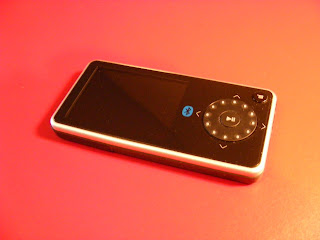


 Pictures look as good as possible on a small LCD screen. They are bright, and easy to see from any angle. You can play them as a slide show, with timing between images from 2 seconds to 1 minute. They can be zoomed and rotated.
 My conclusion? The Insignia Pilot is competent and versatile. It doesn't have the best interface. It doesn't have the biggest screen. For the money, though, it stands out as an amazing bargain. It will play almost any media you throw at it, and can be upgraded to play future formats as well. If you've got a large collection of music, videos, or photos, the Insignia is your most economical way to take them with you. I vote Best Buy.

 Posts
Posts

