 This will be my third Philips portable media player. The first was the cryptically named SA5245BT. I still enjoy using that player. The included Bluetooth is great. Yet with a non-memorable name it is hard to recommend to anyone in conversation. Philips got smart this year and started giving their products family (GoGear) and model names (Muse). I love the name. Cleverly appropriate. Perhaps they've been reading my blog.
Dimensions: 110 x 55 x 8.9 mm or 4.33 x 2.16 x .35 inches. It weighs 95 grams or 3.35 ounces.
·
Included: USB charge/sync cable, slip case, noise cancelling ear buds with 3 different sized tips, registration form, warranty info, a Quick Start guide, offers from Audible and Rhapsody, and an installation CD.
·
I HIGHLY recommend the Muse. Why? It plays just about every form of media I throw onto it. The Noise Cancelling works well, and the included (required) earbuds are comfortable. It's well made (is that stainless steel?). The big LCD screen is great to watch Photos and Videos on. They've already updated the firmware with a more colorful and animated set of icons. Lastly, it sounds great!
·
Specs and Features can be found HERE. What stands out to me are the supported codecs:
- Audio includes MP3, WAV, WMA, AAC, Ogg Vorbis, FLAC, APE, and Real Audio.- Video includes AVI, WMV, MP4, and RMVB. Resolutions up to D1 (720 × 576) in AVI and MP4, with up to VGA (640 x 480) in WMV and RMWB. WM-DRM is also supported.
- Picture support includes JPEG, BMP, GIF, and PNG files. It came with some 800 x 480 photos on board which look great when displayed.
- You also get FM Radio and text display with the Muse. FM includes RDS for additional information about the station and song you may be listening to. There are 20 station presets you can program. You can mute FM Radio too. Not all players can. Text files (.TXT) will also display on the screen.
- You can record FM radio to the Muse as MP3 (stereo) files. There's also a built-in microphone for recording voice messages in MP3 (Mono) format.
- Picture support includes JPEG, BMP, GIF, and PNG files. It came with some 800 x 480 photos on board which look great when displayed.
- You also get FM Radio and text display with the Muse. FM includes RDS for additional information about the station and song you may be listening to. There are 20 station presets you can program. You can mute FM Radio too. Not all players can. Text files (.TXT) will also display on the screen.
- You can record FM radio to the Muse as MP3 (stereo) files. There's also a built-in microphone for recording voice messages in MP3 (Mono) format.
·
Details: Across the top is a noise cancelling switch and volume control rocker.
 The microphone is on the right edge next to a slot to tie a lanyard or wrist-strap through.
UI: Getting around through the icons and menus is done using a 4-way direction pad with pause/play/select in the middle. There's also a back button bottom left of the pad and an options button top left of the pad. 
A Power and Hold slider is on the bottom edge next to the USB port. Far right on the bottom edge is the headphone jack. 
The headphone jack has an extra "keyhole" slot to key with the noise cancelling headphone's plug. The player will also take standard headphone plugs. That key keeps you from using the included headphones with any other player though. 
As non-touchscreens interfaces go, this is average. To finding one song in a long list is not too bad. The longer you hold down the down button the faster the list scrolls. A little better than typical.
 Music: With noise cancelling (NC) the Muse is more of a pleasure to listen to than most players. With NC on the ordinary sounds of living go away and leave just your music to enjoy. I type this with my CPU case next to my monitor on my desk, and the CPU has the expected fan and hard drive sounds coming from it. Plug into the Muse and that din disappears. Getting to the music is surprisingly easy as well. The Music icon is first in line and takes one tap of the play button to select. You can then choose from All songs, Rhapsody channels, Smart Shuffle, Artists, Album Art, Albums, Genres, Rating, Playlists, and Audiobooks. The screen area is well used. While any song or book is playing you'll see cover art/album art on the left and information on the right. From the Options menu you can adjust sound settings, Add the current song to a playlist, Bookmark, Delete, Rate, and choose play mode. The only thing I haven't been able to do is play all songs (across more than one album) from an artist. There are 10 preset EQ settings, and one 5-band custom EQ you can set yourself. You've also got Philips Full Sound option to turn on or off. Lastly there is an option to set a volume limit. Music play gets an A from me.
Video: What I love about the Muse is that I can drop about any video files I have on it and it will play. MP4 Videos at 480 x 320 for the iPhone and iPod Touch are most easy to come by and they play fine on the Muse. AVI files formatted for my players with 480 x 272 pixel screens also play fine. I've thrown 512 x 288 and 640 x 360 MP4 files onto the Muse and they play as well. They only thing to keep away from is DRM encoded videos. Video gets an A.

Pictures: The Muse displayed photos taken right off my 7mp digital camera. It's obviously internally shrinks then to display on it's screen. It doesn't offer any Zoom capability that I could find. You can rotate images in 90 degrees steps. Photos look typical for an LCD screen, and will fade out as you tilt away from a straight-on view of the screen. There is a slide show function. You can select the time between photos, as well as shuffled or sequenced play order. There is an option to add individual photos to an Album. You can also delete photos from the player. To display the photos in a single folder use the browser to find that folder first. I'll give the Photo app a B- for not having a zoom option.
·
Conclusion: The Muse from Philips leaves me with a generally good feeling. There are no major flaws or shortcomings among it's features. The price (mine was $128 from amazon.com) is right for what you get, and what you get is a versatile and great sounding media player. Philips seems to know there is little 3rd-party support for it's player so they throw in a nice slip-case to keep the muse in. A simple but appreciated touch.  Should you buy a Muse? I see no reason why not. There is no memory expansion slot on the Muse, but you can get one with 32gb memory installed if you need it.
Should you buy a Muse? I see no reason why not. There is no memory expansion slot on the Muse, but you can get one with 32gb memory installed if you need it.·
4D


 I've got two different wrap around bluetooth headsets.
  My wired headphones include Sony CD30,
  Three are noise cancelling. Of these the Philips HN110s are the best. Second comes the Maxell NC-11s, and the weakest is the JVC NC-80s. The Sony CD30s are my oldest pair and also the worst of the bunch. Sony's V150s are next. Both suffer from very poor bass reproduction. My top three are the Philips, Sennheiser, and the Maxell in that order. Sound reproduction is amazing in both the Philips and Senns. Two reasons I rated the Philips higher is because they were 1/3 the price of the Sennheisers and include noise cancelling that does an excellent job of cancelling background noise.
 Smaller than they appear in photos you'll find on the web, the BT50s don't quite surround my ears. Sound quality from my Samsung P2 is easily as good as from the Philips wired headphones. The Sennheisers completely cover my ears, and are more comfortable, but the Sonys are far more convenient. With no apparent loss in sound quality over the best of my wired headphones, no wires to contend with, and remote control of the player directly from the headphone, the Sony DR-BT50s win my vote as the best headphones in my collection. Just like all my bluetooth headphones they have volume control, FF/RW, Play/Pause, and will also pair with any bluetooth cell phone. Sony throws in an additional Folder +/- command, although none of my bluetooth players utilize it.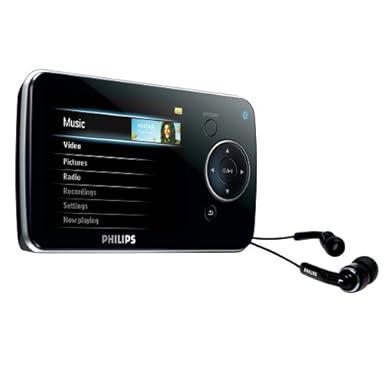


 Posts
Posts

