Monday, June 27, 2011

HTC Evo 3D. Love it!


Dual 5mp Cameras with Flash.
I previously wielded the HTC Hero Android phone, and although it worked fine it was so un-inspiring that I usually left it at home.
Friday I swapped it for the HTC EVO 3D and won't let it out of my sight. Here are a few key reasons why anyone looking for a new smart phone should seriously consider this phone: 
  • It is big. The 4.3" inch Super LCD 540x960 QHD resolution 3D display is crisp and beautiful too.
  • It prints to WiFi printers. No special apps needed.  It found my Canon WiFi printer and now prints wireless from email, photos, contacts, calendar, browser, and many other apps. Many Canon, Epson, and HP WiFi printers identified as supported so far. 
  • It is blazing fast. The 1.2 GHz Dual Core processor moves the UI from "a little hesitant" to "fluidly natural".  Nearly intuitive.  It boots fast, plays 1080p videos, and handles 3D games with aplomb.
  • FM Radio including RDS.  Local channels.  No need to miss local news, sports, weather alerts, or school closings. Headphone required as antenna.   
  • It has 3D capabilities. Photos taken and viewed, Videos recorded and viewed, Games played.
  • Sense 3.0
  • Customize Live Lock Screen. One glance to check the time, temperature and conditions, and quick access to phone, email, messages, and the camera.  Or configure it how ever you want it.
Lock Screen
The charge port is a microUSB jack on the left side. It may also be a MHL port  (outputs via HDMI to HDTVs) although I haven't verified that yet.  The right side has a volume rocker and dedicated camera button.  The headphone jack and power button are on the top edge.
Mini USB charge port on left edge.
Camera, 2D-3D switch, and volume rocker.
Headphone jack and Power button.
You also don't have to worry about access to your music from your phone.  Just sign up for Google Music Beta.  All my music has been uploaded to Google's servers, and with the Music app I can access it on any Android device or even iOS devices using their web browsers.
Google.Music.Beta
The large screen is delightful for photos and videos.  2D or 3D.  Several examples came with the Evo 3D, and the cameras can take 3D photos or video as well.  There are also several 3D videos on YouTube which you can enjoy with no glasses on this phone.
Sample Photo
Conclusion:  This is an amazing phone. The specs alone allow it to perform.  Add Sense 3.0 for a delightful experience.  Enjoy your favorite Android apps or flash-based web games.  For those wondering if it is better than the iPhone, you should know that after seeing mine my Wife traded in one of her two iPhones for her own Evo 3D.

4D

PS: If you enjoy my blog, please consider clicking on an ad or two.  Thanks!

Thursday, June 23, 2011

Google Music vs Apple's iCloud. Showdown!

I'm fortunate to have been invited to join Google's Music Beta program, and at the same time have several iOS devices from Apple that will soon be updated to iOS 5 and have access to Apple's iCloud for access to my music anytime those devices have a web connection.
Both services are free (to start). 

Google: Required uploading all my music to its servers. Free.  In my case the upload of 2000ish songs took three days of background uploading.  I could still use my PC with no apparent slowdown of web access during that time. Google has a limit of 20,000 songs for each user.

Apple:  Past and new music purchases from iTunes will be available on all your iOS devices from the iCloud.  Free.   Other music of yours (not originally from iTunes) will only require the uploading of songs Apple doesn't have a match for in the vast iTunes database. Songs in your collection it knows about will be available from that collection without any physical upload from you.  For just $24.99 a year.  Apple calls this iTunes Match.  Limit of 25,000 songs.  Your songs will be available in (your) iTunes on your PC or Mac, and on any iPad1 or iPad2 or iPhone (3GS, 4), or iPod touch (3rd and 4th generation) registered to the same iTunes account.

Basically, both services are offering to make your music available to you no matter where you are or what device you are using. 

Apple puts a few restrictions on that though:
  • You have to be using (your) iTunes (so much for the Post-PC era) if you are at a PC,
  • Older iPhone and iPod Touches won't have access. 
  • No accessing your music on a friend's computer,
  • No using any work computer you aren't allowed to install iTunes on.
  • No Linux PCs either.
  • Songs Apple provides will all be limited to 256kb
This is where Google Music gets the win
  • I can access my music on ANY WEB BROWSER, simply by going to Google.Music.Beta and logging into my account.
  • There is also the Google Music app for Android devices which runs on anything running Android 2.1 or higher.
  • Android devices running anything lower can still access the music via their web browsers.
  • It works via Safari on both iPads, all iPhones, and every generation of iPod Touch.
  • It even works using the web browser on my Zune HD.
Conclusion?  It should be obvious by now.  Google Music Beta is by far the best way to enjoy your music wherever you have a data connection.

4D

PS: If you enjoy my blog, please consider clicking on an Ad or two.  Thanks!

Tuesday, June 14, 2011

iPad Keyboard Dock Review: The Good and The Bad.

If you've read my short review of the ASUS Transformer then you know its standout feature is the symbiotic keyboard dock for it.  I'm in the process of writing an Asus/Acer/Apple tablet showdown. To be fair I need to point out that the iPad 2 also has a keyboard dock designed and produced specifically for it. Click on any of the following pictures to enlarge them.
Apple's Keyboard Dock for the iPad and iPad2
This keyboard is well built. Surrounding the large keys is nicely finished aluminum. The tablet support is a hefty extension of the plastic bottom.  That support receives your iPad dock port, meaning it will only mount vertically (portrait) in use.
Dock with iPad in Portrait.
Beside the normal QWERTY layout of keys, there is a top row of iPad-specific function keys.  They include Home, Search, dim (the backlight), brighten, Picture Frame Mode, On-screen keyboard, (blank), Prev, Play/Pause, Next, Mute, Vol-, Vol-, and Lock (sleep).
Rear Tablet Support. Fixed Angle. Doesn't detach.
The rear tablet support does its job well, but is the unfortunate downside of an otherwise great keyboard.  Why?  It doesn't come off or fold down.  This keyboard will stay on your desk as that lump of a rear support makes it impossible to slip into a case with your model-thin iPad.
Line-Out and Dock Passthrough.
A redeeming feature is the Line-Out jack on the back. Using an 1/8" stereo miniplug to RCA L/R cable (left) you can pipe the audio from your iPad directly to your Home Stereo's Aux line-in jacks.

Conclusion:  This keyboard dock is easy to use and well built. The one fixed angle of tilt is reasonable, but having a little range in angle to deal with glare and reflection would be better.  They (Apple) should have spent a little more time to get it folding flat, as this dock won't be going easily with you in its current form.

If you have a lot of typing to do on your iPad, and don't mind the iPad in portrait view, this is a good solution. For more versatility in positioning you can consider any of the great cases and bluetooth keyboards out there for the iPad.  I bought my Keyboard Dock  at Target for $69.99 (+ tax).

4D

PS: If you enjoy my blog, please consider clicking on one or more of the ads.   Thanks!

Wednesday, June 8, 2011

Acer Iconia Tablet Details (With Photos).


1280 x 800. Plenty of room!
Acer's 10.1" Honeycomb tablet weighs a bit more than most competitors. For that small weight penalty you get a tank of a tablet with more features than most.   I've had my A500 for a few weeks now (Target.com) , and am greatly appreciating the included full-sized USB port, 5mp Camera (with flash),  and solid construction. You can find more information about it at Acer.com.
Brushed Aluminum Back.  Stereo Speaker.
Audio output is surprisingly good with the two built-in speakers.  Not the best for music as there is no low frequency output, but fine for podcasts, audio books, and even movies. There is a standard headphone jack on the left end.  The A500 also sports an LED flash next to the 5mp rear camera!
MicroSD slot under the top-edge flap. Future 3G SIM slot on the right. 
 You get a volume rocker and screen rotation lock on the top edge, left. The power button and headphone jack are on the left end near the top.  That is a Micro HDMI jack near the bottom of the left end (below).
Power, Headphone jack, and HDMI jack.
The right end holds the rest of the goodies.  The AC power jack is near the top, with microUSB and standard USB ports near the bottom (below).
USB, microUSB, Reset, and Power jack.
You can enjoy ALL of the web with Adobe Flash support and full sized web pages on the large screen. Angry birds is a joy to play on the 10.1" screen, and even more to watch on your HDTV via the HDMI out port. The USB port supports USB keyboards, USB mice, removable storage devices, and (when android 3.1 arrives) USB joysticks and game controllers.
Google.  Not their Mobile version.
Angry Birds Rio!
Music and Video are well served by this Iconia.  The 16:10 screen is far better than any 4:3 screen on a tablet for wide screen movies. The Google Music app works great!  Photos look wonderful in portrait or landscape view.
A scene from Mulan fills the screen.
Google Music app.  Now-Playing portrait view.
Photo of a Rocking Hammock.  Designed by Lydia Palma.
ConclusionAcer's Iconia A500 is a winner here.  At $449 for the 16gb version it is $50 less expensive than a comparable Apple iPad 2 yet far more capable. You can easily expand its memory with up to a 32GB microSDHC Memory Card. Access media or documents off a connected USB thumb drive  or external USB hard drive.  You'll find thousands of Android apps certified to work with Honeycomb (Android 3.0/3.1). I was able to find parallels of every critical app I have on my iPad2. The dual-core Tegra 2 processor inside will play any game on the android market with ease. Plug in a USB keyboard and get some work done with the included Document to Go programs. Put your inner artist to work with Autodesk's Sketchbook or any of a dozen other drawing programs for Android. Send your sketch over Bluetooth or in an email to your friend's phone or tablet.  If you are looking for a great tablet, this is a serious contender.  Acer has promised an update to Android 3.1 before the end of June (2011). 

I'm keeping mine!
4D

PS: If you enjoy my blog, please consider clicking on an Ad.  Thanks!

Tuesday, June 7, 2011

Asus Transformer Keyboard Dock. With Photos.

 
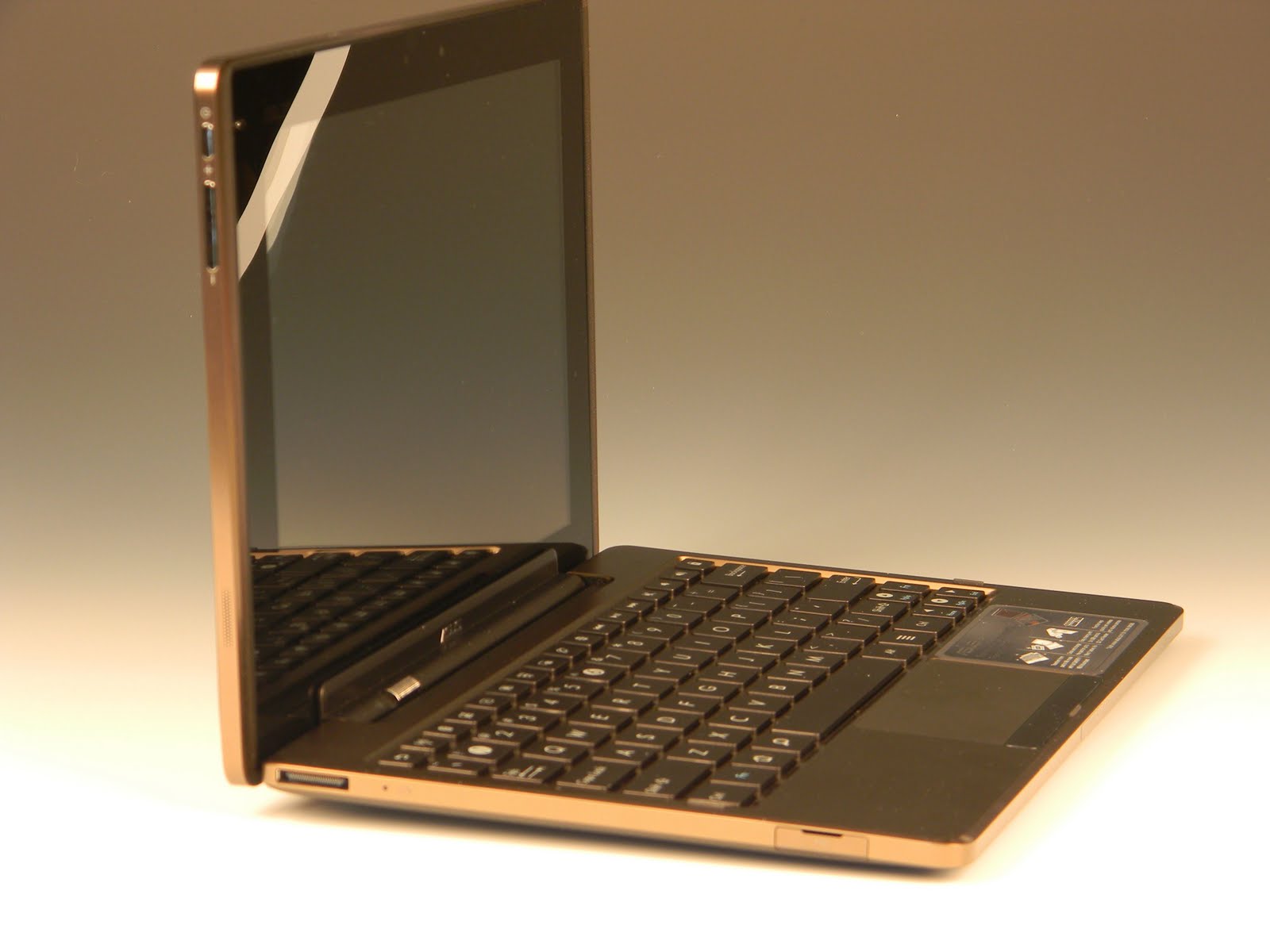
One of the nicest features of ASUS' Eee Pad Transformer  is the Keyboard/Docking Station.  For $150 (MSRP) you get a nice keyboard, two full sized USB ports, a full sized SD-HC slot, a second battery for your tablet, and a trackpad.  The dock is as well made as the tablet.  When connected you have a nice touchscreen netbook that shuts off when folded closed. The hinge is stiff enough to hold the tablet at any angle, with the weight of the battery in the dock keeping it from tipping backwards.
Together they make a perfect pair.
Good friction in the tablet hinge.
Top row includes Android, media, and utility keys.
Special top row keys include (left to right)
  • Back
  • WiFi
  • Bluetooth
  • Trackpad on/off
  • Backlight dim
  • Backlight bright
  • Backlight Auto
  • Screenshot capture
  • Web Browser
  • Settings
  • Previous Track
  • Play/Pause
  • Next Track
  • Mute/Unmute
  • Volume down
  • Volume up
  • Lock/Unlock (sleep/wakeup if no lock is set)
Left side features cable jack, reset, and USB port (under flap)
When docked, the tablet's charger and cable connect to the dock instead.  It will charge both the dock's battery and the tablet when connected.  Also notice the slight lift of the keyboard's back edge by the tablet bracket when rotated up.
The right side features an SD-HC slot and another USB port (under flap).
One of the nicest features the Dock brings to the tablet it the SD slot.  It reads cards up to 32gb, and is the perfect way to import photos from your digital camera. Simply take the card from your camera and slide it into the side of the keyboard.  A notification will show up on the tablet which you can tap on to bring up options to display the card content (folders and files) or eject it safely. You also have two USB ports for accessories or external storage. Android 3.1 supports an array of keyboards, mice and game controllers.  That should make the ASUS Eee Transformer the best device for Android game players out there.

Conclusion:  If you own the Transformer, you need this keyboard/dock. Well built.  Feature rich. A great value. Be warned though, as any price over $150 is from a scalper. Demand is high for this dock, and people are taking advantage by buying them up at MSRP and reselling them for more. Mine came from Newegg.com

4D.

PS:  If you enjoy my blog, please consider clicking on an Ad.  Thanks!

Sunday, June 5, 2011

Asus Transformer Details (with Photos).


Plastic Back.  Not gloss black boring though.
One thing I hear often when there is a debate between iPad fans and competing tablets is that no one make devices as well as Apple.  Tech pundits who generally are also Apple fans dismiss the clever Asus Transformer as cheaply built. Here are a few photos I took of my Asus Transformer.  You decide for yourself.
Headphone, USB, HDMI, Speaker on right edge.
Volume and Power, Speaker along the left edge.

Dock and Latch slots on bottom edge

YouTube App Cylindrical View

This is just the tablet.  Click on most pictures to see an enlarged view.  Monday I'll be getting the keyboard dock that includes another battery to power the Transformer. Stay tuned.   I also have a showdown between the iPad2, Acer Iconia Tablet, and the Asus Transformer in the works.

Amazon.com Links:
Apple iPad 2 MC979LL/A Tablet (16GB, Wifi, White) NEWEST MODEL
Acer Iconia Tab A500-10S16u 10.1-Inch Tablet Computer (Aluminum Metallic)
Asus Transformer

4D

PS: If you appreciate this blog, please consider clicking on one of the ads.  Thanks!