Tuesday, October 18, 2011

Samsung Galaxy Player 4.0 Review.

Samsung 4.0 WiFi Player
I have to admit that this media player has me conflicted.  It may be a great device, but it should have been in my hands 4 months ago. I found one at my local BestBuy, and I've been running it through its paces to see what shakes loose.
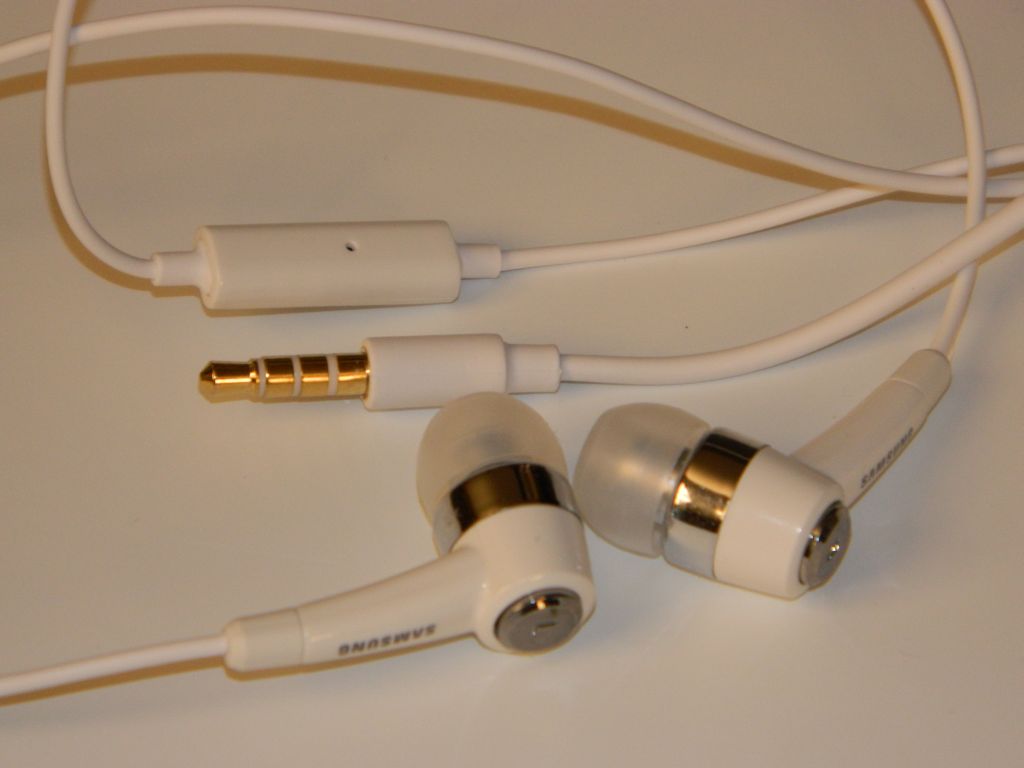
Included Headphones with Mic
In the box:
  • Nice set of in-ear-monitors (IEMs) that include a microphone on the cord.
  • Micro USB cable.
  • AC power adapter.
  • User Guide.
  • Health & Safety and Warranty Guides.
  • 1200mAh Battery: 36hrs Music play with WiFi and screen off.  5hrs video.  Replacement batteries with greater capacity are supposedly available.
AC to USB Adapter
Hardware:
  • 4.0" 800x480 Super Clear LCD
  • Front Camera: VGA 640 x 480
  • Rear Camera: 3.2 Megapixel
  • FM Radio
  • GPS
  • Haptic (vibration) feedback
  • Bluetooth® 3.0 (added speed and power savings)
  • Wi-Fi (802.11 b/g/n/a)
  • Stereo Speakers
  • MicroSD card slot (under back cover)
  • Volume Rocker
  • Power/Lock button
  • Microphone
  • USB port (under sliding cover)
  • Headphone Jack
Back Off.  Removable battery and MicroSD Slot
Media capability:
  • Music:  The Music app is excellent with easy access to volume control, shuttle controls, shuffle/repeat, lyrics (if available), EQ settings (presets and 2 user settings), full-screen album art (when available), song info including artist, album, song name and track number, song position and length, etc.. There is also a LIST icon to tap to go back to the songs list.  The menu icon will bring up several more options including Add to Quick List, Share Music Via, Add to Playlist, Via Bluetooth/Speakers, Set as Alarm Tone, and More.  Tap "More" and you'll get a Settings and Details option. Settings include Samsung's SoundAlive,  Choices for how the music is sorted, and the option for choosing a graphic to show when no Album Art is available. The Music app claims WAV, MP3, AAC, AAC+, eAAC+, WMA (v9), WMA Lossless, and Ogg formats will play. The player also played M4A and FLAC files with no trouble.  The was no left/right balance setting.  The largest negative I can find is that there is no gapless playback. I'm giving music playback an A though.   Just not an A+.
Music: Now Playing
  • FM Radio: The radio app is also well done.  The first time I opened it the app started searching for stations.  When done there were no active frequencies in range of me that were left out, and no frequencies logged that were nothing but static or noise. You can have it output through the headphone (required for antenna) or the onboard speakers.  You can turn it OFF within the app or leave it playing in the background after leaving the app. Volume levels are separate for speakers and headphones. No RDS that I noticed. No FM output via Bluetooth. No Radio recording. That leaves Radio with a B+.
  • Video: Video support is great, supporting any WMV, AVI or MP4 up to 720p that I've tried. The specs claim H.263, H.264, MPEG4, 3GP, WMV (v9), Xvid, and DivX ® formats. The Video app remembers your position in the file when you return to it. Besides the normal shuttle controls, the Menu button brings up Share Video, Details, Via Bluetooth/Speakers, Play Speed, Subtitles, and Settings options. The Settings option includes Repeat, Brightness, Colour tone, and Outdoor visibility. You can resize/stretch video to fill the screen. There is also a toggle for 5.1ch audio although I'm not sure why given the player only has stereo out. Video deserves an A+. 
Video Player
  • Photos: The larger screens get, the better they are for photo display.  This is true for the 4.0" Samsung compared to my previous 3" P2, P3, and M1 players from Samsung. The Gallery app supports JPG, PNG, GIF, and BMP files. Photos are vivid.  Sliding between them is fluid. The included samples look great.  You have Slideshow options, Share options, and Editing options including Crop and Rotate left or right.  You can also delete photos from within the Gallery app. Photos get an A thanks to the great screen. 
  • Cameras: The front facing camera is worthless for anything other than video chat.  Photos taken with it are low resolution (640 x 480) and grainy. The rear camera does a little better, but at 3.2mp isn't up to the images you'll get from most 5mp or 8mp phones these days. The lens is much better than that on the front, so with good light you can take some decent images. There are several settings and options in the Camera app. You have Shooting Mode choices of Single Shot, Smile Shot, Continuous, Panorama, Add me, and Action Shot.  You have Scene choices of Landscape, Portrait, Sports, Night, Party/Indoor, Beach/Snow, Sunset, Dawn, Fall Colour, Firework, Text, Candlelight, and Backlight. You can adjust Exposure Value from -2 to +2 in .5 steps. There is also a long list of Camera settings you might find on Samsung's best consumer cameras. Finally you have tools, which include Guidlines, Review, GPS, Shutter Sound, Storage, and Reset.  You may want to check out a few photography books for information on how to use all these features.  The Rear camera's highest resolution is 2048 x 1536.  There is no flash.  I'm giving the Camera app an A though.  They don't usually come as full-featured as this one.
UI: The user interface is Typical Android Phone.  I'm guessing that if you own a Samsung android phone you'll be right at home. Samsung's TouchWiz additions are nothing more than useful. They include a dock bar that hold 4 apps and is always there no matter which home page you are on. Power shortcuts (Wi-Fi, Bluetooth, GPS, Sound, and Auto Rotation) also were added to the dropdown notifications list. A long press on the menu icon brings up Search, and a long press on the Home icon brings up a window showing recently used apps and a shortcut to the Task Manager. There are 7 home screens, but Edit in the home screen menu options will let you delete ones you don't use. You can add them back using the same Edit option.  The UI doesn't rotate as the device rotates. For few improvements over their phone UIs, I'll give the UI an Android average C+.  Yes there are widgets and animations and such.  Nothing surprising though.

Apps:  In addition to the Google Android Market, this player also comes with the Samsung Apps application. You can also add the Amazon App Store with relative ease. No need to root or hack this player to gain access to all of Google's apps.  Some unique apps added by Samsung include AllShare, Samsung App(store), and Thinkfree Office.  Several typical android apps (usually social or media related) also appear to have been altered (improved) by Samsung.
Android Market
Impressions:  Light weight. Well built.  Beautiful screen. Great media support.  Good headphones included. The removable battery implies this player could be the last player you'll ever need. Batteries have a limited number of charge cycles, and as such will wear out eventually.  Any player without a removable battery will only last as long as that battery. This player is comfortable to hold although a little slippery. This is an "everything device" you can carry in your pocket. Cameras, Radio, GPS, Skype and Google Talk phone services, in addition to the great media capabilities make this a wonderful alternative to a phone if you don't want to pay that monthly phone service fee.

Conclusions:  Samsung has built a great player here. At $229 for 8gb it is higher but more capable than the $199 8gb iPod Touch.  GPS, FM radio, and a larger screen may be worth the $30 difference. There are other more subtle differences that should help justify that cost. I'm rating the Samsung Galaxy 4.0 a Great Buy. Consider that 9.5 out of 10, with .5 for hoping the price drops to $199.

4D


P.S.:  If you enjoy my blog, please consider clicking on an Ad or two.  Thanks!

Saturday, October 8, 2011

HTC Flyer Review. Is this the best 7" tablet available?

HTC Flyer Lock Screen
The latest generation of tablets and phones have dual-core processors, typically running at 1Ghz. HTC's Flyer has a 1.5Ghz single-core Qualcomm processor. Now that its price has come down to Earth and you can get one for $299 this 7" tablet may well be the best performing tablet in it's price range. The Flyer isn't just an ordinary Android tablet. On top of the regular hardware features most tablets have, HTC has added their Scribe Technology™. You need their normally $79 Pen to take advantage of it, but the Pen can be had for $50 if you shop around.  The 1.5Ghz processor is also unusual, and suffers only to make the Flyer fly. Boot-up time is delightfully brief. Screen reaction is fluid, and apps open quickly.

Inside the box:
  • HTC Flyer
  • USB cable
  • AC Power adapter
  • Quick guide
  • Safety and regulatory guide
  • Call center card (hotline card)
  • Warranty card
Hardware:
  • 7-inch 1024x600 TFT capacitive touch screen.
  • 16GB internal memory, with microSD slot.
  • Wi-Fi 802.11 b/g/n 2.4GHz.
  • G-sensor, GPS/aGPS, digital compass, ambient light sensor.
  • Rear (5MP) and Front (1.3MP) cameras.
  • Bluetooth 3.0 with A2DP for stereo headsets.
  • MHL port (HDMI-out) and DLNA capability.
  • SRS WOW HD™ surround sound over the dual speakers or headphones.
Dimensions: 7.6875 x 4.8125 x 0.5625 inches.  Weight: 14.7oz  (418g). A little lighter and narrower than the BlackBerry Playbook.
Music: Now Playing
Media Support: I was able to play WMV (540 x 360 ; 960 x 720), MP4 (1280 x 720), and AVI (640 x 480) video files with no problem or dropped frames.  I couldn't find any info on what the resolution limits are or what specific audio and video codec combinations play or won't play.  Among the audio files I could test and would play were WMA, WMA lossless, MP3, AAC, M4A, and WAV. FLAC files wouldn't open.  I had no problems with .JPG photos.
Multi-Page View
User Interface (UI): is typical HTC sense, and almost identical to the Sense UI you'll find on HTC Phones.  I have the HTC Evo 3D, and first boot-up of this Flyer tablet was deja vu.  Rumors are that there is a Honeycomb 3.* update in the works for the Flyer, but for now the UI is very phone-like. It WILL switch from portrait to landscape when the screen is rotated though.  Screen response is quick. A light touch is all that is needed to get a reaction from the screen.  Graphics flow smoothly.  Photos zoom in and out with no delay or sluggishness.   If you pull down the notifications bar at the top of the screen there is a tab for Quick Settings. It include check boxes for Auto Brightness, Auto Rotation, Wi-Fi, Bluetooth, and a link to All Settings. Very handy. The bottom of the screen has a row of icons that stay there no matter which home page you are on. They can be swapped out for any app or shortcut or web bookmark. A hold of the Home button brings up your 10 most recently used apps to choose from.  A quick double-tap of the Home button (when on the 1st page) brings up an array of all the Home pages.  Tap any one to jump immediately there.  In landscape (horizontal) position the Home pages display in a 3D carousel view.  Nice effect.
Pen Tools
Share your Pen Scribble
Pen:  I ordered the Pen that goes with the Flyer from Amazon.com  Saved roughly $30 over (OK, under)BestBuy's asking price.  The first time you use the pen the tablet will bring up some quick lessons on how to use it. In use a tap on the pen on the screen takes a snapshot of what is displayed, then lets you draw over that image using any of several pens/pencils/brushes and colors. This capability alone makes the Flyer a very useful tool if you need to annotate a drawing or sign a document on the Flyer.  I'm a  design educator and students often email design sketches (as JPG images) to me. This feature will allow me to draw/comment on the images then "Share Via" them back to the student.  The pen is far more accurate for drawing than any capacitive stylus, but it doesn't work as a stylus.  It is only a drawing and high-lighting tool. Still a great feature that only THIS tablet has as far as I know.
Notices Drop-Down
Google News
Reader Widget
Rear Camera and Speaker Slots
Weather Widget
Conclusions:   This is a fantastic tablet (at $299).  Even with no Android 3.? update it is quickly becoming my most productive device.  I can print straight to my Canon WiFi printer from within any app where it makes sense to.  Anything on my screen can be captured then drawn on using the Pen. Essentially screen capture with annotation rolled into one. You could make a pictorial tutorial about any topic that can be displayed on the screen, complete with commentary and notes, then quickly post them all to email or Facebook or even send them via bluetooth to your PC or friend's phone/tablet.   Every other feature is first rate as well. Boot up time is incredibly fast. The cameras work better than most tablet cameras.  WiFi can be set to turn off when the screen times out, for a tremendous boost in battery duration. I get a giddy feeling when I hold this one. At $299 it is a steal.  You want one.  Go get it!

4D


P.S.  If you enjoy my blog, please consider clicking on an Ad or two.   Thanks!

Monday, October 3, 2011

Amazon's Kindle Fire. Is it Worth $199?


Kindle Fire
It's official.  Amazon has a few new Kindles, and one is the color Android-based Kindle Fire. The press was stunned when the Fire's $199 price was announced.  The hardware specs are competitive but missing a few standard components.  Some estimate 5 million or so will be sold before the end of this year. The Fire isn't the first 7" tablet out there, and it isn't even the cheapest one. Walmart.com has a half dozen 7" tablets available for under $200. You can buy the Maylong 7" tablet for as little as $97.

Here are a few:
So what magic makes the press think Amazon's Fire will sell better than any of these?  Sure, most of these have worse specs than the Fire.  Yet many also have hardware features (Cameras, HDMI-out) the Fire doesn't include. All have WiFi.  All are touchscreen Android tablets.  All run apps including all of Amazon's apps. Lined up spec for spec the Fire doesn't glow for what it can do.  It blushes for what it doesn't do.

So what is the secret?   I'm blaming it on Respect.  Amazon, like Apple, has built up a reputation for treating customers well. They have both simplified the process of buying media and products from them. We respect Apple and we respect Amazon. They are both American originals. We surrender our beliefs to Apple in exchange for designful and productive devices we didn't know we needed. The press and Amazon fans have done the same concerning the Fire. I've pre-ordered mine out of the same respect.

Let's do a reality check though.   The Fire is a first generation device.  Remember the first wedge Kindle?   Original, but far from evolved. The second and later generations were better in every way.  My experience repeatedly demonstrates that 1st generation devices are poor investments. This is more often true for ground-breakers, and Amazon is a ground-breaker. Late comers/Followers can learn from the mistakes made by others.  I expect the second generation Fire to be thinner, faster, and have a few more features than this first gen Fire.  It may also be less expensive.  Previous Kindles have gotten cheaper each year since the first one came out at around $400.

So is the Kindle Fire a good investment?  I'm going to rate it a tentative "yes". From what I can tell the hardware is similar to the Blackberry Playbook. Made by the same manufacturer I'm expecting the Fire to be similarly well-made. The dimensions are a little different, but the details are very similar.  Each specification the Fire lists is equal to or better than the competition. A 1024 x 600 screen when many have 800 x 480 screens. Capacitive multi-touch when many have resistive single-touch input. A dual core processor when many have single core chips.  The Fire will have a liquid user interface (UI) and shouldn't stutter or pixelate displaying movies or photos. The screen will react instantly to your touch, and using it should become a mere extension of your thoughts.   I expect Amazon to do it right.  The Fire should delight the user. Should it not you can certainly expect the 2nd generation to.

Yes,  I believe the new Kindle Fire is worth $199.   The Blackberry Playbook and HTC Flyer are more capable tablets, and at $299 they are also priced proportionally correct given their additional features.  If you think you might want a Fire, don't wait. Reviews will be out before new orders are shipped and you can always cancel should you change your mind.

Comments are welcome.  Feel free to contribute.
4D


P.S.: If you enjoy my blog, please consider clicking on an Ad or two.  Thanks!

Sunday, October 2, 2011

BlackBerry Playbook Review. Finally a Realistic Price!

BlackBerry PlayBook
With most 10" tablets hovering around the $500 price point it never made sense to me why the major vendors thought they could ask the same for their 7" tablets.  HTC's 7" Flyer is $499. (edit: Oct 1st BestBuy lowered the price of the HTC Flyer to $299).  RIM's BlackBerry PlayBook was $499 until a few days ago when they dropped the price to $299.  The PlayBook finally offers a compelling set of specs and an innovative OS/UI at what is now a reasonable price.
Headphone Jack, Volume and Play, and Power.  Rear Camera on Back.
Hardware:
 - Dimensions: 7.6" x 5.1" x .4" thick. Weighs 0.9 lbs/425g.
 - Cameras: 3mp front.  5mp rear.
 - Touch-Sensitive bezel.
 - Bluetooth DUN, HID, SPP.  A Bluetooth mouse worked, but I failed with Bluetooth keyboards.
 - WiFi 802.11 b/g/n
 - Front-facing Stereo Speakers
 - Two Microphones. Voice Notes sound excellent.
 - Notification LED
 - External Volume rocker
 - External Play/Pause button.
 - Headphone jack.
 - Mini HDMI port.  Full mirroring of the UI on your HDTV.
 - Micro USB port.
Bottom Edge: microHDMI, microUSB, and Dock Port. 
With more features than the upcoming Kindle Fire, the $299 price may be right on track to help RIM sell a few million more of these.  They'll still need more apps in their apps store. Adding the ability to run Android apps will be a step in the right direction even if there are limits on what apps will run.  Updating the Playbook with Email, Contacts, and Calendar app will also go a long way to bring this tablet into the mainstream.

The Playbook is well built and comfortable to hold. It doesn't feel flimsy or squeaky, and the matte-finish rear is both fingerprint-shy and non-slippery.   Tapping on the back only finds a small hollow right in the middle where the logo is, with the rest of the area sounding solid.  I greatly appreciate the play/pause button between the volume + and - buttons on the top edge. The front facing speakers are loud and efficient. The included soft slip-on cover was a nice touch too.

Cons:  No dedicated email app.  No dedicated contacts app. Limited app store compared to Android. The power button is also hard to press when you want to turn the Playbook ON.  Very slow to boot up from the OFF state.
Music App
Media:  Codec support is decent.   AVI, WMV, and MP4 videos play just fine with the stock Video app.  An MKV sample I had would not play.   MP3s, WMAs (+ WMA lossless), AAC and M4A audio files would play.  FLAC files wouldn't.  The Music app allows sorting by Songs, Artists, Albums, and Genres. You can shuffle or play sequentially though a list. There is an on-screen volume slider, progress bar, and full play controls within the app. You also have a dynamic Search function. No Bookmark or Playlist options I could find though.  The video app takes advantage of the Touchscreen capabilities and lets you stretch your video with two-fingers to enlarge or shrink them, as well as pan around the moving video as if it was just a photo. No bookmarking in the video app either, and it won't remember where you left off when you return to a video either.
Video Scene
UI:  I'll give RIM some credit here.  The Playbook's User Interface is original, practical, easy to understand, and fascinating to use.  Far more clever than any iOS or Android device has implemented to date.  I have to believe it was only the high price and missing apps that kept the Playbook from catching on faster.  The price has been corrected now.  Hopefully an Apps update will show up soon.
Multi-Tasking


Summary:  This is a very capable tablet. The $299 price is fair for what you get and what it can do.  Screen reaction is fluid. Media playback is beautiful though not fully-featured. The OS is refreshing compared to Android and iOS, but the missing email app and android app support is a wound that needs repair before I'll recommend this to anyone. Are you listening, RIM?    I'm parking mine until that update shows up. The HTC Flyer is also $299 now, and it's an Android 7" tablet with some useful enhancements.

4D


P.S.  I you enjoy reading my reviews, please consider clicking on an Ad or two.   Thanks!