 |
| Samsung 4.0 WiFi Player |
I have to admit that this media player has me conflicted. It may be a great device, but it should have been in my hands 4 months ago. I found one at my local BestBuy, and I've been running it through its paces to see what shakes loose.
 |
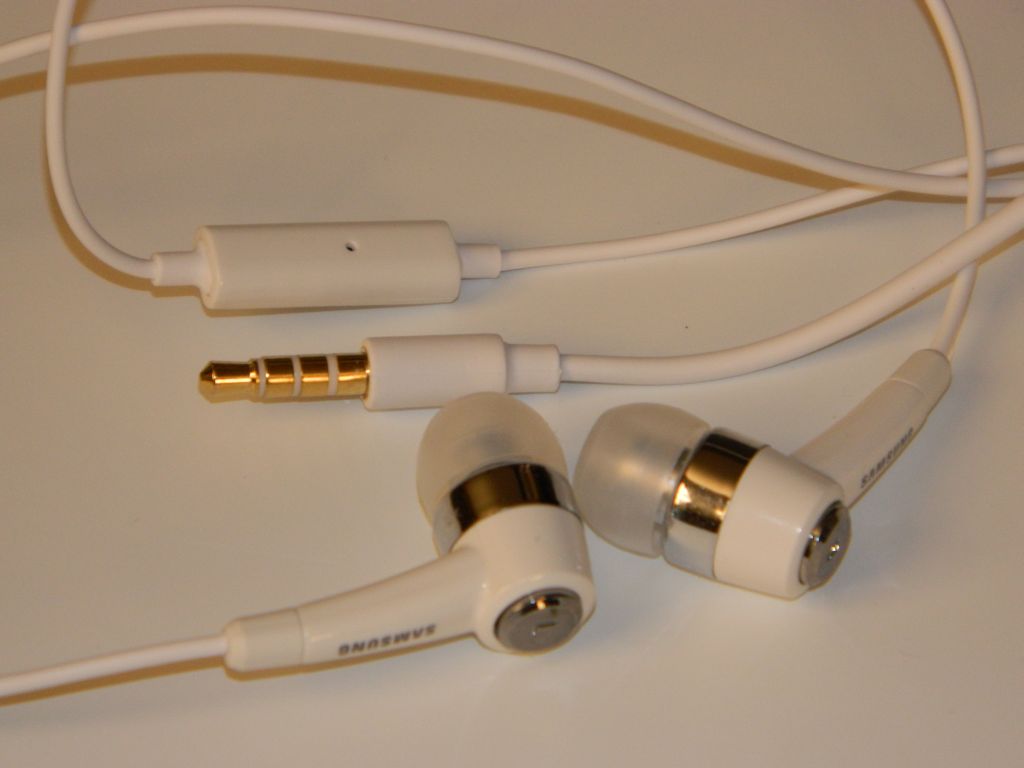
| Included Headphones with Mic |
In the box:
- Nice set of in-ear-monitors (IEMs) that include a microphone on the cord.
- Micro USB cable.
- AC power adapter.
- User Guide.
- Health & Safety and Warranty Guides.
- 1200mAh Battery: 36hrs Music play with WiFi and screen off. 5hrs video. Replacement batteries with greater capacity are supposedly available.
 |
| AC to USB Adapter |
Hardware:
- 4.0" 800x480 Super Clear LCD
- Front Camera: VGA 640 x 480
- Rear Camera: 3.2 Megapixel
- FM Radio
- GPS
- Haptic (vibration) feedback
- Bluetooth® 3.0 (added speed and power savings)
- Wi-Fi (802.11 b/g/n/a)
- Stereo Speakers
- MicroSD card slot (under back cover)
- Volume Rocker
- Power/Lock button
- Microphone
- USB port (under sliding cover)
- Headphone Jack
 |
| Back Off. Removable battery and MicroSD Slot |
Media capability:
- Music: The Music app is excellent with easy access to volume control, shuttle controls, shuffle/repeat, lyrics (if available), EQ settings (presets and 2 user settings), full-screen album art (when available), song info including artist, album, song name and track number, song position and length, etc.. There is also a LIST icon to tap to go back to the songs list. The menu icon will bring up several more options including Add to Quick List, Share Music Via, Add to Playlist, Via Bluetooth/Speakers, Set as Alarm Tone, and More. Tap "More" and you'll get a Settings and Details option. Settings include Samsung's SoundAlive, Choices for how the music is sorted, and the option for choosing a graphic to show when no Album Art is available. The Music app claims WAV, MP3, AAC, AAC+, eAAC+, WMA (v9), WMA Lossless, and Ogg formats will play. The player also played M4A and FLAC files with no trouble. The was no left/right balance setting. The largest negative I can find is that there is no gapless playback. I'm giving music playback an A though. Just not an A+.
 |
| Music: Now Playing |
- FM Radio: The radio app is also well done. The first time I opened it the app started searching for stations. When done there were no active frequencies in range of me that were left out, and no frequencies logged that were nothing but static or noise. You can have it output through the headphone (required for antenna) or the onboard speakers. You can turn it OFF within the app or leave it playing in the background after leaving the app. Volume levels are separate for speakers and headphones. No RDS that I noticed. No FM output via Bluetooth. No Radio recording. That leaves Radio with a B+.
- Video: Video support is great, supporting any WMV, AVI or MP4 up to 720p that I've tried. The specs claim H.263, H.264, MPEG4, 3GP, WMV (v9), Xvid, and DivX ® formats. The Video app remembers your position in the file when you return to it. Besides the normal shuttle controls, the Menu button brings up Share Video, Details, Via Bluetooth/Speakers, Play Speed, Subtitles, and Settings options. The Settings option includes Repeat, Brightness, Colour tone, and Outdoor visibility. You can resize/stretch video to fill the screen. There is also a toggle for 5.1ch audio although I'm not sure why given the player only has stereo out. Video deserves an A+.
 |
| Video Player |
- Photos: The larger screens get, the better they are for photo display. This is true for the 4.0" Samsung compared to my previous 3" P2, P3, and M1 players from Samsung. The Gallery app supports JPG, PNG, GIF, and BMP files. Photos are vivid. Sliding between them is fluid. The included samples look great. You have Slideshow options, Share options, and Editing options including Crop and Rotate left or right. You can also delete photos from within the Gallery app. Photos get an A thanks to the great screen.
- Cameras: The front facing camera is worthless for anything other than video chat. Photos taken with it are low resolution (640 x 480) and grainy. The rear camera does a little better, but at 3.2mp isn't up to the images you'll get from most 5mp or 8mp phones these days. The lens is much better than that on the front, so with good light you can take some decent images. There are several settings and options in the Camera app. You have Shooting Mode choices of Single Shot, Smile Shot, Continuous, Panorama, Add me, and Action Shot. You have Scene choices of Landscape, Portrait, Sports, Night, Party/Indoor, Beach/Snow, Sunset, Dawn, Fall Colour, Firework, Text, Candlelight, and Backlight. You can adjust Exposure Value from -2 to +2 in .5 steps. There is also a long list of Camera settings you might find on Samsung's best consumer cameras. Finally you have tools, which include Guidlines, Review, GPS, Shutter Sound, Storage, and Reset. You may want to check out a few photography books for information on how to use all these features. The Rear camera's highest resolution is 2048 x 1536. There is no flash. I'm giving the Camera app an A though. They don't usually come as full-featured as this one.
UI: The user interface is Typical Android Phone. I'm guessing that if you own a Samsung android phone you'll be right at home. Samsung's TouchWiz additions are nothing more than useful. They include a dock bar that hold 4 apps and is always there no matter which home page you are on. Power shortcuts (Wi-Fi, Bluetooth, GPS, Sound, and Auto Rotation) also were added to the dropdown notifications list. A long press on the menu icon brings up Search, and a long press on the Home icon brings up a window showing recently used apps and a shortcut to the Task Manager. There are 7 home screens, but Edit in the home screen menu options will let you delete ones you don't use. You can add them back using the same Edit option. The UI doesn't rotate as the device rotates. For few improvements over their phone UIs,
I'll give the UI an Android average C+. Yes there are widgets and animations and such. Nothing surprising though.
Apps: In addition to the Google Android Market, this player also comes with the Samsung Apps application. You can also add the Amazon App Store with relative ease. No need to root or hack this player to gain access to all of Google's apps. Some unique apps added by Samsung include AllShare, Samsung App(store), and Thinkfree Office. Several typical android apps (usually social or media related) also appear to have been altered (improved) by Samsung.
 |
| Android Market |
Impressions: Light weight. Well built. Beautiful screen. Great media support. Good headphones included. The removable battery implies this player could be the last player you'll ever need. Batteries have a limited number of charge cycles, and as such will wear out eventually. Any player without a removable battery will only last as long as that battery. This player is comfortable to hold although a little slippery. This is an "everything device" you can carry in your pocket. Cameras, Radio, GPS, Skype and Google Talk phone services, in addition to the great media capabilities make this a wonderful alternative to a phone if you don't want to pay that monthly phone service fee.
Conclusions: Samsung has built a great player here. At $229 for 8gb it is higher but more capable than the $199 8gb iPod Touch. GPS, FM radio, and a larger screen may be worth the $30 difference. There are other more subtle differences that should help justify that cost. I'm rating the Samsung Galaxy 4.0 a Great Buy. Consider that 9.5 out of 10, with .5 for hoping the price drops to $199.
4D
P.S.: If you enjoy my blog, please consider clicking on an Ad or two. Thanks!





 Posts
Posts


