Thursday, October 30, 2008

Coby MP-705. My Review.

The Coby MP-705 weighs 57 grams. For comparison my Samsung T10 weighs 44 grams and my iPod Nano weighs 36 grams. All three players are roughly the same length and width, and sport 2" (diagonal) LCD screens. The Coby is the thickest of the three at .37 inches (almost 3/8"). The T10 is .31 inches thick, and the Nano is .24 inches thick (less than 1/4"). A 4gb Coby MP-705 costs $53 at Amazon.com. The 4GB Samsung T10 is $80 at Amazon. You can't buy the new Nano in a 4GB model, but last year's version with 4GB can be found for $114 at Amazon. To put this in perspective, the Coby sells for less than half the price of an iPod Nano. Lets see how it stacks up against the competition. The bottom edge of the player is where you'll find the Mini USB port and headphone jack. There is a reset hole on the back. The top edge has the On-Off Power/Hold slider. All controls are on the front face, and are back lit touch sensitive. You'll find a Menu button, Options button, and a direction array with OK in the center. The silver ring you see is simply decoration.

The MP-705 is not huge. Only 3.75" long. You can see it here with my glasses and watch. The back is a polished aluminum. The front is a glossy black plastic. Both are fingerprint magnets.

Video. As I said, all three players have a 2" screen. The Coby cheats a little with only 220 x 176 resolution while the T10 and Nano have 320 x 240. With less than half the resolution, video playback on the Coby is unimpressive. There is only one menu option: brightness. Nice enough. Next/Prev and volume controls rotate while watching videos in landscape orientation. I can't give video play on the Coby MP-705 any better than a (C+). Yes, you can play videos on it. IMO it's not worth doing.

Music. The Coby will play MP3, WMA, and OGG audio formats.
The Nano will play AAC, MP3, Audible, Apple Lossless, AIFF, and WAV.
The T10 will play MP3 and WMA. Cover art in the music app is small, with no option to display it full screen. You can access the equalizer, play settings, and mark a song as "favorite" all within the music options menu. Sound quality is good, although not with the included earbuds. If you have associated lyric files with your songs, you can also turn lyric display on or off. Music will play even after leaving the Music App. But one serious flaw is that outside of the music app you have NO volume control. I'll give the Music app an (A-), for small cover art and this volume control flaw.

Photos. The Coby will display .JPG and .GIF files. The Nano will display .JPG files. The T10 display .JPG files. Again the low resolution screen looses this comparison. The lack of resolution in the Coby is very obvious when comparing the same photo on all players. Control over photos is very thorough, if clumsy. A long press of the center button will bring up pixel size, file size, and date of the current photo. Press the down button to rotate pictures in 90 degree clockwise steps. Within the options menu you can zoom in or out, change brightness, start a slideshow or set the show timer, or rotate an image. Zoom is very impressive, with no apparent limit on how much you can zoom in on a photo. I could zoom down to see individual pixels of a 768x960 photo, although each zoom step required 6 button presses. Coby seriously needs to simplify access to zoom in this photo app. Still, this zoom feature has more potential than on any other player I've tried. Photo gets an (B+), for the low resolution screen and inefficient access to the Zoom control.

FM Radio. FM radio reception and performance is adequate on this Coby. Like all other players the headphone cable serves as antenna, so reception varies with position, length, and shielding of that cable. Your reception will also depend on where you live and the strength of stations near you. The MP-705 allows manual tuning, Auto scanning, adding and deleting of presets. I could not tell what limit there might be on the number of FM preset channels. Coby is a bit stingy with specs for this player. FM play will stop if you back out of the Radio application. No listening to the radio while you peruse your pictures. Accessing preset channels is a little confusing. If you've just done an autoscan the FM player will remain in "Preset" mode allowing you to move right and left through preset channels. Yet if you leave the player then re-enter it, you can only access preset channels through the options menu. There doesn't appear any way to toggle preset or manual tuning. I'll give the Coby MP-705 FM Radio App a (B+).

Text. While the Coby does let you read .TXT files you can store on it, the low resolution again inhibits the value of this feature. There is only one font. Legible. You can scroll up and down within a document, or page right and left through a screen's worth at a time if you wish. A nice feature is Auto-Page, where the Coby automatically advances to the next page after a preset amount of time. You can change this amount of time from 3 to 15 seconds. You can also set one or more bookmark within text files. A tap on the options button will tag a location. Unfortunately it takes a longer touch of the same button to recall and goto or delete saved bookmarks. I found it too easy to accidently set a tag. The eBook reader on the Coby gets a (B).

User Interface. You manuever through the MP-705's main applications by tapping left or right direction buttons. The graphics used are uninspiring, but adequate. The current time and play status is shown at the top of the screen. You'll see a postition marker at the bottom of the screen, indicating where relatively among the 7 apps you are. The touch controls are sensitive enough. Their backlight turns off very quickly, no doubt to save battery life. The buttons still respond with the backlight off, so it's not a functional problem, yet I am bothered by this "invisible" nature of the Coby's controls. I suspect I'll get used to it though.

Value? With touch controls and a sleek design the Coby MP-705 appears to be more expensive than it is. The reality of it's features brings the low price into perspective. Coby saved costs on the screen, UI development, extent of features, and online support. Of all my players that came with 4gb memory including the T10, Zen, Hip Street, Sylvania, and a few others cost more. Many had add-on memory slots. Most had mics with voice recording. One even had a camera. Yet if you don't need those features then the Coby MP-704 will do fine, and is priced appropriately for what it does. A better value than the iPod Nano although not as thin or stylish.

Overall grade? (B+).

4D

Tuesday, October 28, 2008

Creative Zen 4GB. My Review.

First the facts. The Zen is available in 2,4,8,and 16gb versions. The 4gb model is available in Red or Black. Black seems to be the only option in the other sizes. This one being reviewed came from my local Target store and is a 4gb model. You can find it at Target.com for $99.99. You can find it at Amazon.com for $10 less.
Mine came with 4GB internal memory, and an SD/SDHC slot for expansion. I found a Transcend class 6 16GB SDHC card for about $43, giving me a 20gb player for $143, tax not included.

It has a beautiful 2.5" ( 2" x 1.5") screen at 320 x 240 resolution. There are 6 different background themes/colors to choose from.

The Zen is 3.27" long, 2.17" wide, and 0.45" thick. It weighs 2.2 ounces (64 grams). Add 3 grams for an SD card. For comparison my Insignia Pilot with many of the same features also weighs 64 grams. The Zen fits easily in the watch pocket of my painter's pants.
The body of the Zen is Black, with a matt finish on the back and gloss on the front. The front is, like all other gloss players, a magnet for fingerprints.

The top edge has the SD/SDHC card slot and microphone. I like the convenience of the SD slot location. My Insignia Pilot also has an SD/SDHC slot, but it has a cover and makes it difficult to install a card.
On the right end you'll find the headphone jack, USB jack, and power/lock slider. Under the power slider is an LED that indicates power status. No custom cable required. The short USB cable provided is a cheap trick. Not really a problem for me since I've got several cables that will work, but the short length would be a problem for anyone with a PC that only has USB jacks on the rear of the CPU.
The bottom edge has a small reset hole. I've read that you can also reset a locked up Zen by holding down the power slider for 15 seconds or so.

In addition to the Zen, the box includes a short (4.5") USB cable, earbuds (48" cable), accessories brochure, savings booklet, a warning about hearing loss, a quick start guide, and a software CD.

The front face has a Menu/Back and Options rocker, a shortcut and Play/Pause/Record rocker, and a square direction pad with separate OK button in the middle. The buttons are not as easy to use as the touchscreen buttons on the Samsung T10 or the touchpad on the Zune. They are easy enough to figure out though and are logically located so long as you are right handed. For what it's worth the Insignia Pilot controls can be flipped for left handed users.

No sharp corners on this Zen. 1/4" radius on the back, 1/8" radius on the front, and four corners with a 3/16" radius. Mostly comfortable in the hand, although the seam between front and back is a little rough in places.

Main menu items include Microphone, Photos, Music, Videos, FM Radio, Extras, Memory Card, and System. Extras include Date & Time as well as an Organizer. The organizer includes Calendar, Tasks, and Contacts which can all be synced from your PC.
Microphone leads you to the voice recorder app. It records WAV files from the internal microphone. You can pause and resume a recording using the Play/Pause button on the Zen. You need to hit the Options button to begin and stop a recording.

Photos obviously opens the photo viewer. There is a zoom option, however there seems to be only one degree of zoom. Photos that are only 240x320 will not zoom. You can select a photo or part of a photo as your Zen's wallpaper. There are some interesting photo effects you can apply to the photo during that process including brightness (10% to 100% in 10% steps), warm, cool, graytone, and sepia tone. Music can be playing while you are looking at photos, and there is a volume control within the photo options for convenience. You can rotate photos in 90 degree clockwise steps. You can rate photos, and then move between rated photos. You can inspect photo detail, and also delete photos from the photo options menu. A press of the center controller button will turn off and on the filename of the current photo.
Music has many sort options including by Playlist, Album, Artists, Genres, All tracks, Recordings, Bookmarks, and DJ. DJ gives you a further set of playlist creation options including Album of the Day, Random Play All, Most Popular, Rarely Heard, Highly Rated, and Yet to be Rated. Any song you are playing can be rated. You can set bookmarks in a song. View details, add or remove them from playlists, and lookup the artist (within other songs on the Zen). Lists can be quickly browsed alphabetically. Sound quality through the include earbuds is typical, with no discernable bass but also no hiss or noise. I recommend throwing out the included buds and getting some higher end headphones. Through my Sennheiser HD595s the music quality from the Zen is excellent. Equalizer settings are not accessible from the music app, although you can back out of the music player with the music still playing to go into settings where the EQ options are. I suggest turning Bass Boost ON when you've got good headphone connected, as bass tones seem to be muted by default. More than likely to not overdrive the included earbuds.

Videos look better than decent on the 2.5" screen. The .5" larger size over a 2" iPod Nano or Samsung T10 screen makes a big difference. Videos can be "Fit To Screen" or "Stretched To Fit". You can also Seek to any spot in a video to play it from that spot. The Zen came with several AVI sample files. It plays WMV9, MJPEG, and MPEG4-SP video formats.

FM Radio uses the headphone cable as it's antenna meaning your reception will vary depending on the length, position, and any shielding your headphone cable may have. There are 32 possible channel presets. You have to let the Zen autosearch for channels, as I could not find any way to manually tune the radio. Once a station is preset you can add it's name to the frequency. Pressing the center controller button will bring up a list of preset channels for quick jumping to a specific one. There does not appear to be any RDS reception or display. There is also no recording of radio programming available on this Zen. Radio play will also cease when you leave the FM application. No looking at photos while listening to the radio.
Although it sounds fine, I'm disappointed with the FM feature of the Zen. No manual tuning means I have no way of telling it to tune to one of my favorite local channels that the autoscan couldn't seem to find. Every other media player with an FM radio I have does tune this station. Mystery.

Extra features are alway welcome in these pocket media players. I'm not sure how useful the Date/Time and Organizer will prove to be, though. So far my Zen has lost track of the time and date I set it for one day ago. You can't enter tasks or contacts on the Zen directly. I rate the extras a scientific "ho-hum".

Memory Card is where you'll find the content on any SD card you've inserted. It's unfortunate that removeable media is not automatically incorporated with the internal library. You can Browse and subsequently play any media file you select. You can import any media files found on an SD card directly to the Zen's local memory. This might be a great way to get photos off an SD card from your camera. You can also look at information about the memory card you have inserted.

System includes Information, Audio Settings, Photo/Video Settings, Display Settings, Player Settings, Clock Settings, Language Setting, and Reset option.
Information will reveal the Firmware version (1.21.01), total space, Free space, Track count, Album Count, Playlist count, Photo and video counts.
Audio settings include Play Mode, EQ choice, Smart Volume, Bass Boost, and Restrict Volume.
Photo/Video settings include Slide interval time (3, 5, 10, and 15 seconds) ,and slide transition style (None, Fade, Bounce, Pan Zoom, Shrink, Roll, Flip, Squeeze, Blend, Scroll, and Random).
Display settings include the ability to turn on or off menu selections, a backlight timer, Brightness, Theme, and the option to Reset your wallpaper.
Player settings include owner name, Idle shutdown time, Sleep timer, Shortcut button option, Protected Content: Show and Protected Content Password.
Clock settings include View Clock, Clock in Title Display, and Set Alarm.

Language settings include 22 possible languages to choose from.

If you mess anything up you can always choose to RESET the settings.
Summary? The Zen is a great music, photo, and video player. Controls are easy to manuever although not as direct or simple as most touchscreen players are. Sound quality with good headphones is above average. The FM radio gets a C for having no recording or RDS, and no way to manually enter a station frequency. My Zen won't be my player of choice, but for the $99 I spent it has a better (larger) screen than most and can keep up with most for audio quality. No bluetooth (for wireless audio) or Text display, along with no RDS or FM recording puts the Zen a couple of big steps below my Samsung T10. No wifi puts it below the Zune (any of them). I'd rank it higher than an iPod Nano, with a better screen and FM Radio, but just barely.
Should you buy one? If you can find one on sale for $69 or less then go for it. If you have $100 to spend then look for a 4gb Samsung T10.

4D

Saturday, October 25, 2008

Eco-nique Case for the Samsung P2. My Review

I just received my Eco-nique case from I-nique.com via Amazon.com. It arrived via Royal Mail (Air Mail) all the way from HERE. It was ordered October 19, 2008 and arrived 6 days later on October 25, 2008. Decent service.

This case for the Samsung P2 weighs 2.0 ounces (57 grams) with belt clip and 1.3 ounces (36 grams) without it. It's the heaviest case I've evaluated so far, but not by much. For comparison the Noreve case weighs 1.7 ounces (47 grams) with belt clip and 1.3 ounces (38 grams) without. The Kroo case weighs 1.4 ounces (40 grams) with it's non-removable belt clip.

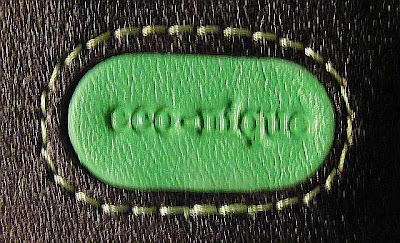
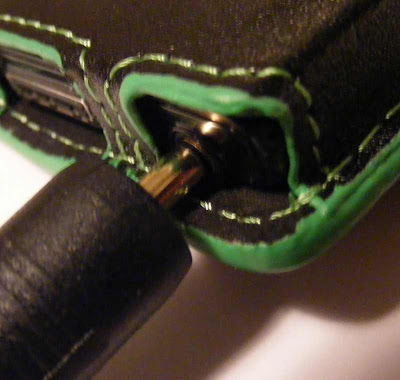
The eco-nique case has a green stripe around all the exposed edges of the leather. It appears to be painted on, and on my case rather poorly. It does serve a purpose though. Being something other than typical black it draws attention to itself, and possesses the ability to spark a conversation or discussion of it's "green" pedigree: My P2 fits snugly in the eco-nique case. My inexpensive Kroo case allows the P2 to slide up when you try to insert headphone or data cables. The eco-nique's grip is much appreciated. There are cutouts for buttons on both sides, and the headphone and data ports are exposed on the bottom. I had no trouble getting the data cable to engage, but the leather protrudes beyond the bottom edge of the P2 making it impossible to insert any headphone cable that isn't very small. My Samsung ear buds would fit (barely), but any of the larger cable ends of my higher end earphones would not insert all the way.
The lid stays closed with four magnets. I have a griffin case for my iPod Touch that also uses magnets for closure, and it tends to pop open. The smaller eco-nique case for the Samsung P2 hopefully will stay closed more reliably. I like the simplicity, but have not learned to trust magnet closures yet. With it's rear snap closure, the Noreve case has to be taken off my belt to unsnap and reveal the touchscreen. The Kroo case unsnaps from the front, and is only a little more cumbersome than the eco-nique case to use while still on my belt.
The belt clip that came with this eco-nique case is a huge lump of plastic. At 13/16" thick it also stands my P2 a full 7/8" out from my belt. On one hand it is easy to access and doesn't get covered by shirt or jacket. On the other hand it's out there more exposed than makes me comfortable. It seems likely to snag on something I'll pass in tight spaces. This aspect of the eco-nique case could use some re-engineering and refinement.

One nice aspect of this case is that the flexibility of the closure flap allows it to serve as a useful stand prop in both horizontal and vertical positions.

Conclusion? I'm not sure this case is worth the roughly $40 I paid for it unless you consider that part of that cost is going toward eco-friendly causes. The huge belt clip, roughly painted green edging, and tight headphone jack tolerance are three negative issues. On the positive side, this eco-nique case is a good fit, with good seams and appears to be made with high quality leather. I'll give it a "B" grade, but mainly because my wife is a fan of the green color and eco-pedigree.

4D

Saturday, October 18, 2008

ASUS EEE 901 Review and Unboxing

My ASUS 901 arrived yesterday. I've had a little while to play with it, and though I'd share my thoughts about it with you. To start with, although I had ordered a black one, I was afraid I'd gotten a white one when I saw the box. ;-)

The EEE promised to be Easy, Excellent, and Exciting. It promises this in several languages, just to make sure you believe it.
Before I get much deeper into this review, you need to know I didn't buy the EEE 901 to be a work machine. Although it may be possible to get some work done on one, I bought mine to use as a media player and portable web browser. For both these tasks, this little PC seems exceptionally well suited. Unlike lesser EEEs, the 901 has 802.11 b/g/and n for fast wifi network connectivity, and Bluetooth wireless for connecting with almost every Bluetooth device out there including wireless headphones and Bluetooth speakers/stereo transceivers. Those just scratch the surface, as the EEE's Bluetooth features include:

EASY? The EEE is certainly Easy. With no hard drive, the little 901 boots up quickly. My 901 came with Windows XP. I suspect the Linux versions may be "simpler" to use from an interface point of view. The 8.9" widescreen with 1024 x 600 pixel resolution is easy to read, sufficiently bright (indoors at least), and evenly lit. The keyboard is small, yet my average sized man-hands seem to handle hunt & peck typing with few errors. You touch typists will find it a challenge. For those of you with a "need" to type a novel on your EEE I suggest getting a larger and Bluetooth wireless keyboard. The Bluetooth keyboard from my iMac works well with the 901. If Bluetooth is too pricey for you, there are three USB ports on the 901, any of which could handle a USB keyboard. The 901's touchpad is reasonably sensitive, although it's right/left buttons are a little stiff. This touchpad supports the use of two fingers for scrolling up and down on web pages or within any long list. There may be more functionality in there. It would be nice if this multi-touchpad could be used for resizing photos and web pages.
Excellent? More specifically the claim is that the 901 is an Excellent mobile internet device. I have to agree! At 2.8lbs (with battery) and only 9" x 7", the little 901 is VERY mobile. As an internet device it works wonderfully. I've got seven other wifi devices in my house (2 iPod Touch, 2 Zune, one iMac, one TIVO, and one Kodak Picture Frame) and none was as easy to connect to my wireless router as this little 901 was. With 802.11n support, the 901 took less time to find and download 1400 songs from my network server than my iMac. Using VLC media player I can play DVDs off that server with no stutter or delay. Wide screen movies look GREAT on the 901's wide format LCD.
Exciting? The more I play with my 901 the more excited I get. It took me awhile to figure out how to turn on Bluetooth, but once that was accomplished my smile has crept upward each hour. The EEE came with Windows Media Player 9, which I quickly upgraded to Version 11. Skype is included as well, and I'm looking forward to getting it set up. The EEE is well configured for use with VoIP applications. It includes a 1.3mp web cam, two microphones (with noise cancelling) as well as an external microphone jack. It supports Bluetooth headsets, and pairing with a cell phone. With no hard drive the EEE is absolutely quiet. No machine noises to distract from music enjoyment or your VoIP phone call.
The 901 came well-packaged. Inside the box I found:
- The EEE 901.
- A soft slip-case for the 901.
- A cleaning cloth.
- The AC adapter.
- User Guide
- XP Support DVD
- A Microsoft Product Identification card for Microsoft Works.
- Warranty Card
- Quick Use Guide (for Windows XP)
The right side of the 901 includes an SD/MMC slot, Two USB ports, a VGA Video Port, and the AC adapter port.
The left side of the 901 includes earphone and microphone jacks, another USB port, and Ethernet jack, and the lock socket.
The underside view reveals many vents for passive heat control, two tabs allow releasing the battery, and there is a removeable panel behind which I presume memory socket(s) might be found.
I fully charged the 901 last night. It includes a 6-cell battery, and having had it on for more than 3 hours already with wifi and Bluetooth active, it reports that I've got 3:08 hours remaining. It looks like battery life will be amazing on this little PC. The 901 features ASUS' Super Hybrid Engine, a power management utility. It allows you to select between Super Performance, High Performance, Power Saving, and Auto Modes.
At this point, I'm extremely impressed with the 901. It feels solid, looks great. The keys have a nice travel. The touchpad needs some refinement, but that may be something I can accomplish with settings I haven't found yet. The bottom of the 901 can get pretty warm, but no more than any laptop I've had experience with. I don't recommend setting it on your bed or anywhere else it may be "insulated" and as such not cool itself easily. Vents on the bottom should not be blocked. There is no active fan.
My advice? If you're interested in a VERY mobile, small and lightweight netbook the ASUS EEE 901 may fill the bill. With limited internal storage (12gb in the XP version) you won't want to keep your entire media collection on it. Adding an external DVD/CD burner and an external hard drive should be easy. Personally I use the 901's great wifi to access my media off my home server, and will rely on that same server for future program and data storage.
Grade? B+. ASUS is working on a touchscreen model. I've grown to love the touchscreen interface of my iPod Touch, and believe a touchscreen version of the 901 with a screen that could fold back over the keyboard would be the ideal netbook. B+ is above average and certainly passing though. Well done, ASUS.
4D

Friday, October 10, 2008

5 Great Reasons to Pass on the New Nano.

The Apple iPod Nano 4th generation may have your attention. Let it go!

1. It is not the best value for the money.
2. iTunes.
3. No Radio.
4. Not available in White or Black.
5. Non expandable Memory

Value. Simple math. What features do you get for your money? What is each feature worth? One place to compare is between the new Nano and the Zune. Each sells for $149.99 in an 8gb version. The players are nearly the same size. For that money the Zune includes wifi and an FM radio with RDS. The Nano's only unique function is the accelerometer, which has some owners wishing it could be disabled. The Samsung T10 also has a Radio, and adds Bluetooth wireless headphone(s), Phone pairing, File sharing, and gameplay between players.

iTunes. Ok, iTunes itself isn't that bad. I have it. I like some of the features. What is bad is that it is my only choice with the Nano. My Samsung P2 or T10 can use their equivalent Emodio software, or Windows Media Player, or Media Monkey, etc. I can simply drag and drop media onto either within Windows Explorer. iTunes needs to pay attention to the competition. Have you seen the new ZUNE software? It is quickly becoming my favorite with MixView and the optional music subscription plan.

Radio. Apple seems to be afraid of putting a radio receiver in their iPods. Yet EVERY OTHER player I own has one built-in. With the Zune you can "Buy from FM". With my Samsung players I can record songs from the radio. A Radio in your pocket media player will keep you connected to the outside world. Those white ipod earbuds lock you in, shut you out.

Colors. This year's Nano comes in 9 colors. No white. No true black. Not a bad choice, but there's the trouble. Those nine colors are so great looking it becomes hard to pick just one. That is Apple's evil plan. You're SUPPOSED to want more than one, turning them into fashion accessories. Buy one to match each outfit or mood. Coordinate with your shoes. Buy MORE. The Zune comes in a few colors, but they are such that you're lucky if you like one of them. There is always the safe black though, except in a Nano. "Wait!", You proclaim. "The Nano comes in Black!" I thought so too until I bought one. The Nano's black is a pretender, easily spotted in lighter contrast to the truly black click-wheel.

Memory expansion. This is only a minor infraction given the new lower price of the 8gb and 16gb Nanos. Yet with an SDHC slot my 8gb Insignia Pilot has been expanded to 24gb. That 16gb SDHC card cost me $40.99, and with the $99 price of the Pilot leaves me with an amazing 24gb player for less than $150. The Pilot also has FM radio with recording, a microphone with voice recording, Bluetooth for wireless headphones, and more.

Sure, all your friends will have an iPod. What is also true is that they spent more money than they needed to for the few features they got.


Style, you say? Yes. Apple goes out of the way to make their players sexy and desirable. The new candy colors even appeal to your taste buds. They have to, since on a feature-by-feature comparison they don't compete well. The Samsung T10 oozes with style, and you can customize the interface to be unique to you.
You get the same size screen as the Nano, with an optional and entertaining animated interface. The controls are touch sensitive and disappear into the sleek smooth face of the T10. Even the 8gb Zune has some sex appeal. The touchpad is more efficient than the Nano's click wheel. The brushed aluminum back is a nice contrast to the conservative front. The Zune's 1.8" screen is a little smaller than the Nano's, but the Zune interface is easier to read (IMO).


My Point? More than eighty percent of the people who buy MP3 players buy an Apple product. I'm sure most never considered an alternative. We can't all be swayed by style over substance. Be a smarter shopper. Get your money's worth. Do NOT buy an iPod Nano.


4D

Tuesday, October 7, 2008

Philips Does It Again. The DCP851/37. An iPod Video Dock and DVD Player.

This Philips iPod Video Dock caught my eye awhile back, and when it went on sale I picked one up to check out. Officially the Philips DCP851/37, I can't recommend it for it's name. It does have some interesting features though, including video output support for Apple's latest iPods. I can confirm that it works well with my iPod Touch 1st gen and my 4th gen iPod Nano. The package includes an AC power supply, 12v Car adapter, an audio/video cable for outputting it's content to your TV, a remote control, and a simply slipcover case. It's got an 8.5" diagonal 16:9 screen showing 480 x 234 pixel resolution.

This portable dock will:
Play DVD, DVD+/-R and DVD+/-RW, (S)VCD, DivX® & MPEG4 movies.
View movies and photos via the SD/MMC card reader.

It allows you to:
Enjoy your digital photos from iPod, photo CD or memory card.
Play slide shows, single photos or thumbnails.
Pan, zoom or rotate photos.

It promises up to 2.5 hours of playback with a built-in LI-Polymer battery. Good enough for one movie. Not that impressive, but expected for the large LCD screen and built in amp/speakers. The included power adapters will charge it and your iPod, as well as let you use it in your car or hooked up to your TV for DVD play for as long as you want.

The body is a glossy black, which unfortunately is a fingerprint magnet. The top edge has a DVD door release slider, Monitor, Source, and ON/OFF buttons. The right side has a iPod Eject slider which reveals the pop-out iPod tray. The included remote control stores nicely in this tray. The left side has TWO headphone jacks, great if you've got two kids sharing a movie in the back seat. You'll also find the volume dial, AV in, AV out, the SD/MMC slot which does support SDHC cards, and the 9vDC charge/power input. The front has Menu, Play/Pause, Next Track, Previous Track, and a center direction pad with OK in the center. Stereo speakers are under the perforated grid of the front lower half. There is a pop-out kickstand and the DVD door on the back.
At roughly 2.9lbs it's an easy carry. The big screen is easy to see at all but the steepest angles. Mine comes in handy on trips, as well as being the only working DVD player I have in my house when the power goes out. The added media features and it's capacity to charge my iPod Touch or Nano when plugged in make it very useful in deed.


You can find this player at many stores including a white version at BestBuy.
Selling at MSRP $179, it can be found for as low as $115 or so. I recently saw one on my local Target's clearance rack for under $100.
I'm happy with my purchase. I Guess that means I recommend it.
4D

Saturday, October 4, 2008

MP3 Player Sales Observations.

I've reviewed many players in this blog. I have my favorites. America has it's own. Curious about what people are actually buying I've stumbled across some interesting sites, and here are my observations:

CNET Shopper lists the 100 best selling players as far as it knows. It is not surprising to see the new iPod Nano appear 4 times in the top 8, with positions 1 (Silver 8gb), 5 (Silver 16gb), 6 (pink 16gb), and 8 (orange 8gb). The iPod Touch takes 2nd, 4th, and 10th with it's 8gb, 16gb, and 32gb variations.

A pleasant surprise is that the hard-drive based Zune models take 3rd (120gb), 9th (80gb), and 21st (30gb) position from the top 25 while the new ipod Classic 120gb model is 20th.

The Samsung T10 is 7th, and the top selling 4gb flash based player. The Samsung P2 8gb is 13th, and the second best touchscreen player behind the iPod Touch. It is the only other touchscreen player in the top 25.
For clip-on players, it does not surprise me to see Sansa Clips at 15th (red 2gb) and 24th (black 1gb), with no iPod Shuffle in the top 50.

Amazon.com's best seller list is nearly the same, except that it is updated hourly. In any given hour the new iPods will show up on top, with the new Zunes and Archos being in the runners up as hard drive based models, and the Samsung P2 sneaking in there in various colors and capacities as the runner-up touchscreen flash model.

Rather than compare sales, it is more interesting to compare players by ratings. In almost every case, the new iPods will not appear anywhere near the top of a "ratings" list. I'll agree that this phenomenon may be due to their popularity, with a higher number sold creating a large pool of reviews, and a greater likelihood that dissenting buyers will feel the need to review. Still, with several players getting 5-out-of-five stars, and the iPods always getting less, it points out that buyers don't buy iPods based on the reviews.

For flash memory based Touchscreens there appears to be only two major players. Amazon rates the year-old Samsung P2 second only to the new iPod Touch. Samsung's S3, a sexy little player that only has a touch sensitive control pad, ranks third among bestselling touchscreen players in the same poll.

There is no science expressed here. The lists/polls I've linked to will change over time. What sells and what is "best" are often different things. I am impressed that the rarely-advertised Samsung players appear so high so often. Owning both a P2 and a T10 I can see their value and compare them directly to my iPods and Zunes and other players. I can also understand why the Zune does well, particularly with it's latest 3.0 firmware update. The Zune software is great, and the players are more efficient to get around on than any iPod except the Touch.

What does it all mean? There are great alternatives to the Apple products. Some people get it. Fortunately for Apple most people don't.

What do YOU think? Leave me a comment.

4D

Thursday, October 2, 2008

Samsung YP-T10 Review. Amazing Value for Your Money!

The Samsung T10 is the little brother of the Samsung P2. While not a touchscreen player, the T10 did inherit many of the P2's functions and features. I picked mine up through Amazon.com for $99.77 with no tax or shipping. It arrived via DHL within 4 days of my order, in great shape and brand new. On a quick check it looks like the T10 is even cheaper since I ordered mine. T10s are available in Black, Purple, Red, Line-yellow, and White. Expect to pay a little more for any non-black T10.
On hooking it up to my PC, the same software (Emodio.exe) I use with my Samsung P2 player loaded up and promptly informed me of an available firmware update. If you've never installed another Samsung player before, the package includes a small CD with software you should install before plugging in the T10 for the first time.
Also included was a charging cable, earbuds, earbud covers, and three pieces of paper. There was a Quick Start Guide, a Registration notice, and a warning about actual memory space on the T10.
The body of the P2 is as clean as one could be. The only external mechanical switch is the Hold/Power slider on the right side. The bottom edge is where you'll find the charging cable port, the headphone jack, a small microphone, and a wrist strap connection point. There is a tiny reset hole on the back.
The front face is split with a 320 x 240 pixel 2" LCD on the top half, and the lower half occupied by a touch sensitive control area. There are dedicated spots for Menu, Back, up/down volume, left/right file browsing, and a center Play/Pause/Select button. All are backlit. The YP-T10 is 3.78" long by 1.63" wide and only .31" thick. It's about the same length and width as the iPod Nano and small Zune. It's smaller and thinner than the Samsung P2.
The rest of it's specifications can be found at Samsung.com. I'll warn you that as the T10 has been updated, the specs I've linked you to are not 100% accurate any more. One example is that the T10 does allow game play, yet the specs claim it doesn't.
The Functions include Music, FM Radio, Datacast (podcast) and Video play, Photo and Text view, and Games. There is also an Address Book which you can fill via bluetooth from your cell phone. While I'm on the topic of phones, the T10 can be paired with most Bluetooth enabled phones, and serve as a wireless headset for them. You can receive and initiate calls from the T10 once it's paired with a phone. The built-in microphone serves well here, and will also allow you to record voice messages or a class lecture if you desire. You can record from FM radio as well. Both functions create MP3 files which can be played back the same as any music file. If you've got a sibling or friend with a T10 or a P2, you can send any file to them via bluetooth. File transfer also works between T10 and a PC, so long as the PC also has Bluetooth. Many Apple Mac PCs do.

The User Interface (UI) is well thought out. Left and right taps on the touchpad get you through the main menu items. There are three menu styles to choose from. The touchpad is just the right degree of sensitive. It knew what I wanted on the first tap, and responded quickly. It's not as efficient as the P2's touchscreen interface, but it serves easily as well as the Zune or Nano UIs do.

Music. You can sort music by Artist, Album, Songs, Genres, Playlists, Recorded files (off FM or from the microphone), or using the music browser. Sound Effects include Street Mode or Clarity. Samsung's DNSe has 10 predefined settings including Normal, Studio, Rock, Classical, Jazz, Ballad, Club, Rhythm & Blues, Dance, Concert Hall, and at least one User Defined setting. There are four play modes including Normal, Repeat, Repeat One, and Shuffle. There are also four music play screen options. Should you be listening to a podcast or ebook, you can change the play speed from o.7x to 1.3x in .1 increments. You can tell the T10 to connect to bluetooth headphones from the Music menu rather than having to go back into the bluetooth settings.

Video. The T10 will play WMV or MPEG4 video files at 30 frames per second and 320 x 240 resolution. Other formats can be converted using the PC software included. They display horizontally on the screen. You've got 3 DNSe (audio) settings for video including Normal, Drama, and Action. You can add bookmarks to video. You can also adjust the screen brightness from the video menu. Very handy. There are three sample videos included. Video looks excellent on the 2" screen, although it's not quite a theater experience.

Pictures. You can play music while looking at photos. You can zoom 200% to 400%, and rotate in 90 degree steps. Slide shows can be timed slow, fast, or normal. Lastly you can select a photo to serve as your menu background image. Pictures look as good as you can expect at 320 x 240 resolution. Standard for players with the same size screen.

FM Radio. The Radio application is fairly straightforward. Headphones must be plugged in as they serve as the antenna. You can autotune stations or manually select. You can adjust the reception sensitivity and region. Lastly you can record from the radio. There doesn't appear to be any RDS.

Datacasts. Datacasts can be either audio or video, differ from music or video files in that they are periodicals. You can bookmark within them, and they will always resume where you left off the last time they were played.

Prime Pack. Prime Pack is where you'll find the Text viewer, Voice recorder, Games, and the Address Book. I don't have any games on my T10 yet, but will do a quick review when I get them.

File Browser. Using the file browser you can peruse every file on the T10, and optionally delete it. Any media file selected will begin playing in the related app.
I chose the T10 as one of the best MP3 players you could buy for your kids. The voice recorder and bluetooth allow siblings or friends to record messages and then send them wirelessly to each other. The T10 is a better value than the iPod Nano. Same size screen, but far more features. Sound quality is better than any iPod. You won't find an FM radio on any iPod, and the T10 even allows you to record off FM. You can use the included earbuds, or choose from a vaste assortment of wired and wireless headphones. Bluetooth is the stand-out application on the T10. Once you go wireless you won't go back.
Conclusion? The Samsung YP-T10 is an amazing player. At less than $100 its value is not matched by anything else out there. They are a little hard to find, but well worth the trouble.
4D