Showing posts with label keyboard. Show all posts

Wednesday, September 28, 2011

Asus Slider Review. Clever, but Practical?

My Slider arrived via UPS on 9/29/2011. I bought it from CircuitCity.com as they had it in stock ready for shipping. The box was typical Asus with the tablet in a plastic tray and included accessories stored beneath it. All the glossy surfaces had clear plastic to protect them that you'll get to peel off.  It came with an AC/USB Power Supply, USB cable, warranty card and a User's Manual. "Inspiring Innovation Persistent Perfection" printed on the last two to put you in a good mood.
The Slider came with Android 3.1 installed, but started downloading the 3.2 update as soon as I had it connected to my wifi router. 20 minutes later or so 3.2 was installed. Out of the box and unpeeled the Slider is a thing of beauty. The front, of course, is mostly a big piece of glass. The setting for this glass is a wide bezel that bows out on the ends with a brushed metal edging on the sides and top. A spin around the edge discovers the power button, volume rocker, and microSD slot on the left end.  Asus's docking port and a mini-HDMI port are along the top. The headphone jack and USB port are nicely articulated on the right end. 
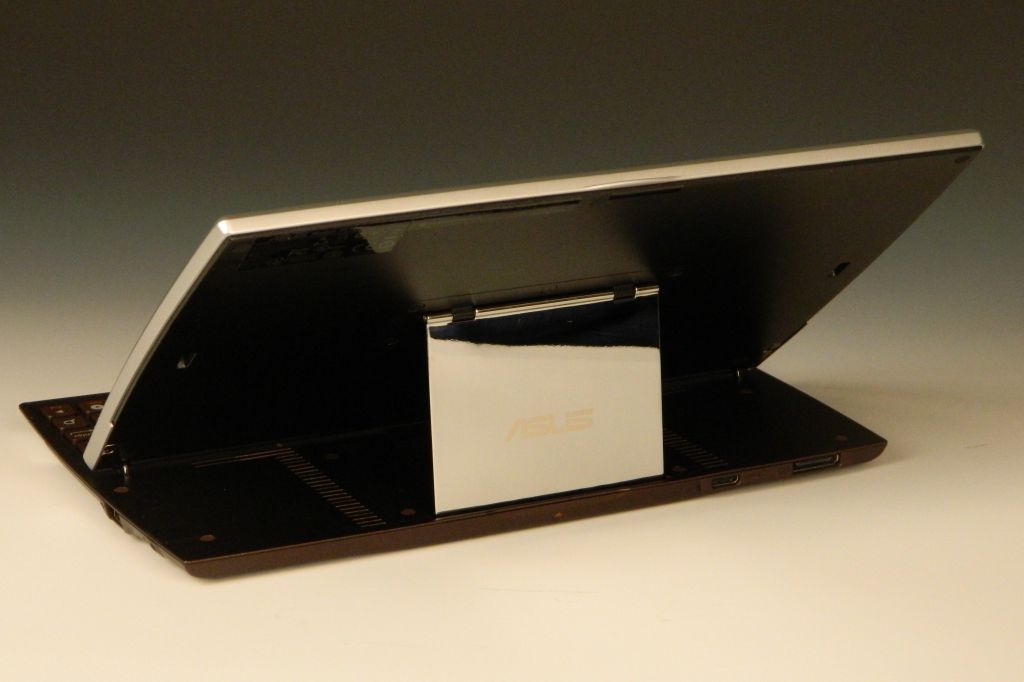
That metal edging wraps around to the back where it widens to a 1.375" band across the bottom. A chrome strip seperates the brushed metal from a bronze field with the camera lens centered near the top. The top center edge has a raised lip at the seam between the front and back, with an arrow hinting something will happen if you pull here. Indeed, with a slight lift the front half rotates up to park itself above the newly exposed keyboard. The screen comes on and confronts you.  The screen's resting angle is roughly 38 degrees above horizontal and not further adjustable.
The keyboard keys are smaller than usual, but have a good action and nice feel to them in action. There are a few android-specific keys.  They have included the number keys along the top row. The One and Six have a bright circle around them to provide a visual location aid.  It appears as if it is carved from a bronze ingot, but is likely a high density plastic.  Not the best keyboard for android tablet use, but it is certainly handy.  Folding under the screen as it does leaves the screen exposed.  I'll definitely need a case for this tablet.

Dimensions: 10.75 x 7.1 x .72 inches. 2.21 lbs.  Not light. Not thin.

Hardware:
 - Screen: 10.1" IPS, 10 point multitouch, 1280 x 800, Gorilla Glass Screen.
 - Processor: NVIDIA Tegra 2 dual core mobile processor 1Ghz.
 - Battery: 25W/h Li-Polymer.  Estimated 8hrs between charges.
 - Cameras: 1.2MP front.  5MP rear
 - WLAN: 802.11 b/g/n@2.4GHz
 - Bluetooth: V2.1+EDR
 - Memory: 1GB,
 - Storage: 16GB/32GB + MicroSD card reader (up to 32GB).  12.63GB available when new.
 - Ports: mini-HDMI port, Full size USB 2.0.
 - Single (mono) speaker.
 - Microphone.
 - G-Sensor
 - Light Sensor
 - Gyroscope
 - E-Compass
 - GPS

 - Volume +/- rocker
 - Headphone/Mic jack.
 - Keyboard: Android-specific keys include Home, Back, Search, and Menu.  You also have Brightness up/down, and Wifi & Bluetooth toggles.

Build Quality: Impressive. When folded the top and bottom are a graceful compliment to each other. The front edge chamfers down then tapers to round over the back edge.  The body is a composite of brushed metal, bronze (paint), and a little chrome. Cable connections are nicely articulated from the bottom edge. Buttons are inset yet project just enough to exhibit their function and permit their use. Reset is a button rather than a hole on this tablet. Speakers are a bit muffled when the tablet is closed, but perk up when you lift the screen to reveal two columns of slots as speaker grills. Strong magnets hold the screen down and up.  The user manual warns against leaving your credit cards too close to the Slider.   The lift mechanism is an offset parallelogram.  The exposed face of this brace is a mirror polished rectangle with "ASUS" etched into it. The IPS screen is easy to see from any practical angle.

Media capabilities: AAC, MP3, MIDI, OGG, and WAV music codecs are all listed as supported in the User's Manual. I was also able to play WMA and WMA lossless files, along with FLAC files with no problem straight from the file browser and in the Music app.  H.263/H.264 MPEG4 is the only video codec listed as supported. I was able to play MP4 videos with no trouble.  AVIs played but with pixilation. MWV movies wouldn't open. There are apps available in the Market that will play just about any video though so don't let the limited initial video support disturb you.
Audio output from what sounds like a mono speaker source is limited to middle and upper frequencies. Audio levels only dropped a little with the keyboard closed tablet down. Quality out the headphone jack to good headphones is a pleasure though.  Their "Supreme SRS Sound with max bass response" is a step or two better than the typical android tablet sound quality with no enhancements. I'll warn you to turn the sound down if you've been listening to the onboard speaker when you switch to headphone or you're in for an ear-busting surprise. This tablet can easily get loud enough to drive the most demanding headphones I have.

Asus applications:  ASUS Launcher, MyLibrary, MyNet, MyCloud, ASUS Sync, Asus @Vibe
Other Include Apps: File manager,  Kindle books, Zinio Magazine, PressReader, Polaris Office
Google Apps: GMail, Google Maps, Google Places, Google Navigate, Google Latitude, Android Market, Google Music, Google Videos, Google Books, ...

In use it is a heavy tablet but as capable as any of the competitors out there. Unless you'll always have a horizontal surface to open the keyboard up on, the extra weight is a bit of a penalty to have to carry. Yet if you plan to use the Slider as a laptop/notebook replacement it may be the perfect solution. The included Polaris Office app (word/spreadsheet/presentation) and that keyboard will let you get some serious work done. When folded away you have tablet simplicity behind a beautiful touchscreen to entertain yourself with.  This tablet also has bluetooth and a USB port on the side.  It is easy to add a full-sized keyboard and mouse if you really want to get serious. HDMI-out lets you mirror the android UI onto any HDTV or computer monitor with an HDMI port.  Don't buy it if you only want to check email and play a game of Angry Birds.  Consider it if you were considering a netbook to shrink your travel load.  This has a nicer screen and broader array of uses than any netbook, and you can still get your work done on it for half the carry-on weight. It'll fit perfectly on that seat-back table too.
Conclusions?  I've spent the last few days with my Slider.  It is easier to lug around than my Asus Transformer and it's keyboard dock. Far easier to tote than my notebook PC. It connected quickly and reliably to my home and work WiFi networks. It allowed me to check and reply to my email. I could browse the web when I needed to. I passed the boring moments playing Soduko or Angry Birds on it. That clever keyboard let me work on this review with relative ease.  The screen is great.  The Build is great.  The engineering is clever.  With nothing bad to say and only  the size and weight to pick on I have to give the Asus EEE Slider an A+ Great Buy. It's unique features require a unique user though.  If you fit that description then this is the tablet for you. Don't buy it if you want thin and light.

4D


PS:  If you enjoy my reviews, please consider clicking on an Ad or two.  Thanks!

Sunday, September 11, 2011

Logitech Tablet Keyboard (for Android 3.0+) Review.


The most obvious feature of Logitech's Tablet Keyboard for Android is not the keyboard itself.  Logitech was smart to realize tablets go portable in briefcases or satchels or purses, and if a useful keyboard goes along it needs to be protected when inside that briefcase. This keyboard comes with a hard shell slip-case. Better yet, the case pops open and re-configures to become an adjustable stand for just about any tablet with Bluetooth.
The clamshell case stays closed with magnets. It will protect the keyboard keys but doesn't grip the keyboard in any way to prevent it from sliding out.  Once hinged open, a fold-out flange reconnects to form a triangular stand.  That flange will extend another 1.5 inches to allow adjusting the angle the tablet sits at by a few degrees.
The keyboard runs on two AAA batteries that were included. There is an On/Off slide on the top right, and a Connect button on the back. The bottom has rubber feet on each corner to keep it from sliding about.

Beside the normal alphabet and numerals, the keyboard has extra functions for android.  They include Volume up and down, Play/Pause, Forward/Previous, and shortcuts to Calendar, Browser, Music, and Email apps. There are also specific Home, Back, and Menu, and Search keys.  The Caps Lock key has an LED to remind you when it is ON.  Keys are normal size and spaced the same as the keys on my full-sized desktop keyboard.  The direction keys are the only keys that are smaller than usual.   Shift, Enter, Backspace, CapsLock, and Tab are all wider than a single letter key.

This keyboard even works with a PC. Not all function keys work as expected, but it'll do if you need a lighweight and wireless keyboard to get back from your PC a bit. I connect mine with my PC and have typed this review using it.  Media and volume keys work. The Home button will take you to your Home page if you have a web browser open. Back works like a browser's Back button. Search opens a search window, and the direction keys move your cursor in the expected direction.

Logitech also makes a Tablet Keyboard for iPad. This Android version does pair and connect to my iPad, but not all the Android-specific keys have a function in iOS.

All in all this is a great package.  The mostly plastic keyboard is well made with a matte black finish and has a nice action to the keys. It paired easily with both my Galaxy Tab and PC, and iPad2 (not at the same time), and had no problem maintaining the connection with either.  The case/stand is very useful and cleverly functional.  I paid $60 for mine, and that's the same or less than you'll pay for any Bluetooth android keyboard that doesn't include a case/stand.   If you're interested in a keyboard for your Bluetooth enabled Android 3.0+ tablet, I highly recommend this one. 

4D


P.S.: If you enjoyed this review please consider clicking on an Ad or two.
