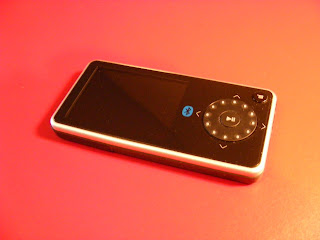
The Features are there:
Music: MP3, WMA, WMA Lossless, WMA DRM, WMA Pro, Audible, OGG, WAV. Formats upgradable.
FM radio: 20 channel presets, RDS, Records to WMA, Saves RDS data. FM also works over Bluetooth headphones.
Video: MPEG4 (30fps), WMV (30fps)
Photos: JPEG. 5 zoom steps into your photo.
SDHC single slot. Reads and automatically adds to it's libraries all supported media on cards up to 8gb.
Windows and Mac compatible.
Rechargeable Lithium-ion battery for up to 25 hours of playback time can be removed and replaced by the owner. This promises the Pilot will last longer than it's original battery.
Five Band Equalizer with 4 presets, with a normal and one custom setting.
USB 2.0 interface, non-propriatory USB cable included.
Built-in Bluetooth wireless audio lets you listen to your music with compatible Bluetooth headphones or speakers (not included). Stereo via Bluetooth, but no volume control to connected speakers or headphones.
2.4" high-resolution 4:3 LCD color display with wide viewing angles. 320 x 240 pixels. 262,000 colors.
Height: 1.6"
Thickness: 0.4"
Depth: 3.3"
Weight: 2.1 oz.
Music-Management Software: Best Buy Digital Music Store
Music Service Compatibility: Best Buy Digital Music Store Rhapsody Rhapsody To Go iTunes Windows Media Player
Music Service Compatibility: Best Buy Digital Music Store Rhapsody Rhapsody To Go iTunes Windows Media Player
Included Accessories: Wired ear buds, mini USB 2.0 cable, software CD-ROM
The interface can be flipped to serve for right or left handed users. You can arrange home screen icons in a circle or array. You can choose from Navy Blue, Yellow Green, Deep Magenta, Dark Gray, and Blue Mist background colors. Eight brightness levels. Backlight timeout from 2 seconds to 3 minutes or Always On. Lastly, you can choose between screen OFF or dimmed after timeout.
The Pilot has two 1/8" (3.5mm) stereo jacks on it's short side. You can use them both for headphone outputs, sharing the music with another person. One alternates as a line input which the Pilot can record from. The other alternates as an A/V output to your TV. 
Control is via a rocker/spinning wheel that also serves as directional up/down/left/right control, a center Play/Pause button, and a menu button. The top edge of the device has an ON/OFF slider that also serves to lock the Pilot's controls. There is also a small rocker switch for rating songs. Access to functions is nowhere near as easy as the touchscreen players allow, but no worse than any other spin wheel player out there. Volume can be controlled with a spin of the wheel, or a long press on the top or bottom of it. 
How does it sound? With it's included earbuds the sound is average at best. Plug in a good pair of headphones and the sound is as good as any other player's sound is. Perfectly enjoyable. There is an A<>B mode for repeating sections of a song or audible book. If you have cover art attached to your music files it will display full screen on the player while the song plays. Pictures look as good as possible on a small LCD screen. They are bright, and easy to see from any angle. You can play them as a slide show, with timing between images from 2 seconds to 1 minute. They can be zoomed and rotated.
Pictures look as good as possible on a small LCD screen. They are bright, and easy to see from any angle. You can play them as a slide show, with timing between images from 2 seconds to 1 minute. They can be zoomed and rotated.Video is also sharp as can be expected on a small screen. The Pilot comes with a version of Arcsoft's video convertor that will convert DVDs and other video formats into video files you can watch on your device. The TV output can be set to 4:3 or 16:9 aspect ratios, and NTSC or PAL format. My conclusion? The Insignia Pilot is competent and versatile. It doesn't have the best interface. It doesn't have the biggest screen. For the money, though, it stands out as an amazing bargain. It will play almost any media you throw at it, and can be upgraded to play future formats as well. If you've got a large collection of music, videos, or photos, the Insignia is your most economical way to take them with you. I vote Best Buy.
My conclusion? The Insignia Pilot is competent and versatile. It doesn't have the best interface. It doesn't have the biggest screen. For the money, though, it stands out as an amazing bargain. It will play almost any media you throw at it, and can be upgraded to play future formats as well. If you've got a large collection of music, videos, or photos, the Insignia is your most economical way to take them with you. I vote Best Buy.4D


 Included: In addition to the View the package included a
 Connections are all on the bottom edge. You'll find a headphone jack and the proprietary USB jack.
 Music: The View supports MP3, WAV, WMA, secure WMA, and Audible formats. Sound quality was decent through the included earbuds, but much better when a higher quality headphone set was worn. Music options include: Add to Library, Rate Music, Purchase, Repeat On/Off, Shuffle On/Off, EQ, Add to Go List, Clear Music Go List, and Delete Song. There are five preset EQ settings (Normal, Rock, Pop, Jazz, Classical), and one Custom five band equalizer you can set. Not as many EQ settings as the typical iPod, but neither my iPod Touch or Nano have a custom user setting option. I'll give Music an A- .

 Posts
Posts

