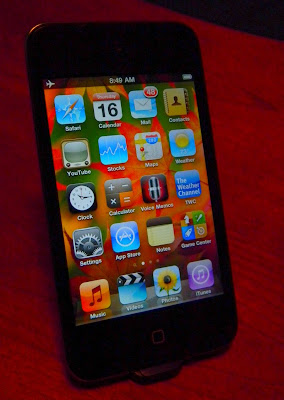
 This blog started out as a quest to find a portable media player that was better than the original iPod Touch. I've still got that device. I bought Apple's second version too, but was disappointed even though they had added a few of the basic features (volume controls, Bluetooth) everyone else had except Touch #1. The 3rd generation was basically just a speed improvement over the 2nd, and so I skipped it altogether. Apple seems to have seen the light now, though. With Android based players starting to show up from the competition they appear to have pulled out all the stops with the new Touch. Almost.
Yes, the Touch now has the cameras everyone thought would show up on #3. Multitasking (sort of), copy/paste, folders, Bluetooth keyboard support (although no mouse support), and more make the new Touch one powerful computer that fits in a pocket. Is it the best at everything though? It is certainly a jack-of-all-trades just like your desktop PC.
iPods were originally just about music. Apple still sells the Nano and Shuffle and Classic that remain music centered. The new Nano has even digressed back down to the basic music player it started as. The new Touch is a PDA, cell phone, camera, and everything else that can be enabled with software (apps). So how well does it do Music?
Music - Yes, it plays music. It even sounds pretty good if you have a good set of headphones. The included Apple earbuds should be thrown out with the packaging. There are still limits in what codecs it can play. 40 hours of music play battery life isn't as good as some competitors, but not bad. The Touch is far more than a music distraction though, and won't last anywhere near 40 hours if the screen is kept active. Audio formats supported include AAC, Protected AAC (from iTunes Store), HE-AAC, MP3, MP3 VBR, Audible (formats 2, 3, 4, Audible Enhanced Audio, AAX, and AAX+), Apple Lossless, AIFF, and WAV. No OGG, FLAC, WMA, or APE that the Cowon J3 and many other devices support.
My major complaint is that some settings can't be accessed from within the music app. You have to leave the music app then open Settings, then Music, to find options to enable Shake-to-Shuffle, Sound Check, Volume Limit, Lyrics and Podcast Info, as well as the EQ choices. The Samsung P2/P3, Cowon S9/J3 and other touchscreen players have all settings on a submenu available from within each media app.
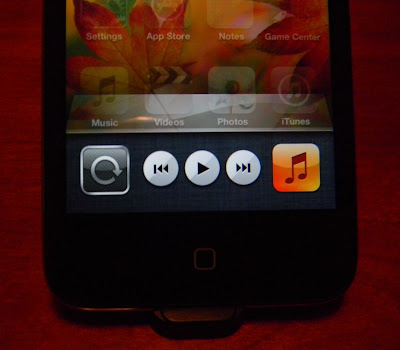 Features I like include the controls (above) that you can access from any screen in any app. To find them double click on the Home button, then slide the bar to the right. I also like full screen album art, being able to quickly flip to the song list currently playing, and genius play lists. I also appreciate the numerous ways you can sort/search your music, including with voice commands. And finally Apple seems to have made Bluetooth work right with wireless headphones. The music app is first class. Almost. It gets a B+ from me for the cheap earbuds included and settings inefficiency.
Video - With its higher resolution screen I was expecting a better video experience. Apple didn't make the screen any larger though, and video playback to my eyes is only marginally better if the content is also higher resolution than before.
Video formats include:
- H.264 video up to 720p, 30 frames per second, Main Profile level 3.1 with AAC-LC audio up to 160 Kbps, 48kHz, stereo audio in .m4v, .mp4, and .mov file formats
- MPEG-4 video, up to 2.5 Mbps, 640 by 480 pixels, 30 frames per second, Simple Profile with AAC-LC audio up to 160 Kbps per channel, 48kHz, stereo audio in .m4v, .mp4, and .mov file formats
- Motion JPEG (M-JPEG) up to 35 Mbps, 1280 by 720 pixels, 30 frames per second, audio in ulaw, PCM stereo audio in .avi file format
- Support for 1024 by 768 pixels with Dock Connector to VGA Adapter; 576p and 480p with Apple Component AV Cable; 576i and 480i with Apple Composite AV Cable.
Photos - Again, the higher resolution screen is not any larger. You can indeed put higher resolution copies of your favorite photos on the Touch. You'll succeed in consuming 4 times as much storage space and get a barely crisper image to look at for the price. The Touch has always had a decent photo app though, and multitouch proves handy for zooming in on details. Photos will rotate with the G-Sensor. You can double-tap to zoom instantly. Panning around a large photo is so smooth and natural you might think it's a printed photo you are sliding around behind the glass. Photos get an A from me. You won't find a better photo app on any device.
The Touch is easily competent at playing media files. I have devices that play a broader range of codecs. I have devices that have better media apps, primarily in making setting variables quickly accessible from within the related app. My Cowon S9 and J3 gave up mimicking Apple's cover flow in favor of their own original Album array view when tipped to landscape view. My devices using OLED screens still look better with more contrast than the new Touch's screen does. The Touch's screen isn't 16x9, and so movies have to be stretched a little to fill it. Any player with a 16x9 ratio screen plays 16x9 movies without distortion.
So if you want a killer Music/Photo/Video player, should you get the Touch? No. Get a Cowon J3 instead. Comparing 8gb models, the Touch is $229 and the J3 is $190 with a free case. You get better media apps in the J3. You get a far more customizable UI. You get a memory expansion slot. You get a beautiful OLED screen. You get video-out with a $10 cable. It does bluetooth and gapless play and full screen cover art and all those basic things the Touch also does. Add up the cable and case saving from what Apple will charge you and save $110.
If you aren't after the best media player out there, but instead want the best pocket computer, then you SHOULD get a Touch. Nothing else today does apps, the web, FaceTime, shoots Photos and Videos, does email and contacts and weather and games and so on, and is also "almost" the best media player. Yes, the upcharge to buy Apple is worth it if you need those things. I'll warn you to turn off WiFi when you don't need it though. My new Touch completely drained its battery overnight while off, yet with WiFi left on. I'll add a few screen captures once I get it charged up again.
If you've got one, then feel free to let me know what you think of it. Comments get reviewed though, so no SPAM please.
4D


 The Good:

 Posts
Posts

