Friday, July 25, 2008
One more time. Emodio 1.0.1.4/1.0.1.2 for the Samsung P2


Thursday, July 17, 2008
StyleX 4GB Media Player: Many Features in a Small Package!
 I was very skeptical when I saw this StyleX 4gb media player at WalMart for $69. Yet the features list intrigued me, so I ordered one. It took about 7 days and one backordered notice to get to me, but here it is.
  As you can see, what it promises to do is pretty amazing for such an inexpensive player. You may notice the 960 x 240 screen specification. Turns out that's a little creative marketing by the Chinese manufacturer. The 4:3 ratio screen is indeed 240 pixels high, but they counted each red, green, and blue pixel component horizontally to come up with 960. The net effect is a 320 (960/3) x 240 screen. It IS a very sharp and detailed image produced though, easily sharp enough for reading ebooks. The other high points include the microphone, camera, built-in speaker, and microSD slot.
Include in the package is an AC adapter, USB cable, earbuds, manual, CD, and the player.
 The player is suprisingly small. At 3.2" x 2" and .5" thick, the StyleX fits easily in a shirt pocket. The case seems to be chrome plated plastic, and the whole thing is very lightweight. Less than the weight of a deck of cards. There is a generally cheap feel to it, consistant with it's price.
The main controls are on the right end, and include Menu, Play/Pause, Forward and Back. There is also a slot to attach a lanyard or wrist strap through.  The bottom edge reveals the microSD slot, a Volume button, and the microphone hole.
The top edge reveals the Camera trigger. The left end reveals the USB jack, ON/OFF lock, and earphone jack. 
 Audio output is strong, no doubt to compensate for the cheap earbuds it comes with. I have to keep it on the lowest possible setting or it overwhelms my good headphones. Audio quality is very good, with strong bass, and fairly even levels across the audible frequency range.
The screen is sharp. I haven't put any videos on it, but the few photos I took with the onboard camera appear crisp. The photo viewer does a nice sideways slide from photo to photo, much like the iPod Touch.
 The camera has a pinhole lens, and doesn't let in much light. 1.3 megapixels (up to 1600x1200), with 4x digital zoom capability. No flash, so to take a good photo you'll need a bright setting, preferably out in the sunlight. The camera can take photos or video. There is also a multi-shot photo mode. The camera can also serve as a USB PC camera. This is a shot taken from the camera:
The Stylex includes three games, and suggests that it plays NES games. I'll have to see it to believe it. The three games are "Explode Pigboat" a submarine hunt game, "Color Block", and "Russian Diamond". You can disable game audio if you want to listen to music instead.
The FM radio will tune to Eurpean, Japanese, and American frequencies, although the American setting is not mentioned in the manual or on the packaging. Capable of 40 channel presets. So far I'm not that thrilled with the FM radio application. It didn't want to remember my settings, and is almost too loud for my headphones. It also overpowered a small self-amplified speaker I tried with it. Don't buy the StyleX for the FM radio.
The little microphone can record WAV files, and serves to capture the audio component of videos taken with the StyleX. In contrast to the FM radio, the microphone is not sensitive enough.
There are four equalizer presets to choose from, including Jaz, Pop, Rock, and Classic. You can also set to to the unaltered Normal setting. There is also a play speed setting, from .5 to 1.5 of normal speed in .1 steps. There is a pre-listen mode, where you can set the device to play only 5,10,15, or 20 seconds of each song. Lastly, you can save any audio file as your power-on and/or power-off sound.
The StyleX can also play videos, display ebooks, show you the month on it's simple calendar, and Explore files with the option of deleting any file.
I'm impressed with the sharpness of the little screen and audio quality via my good JVC headphones. The StyleX is NOT a touchscreen device, and like most of the other devices I've reviewed does not have a very intuitive user interface. Rather than two volume buttons, the StyleX has ONE volume trigger. You press it once, then can use the forward/back buttons for volume up/down. Clutsy.
The user manual is pretty thorough, but you'll need a magnifying glass to read it.
Is the Stylex 4gb Media player worth $69? Yes. If you want the least expensive, fully featured, pocketable, expandible, camera-included device out there, this is it. A 2gb Apple Shuffle costs the same with 1/2 the memory and 1/4 the features. The User Interface gets a C. Features get an A. Audio quality gets a B, but only for being louder than my headphones needed. FM radio gets a D. Still, this one goes with me when I know I'll want to take a picture.
4D
Monday, July 14, 2008
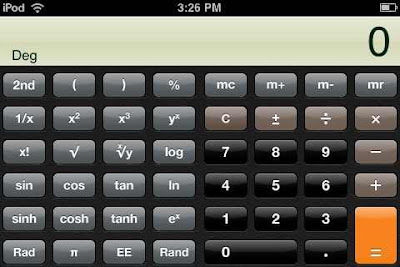
Ipod Touch. 2.0 Firmware and Apps!
Tuesday, July 8, 2008
Samsung P2 4th Bluewave is NOW FINAL
Samsung.com
Samsung Korea
Samsung YEPP download site
That's it! No more waiting for a newer 4th Bluewave. Yes, I'm sad too.
Thursday, July 3, 2008
Hip Street 8gb Touchscreen Review
 I saw this little 8gb touchscreen player on sale at Walgreens.com for $89 and had to have a look. The Hip Street Portable Multimedia Player arrived a few days later, and it turns out to be quite a value for the features it includes. The package included a media convertor on mini CD, manual, AC charger, USB cable, lanyard, earbuds, and the player with stylus.
  Feature are abundant. The Hip Street includes:
 - firmware upgradeable, (but not recommeded if product is functioning normally

 My first impressions:
  Amazingly compact. Here it is next to the Samsung P2. Just as thin. Lighter.

 Posts
Posts

